
Avid Contributor I
July 22, 2023
Answered

Problems adding music library on Synology NAS

I’m trying to give my Android Pixel 6 phone access to my Synology 1522 music library. I believe the attached screenshot is where I do that. If so, I can’t get past inputting what I think is the required information. Hopefully one of you will know if that’s true. 

Regardless of whether what I’m entering is right or wrong, when I click OK, nothing happens. The only option is to click Cancel.
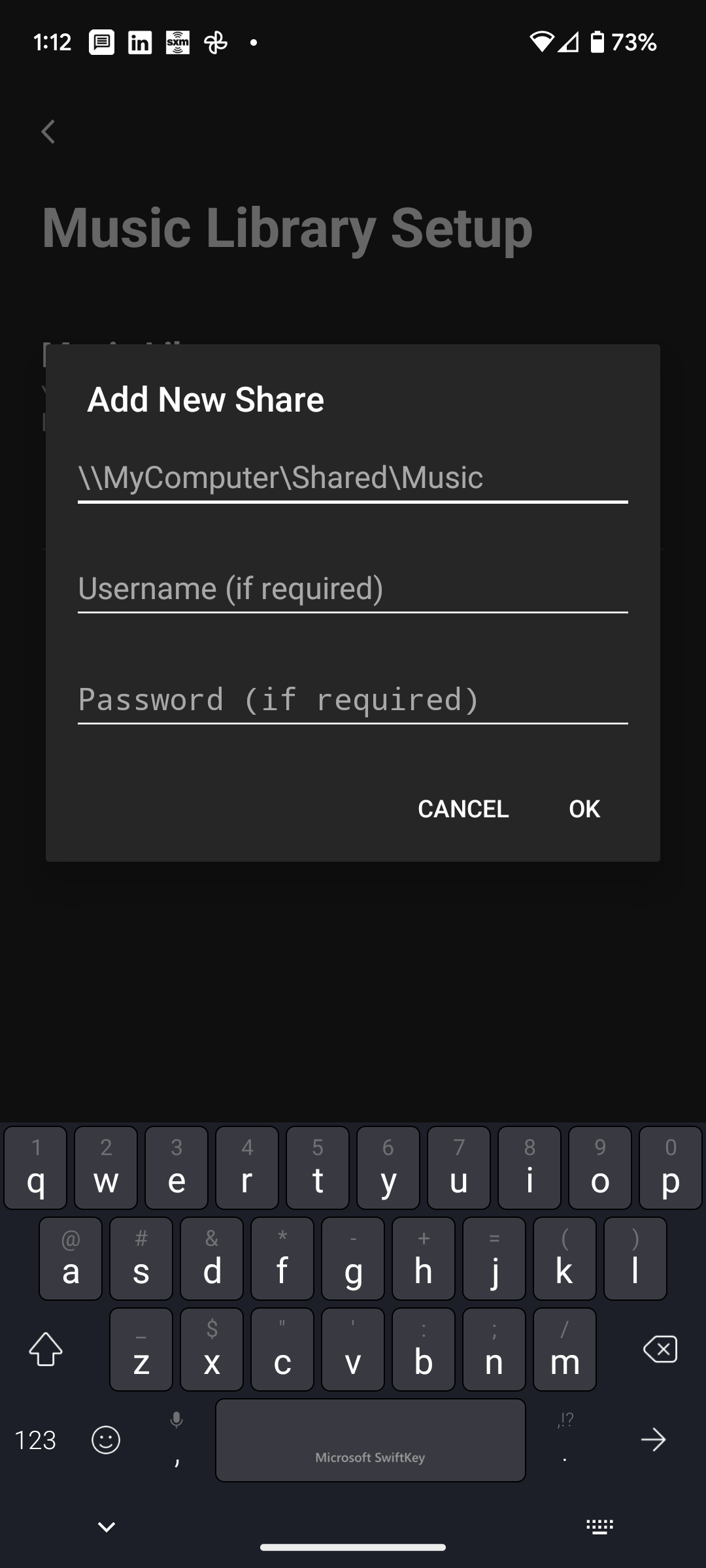
 

Suggestions?

This topic has been closed for further comments. You can use the search bar to find a similar topic, or create a new one by clicking Create Topic at the top of the page.
Ken_Griffiths
July 25, 2023

The playlists in iTunes are stored in library.xml file which once you’ve deleted them in iTunes can be exported…

File -> Library -> Export Library and get an XML file of your library metadata

Just replace the file on the NAS with the exported copy and see if that solves the indexing issue.🤞

23 replies

Ken_Griffiths
July 24, 2023

@Ken_Griffiths, if you mean the screenshot is not the specific information I need to enter, you’re right. This is just the format of required information. Nothing I’ve entered works to the point of hitting OK and having something happen. That may be because what I’m putting in is not correct.

I’ve asked a Synology tech to specify what that should be. I hope to hear from them today. When they confirm what I should enter, if it still doesn’t work, I’ll reach out to Sonos to see what they suggest.

Thanks for your suggestions.

It’s usually…

//Name of NAS (or it’s IP Address)/Name of the SMB share

The NAS and SMB share names are the ones that you have setup in the disk station manager.

…and it’s good practice to setup a user/password for the share too in the DSM and set an SMB min/max setting of SMB v2 and v3 in the DSM settings.

That’s from a quick glance at the user manual, if that info. may help you at all?

WaugustAuthor
Avid Contributor I
July 24, 2023

The following instruction from Synology engineer this morning.

“The format would be the same as any network attached device in theory.

Which would be \\[your ip address]\music\Itunes\music (etc) given the context of the screenshot. Remove the brackets in the IP address section.”

I tried both with the ip address and the name of my NAS. The first resulted in an error message saying “The computer (the ip address i entered) does not allow connection.”

I forwarded this to Synology, asking if there is some other permission I have not granted.

I want to make this happen more than I need to. Now it’s just a question of not giving up.

WaugustAuthor
Avid Contributor I
July 24, 2023

Notice that your suggestion, and that of Synology, calls for \ rather than /. I’ve noticed that conflict elsewhere too.

Ken_Griffiths
July 24, 2023

Notice that your suggestion, and that of Synology, calls for \ rather than /. I’ve noticed that conflict elsewhere too.

The path you posted does not look correct to me. 🤷‍♂️

Perhaps try…

//(IP_Address of NAS)/music


WaugustAuthor
Avid Contributor I
July 24, 2023

Spent time on the phone this afternoon with Sonos support. VERY strange outcome.

We appeared to successfully add my NAS music library using the Sonos app on my M2 Macbook Air. The agent said it could not be done on my Android phone even though there is a link to do so. I asked if the file would then be visible on my phone once we completed installing it using the computer. He said it would.

He then mentioned that my computer would need to be on to access the music once indexing completed. I was surprised and said that defeats the purpose of a NAS since the files I loaded to it came from the computer. I have the original computer file set up for play within Sonos. If I was ok having the computer on, I wouldn’t have bothered trying to gain access to the identical music on the NAS.

He agreed but added that Sonos does not yet have the capability to access files on the NAS without the computer being on. ☹️‪ ‬If true, I just wasted more hours over the last week than I care to think about, trying to get this done. 

I said it appeared we had successfully added my NAS files to the Sonos app because I assumed we had, and once indexing completed, they would be there. The file is supposedly there; I see it listed in Music Library Settings. But it does not show under Select a Music Source or under Music Library. Indexing doesn’t appear to complete based on the message you see in the attached screenshot. As far as I know, I didn’t import any playlists from the computer to the NAS, just music.


Ken_Griffiths
July 24, 2023

@Waugust,
From your description, it sounds to me like the Support Staff were setting up an ‘http’ library share to your iTunes library on your PC, rather than an SMB share to the library held on your Synology NAS.

My suggestion is to go back to Support and perhaps try again.

The playlist error message shown might be one arising from exceeding certain Sonos limits, such as there is a limit of 10,000 tracks across all playlists, but that’s another matter entirely and usually the indexing completes and skips the remaining playlists once the limit is reached - this is something else you may need to raise with the Support Staff.

WaugustAuthor
Avid Contributor I
July 24, 2023

Thank you @Ken_Griffiths, I will do as you suggest.

He did have me change my SMB settings from min 2, max 3 to 1 and 2. I assume that was because he was doing an SMB share but maybe not.

Ken_Griffiths
July 24, 2023

Thank you @Ken_Griffiths, I will do as you suggest.

He did have me change my SMB settings from min 2, max 3 to 1 and 2. I assume that was because he was doing an SMB share but maybe not.

I was going by what you mentioned. You wouldn’t need your computer powered ‘on’ to access the library for starters …and there’s no reason why you should not have been able to setup the library share from your mobile device, assuming your mobile has a compatible OS, as mentioned below..

  • OS 14 and higher
  • iPadOS 14 and higher
  • Android 8.0 and higher (Not supported on Chromebooks)
  • Fire OS 7 and higher

Anyhow, perhaps you will get more joy with your next call to Support.👍

WaugustAuthor
Avid Contributor I
July 24, 2023

Android 13 on Pixel 6 phone.

I am past the point of needing this, it’s now a personal quest. 

I’ll update you after my next encounters with Sonos and Synology support.

Ken_Griffiths
July 24, 2023

There are some videos on YouTube that may assist you - here’s two I came across:

I haven’t gone through them, but perhaps they might assist.