

RealMusicFan
Contributor I
September 18, 2021
Answered

Music Library: "The computer "192.168.0.1" is not responding.

What worked perfectly before, does not work now!


From the many many posts on this subject, we all know the symptoms: Whilst trying to add a  music folder, you are greeted by the message:
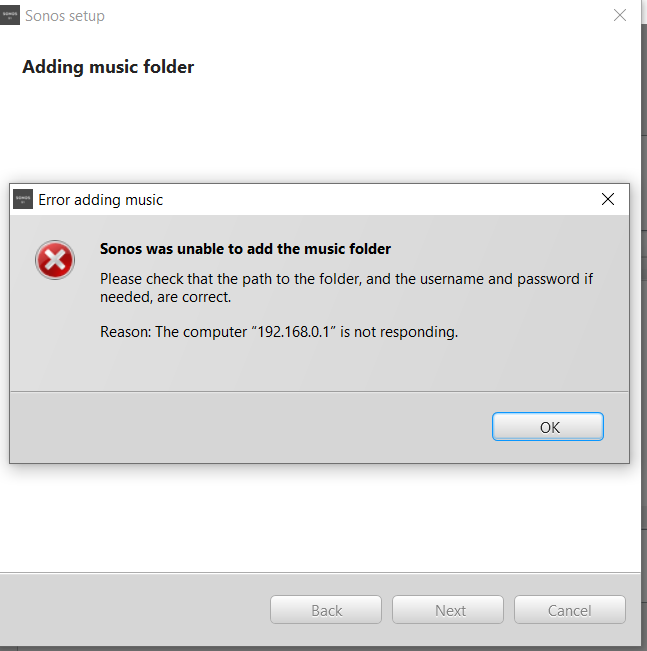


But it worked last week! I have checked all the advice from the various posts about SMB1 and firewalls etc. Nothing works.


The computer I am trying to connect to is a bog standard Seagate HDD attached to a Telstra (Australia) “Technicolor DJA0231” Broadband Modem/Router connected to our NBN (National Broadband Network): a so-called “Telstra Smart Modem Gen 2”. Not the ideal NAS solution I agree, BUT IT USED TO WORK FINE! 


What has changed? I have no idea. I religiously install updates to my Windows 10 system and to the Sonos controller. The Telstra Smart Modem updates itself. I have no control over that. I have a bunch of Sonos products including:

2 Gen1 Play:5

2 new Sonos 5

2 Sonos One

2 Sonos One SL

1 Playbar

1 Sonos Roam

I am running two version of the controller (S1 and S2) in order to accommodate my older Play:5 Gen 1 speakers. Everything runes perfectly. My WiFi runs without problems. I have a WiFi booster installed so the signal strength covers the entire house, garage, front yard and back yard!  The connection to the NBN is fine. I work from home and have Teams meetings all day without any problems.

The only issue I have detected: Windows Explorer refuses to list the HDD attached to the modem under the “Network” icon. I can however map the drive and access the files without any problems. If I execute “Run \\192.168.0.1” the drive appears under “Network”, but as “192.168.0.1”, and not the HDD name. But this issue is not new and did not prevent me adding the Sonos library in the past. I copy and paste the full address (i.e. \\192.168.0.1\Seagate_Expansion_1_3a9d\Music Library) into the Sonos Add Library dialog box and am greeted with the message above. Even if I substitute the IP address for the name of the router, it does not work. Neither the S1 or S2 controller will work. Both return the same message.

I can however add a library from a ‘local’ HDD connected directly to my laptop. No problems whatsoever. The caveat being the laptop needs to be powered up in order to access the music library. The whole reason I invested in so much Sonos kit was that I did not need to have a computer running somewhere in order to access my music library. Well, so much for that!

I’ve tried re-installing the controllers two or three times but alas to no avail.

Incidentally, I have recently installed the Plex media server on my laptop (I cannot install it on my pretend NAS). It works perfectly. It found the pretend NAS HDD attached to my router without any issues and allows me to stream music from my library from anywhere in the world, provided I have internet access… and my laptop is powered-up. Pretty neat eh! I can even get lowly old Windows Media Player to recognize the NAS drive. No problem! This all points to the problem being with the Sonos controller itself.

Sonos: Your speaker system is great. Your controller software gets the job done in all respects expect one: The one I have listed above. I am a very frustrated and disappointed Sonos fan.

 

This topic has been closed for further comments. You can use the search bar to find a similar topic, or create a new one by clicking Create Topic at the top of the page.
Corry P
Corry PAnswer
Sonos Staff
September 23, 2021

Hi @RealMusicFan 

Welcome to the Sonos Community!

Please permanently connect any one of your speakers to your network with ethernet. This should help your system in many ways, but I’m not sure if it will help with the Music Library.

If you haven’t rebooted your router by turning it off for at least a minute, please do so.

The only messaging I see is the same as what you see - 192.168.0.1 isn’t responding on the port used for SMB. Why it responds to other clients, I don’t know, but if the router was not utilising SMBv1 that could certainly explain it. However, I checked a manual and it seems the router only supports SMBv1.

Rebooting Sonos devices and your phone could conceivably help.

I hope this helps.

"Common sense is the collection of prejudices acquired by age eighteen." - Albert Einstein

19 replies

Local Superstar
September 18, 2021

Have you tried a router reboot? 

It's the courageous bee's knees - all 6 🐝🐝🐝🐝🐝🐝. - - - - - Make Sonos Great Again - - - - -
Belly M
September 18, 2021

Make sure SMBv1/CIFS is 100% turned on, a firmware update could easily have disabled it or even removed it.

RealMusicFan
Contributor I
September 19, 2021

Thanks for the tips. Yes, I have tried a router re-boot a few times and the SMBv1/CIFS is 100% on. It does not make any difference. I suspect the Telstra Smart Modem is not helping (it is not a true NAS) but it used to work! Plex Media Server works as does Windows Media Player! Why can’t Sonos?

Airgetlam
September 19, 2021

More than likely due to the SMB v1\NTML 1 issue, which Sonos is still restricted to. That would fit exactly what your saying, where the Sonos speakers can’t ‘see’ the music, but things like Plex and Windows Media Player can. 

The difference there is the Sonos application is running on the speakers, trying to access your data, both Plex and WMP are running on your compuer directly, and accessing the music using a different ‘path’. 

Bruce
buzz
Grand Maestro
September 19, 2021

That’s an odd (but not impossible) IP address for a NAS drive. What is the IP address of your router? Are you sure that this is the current IP address of the NAS?

September 19, 2021

That’s an odd (but not impossible) IP address for a NAS drive. What is the IP address of your router? Are you sure that this is the current IP address of the NAS?

I think that the OP has an HDD attached to their router...

controlav
Lead Maestro
September 19, 2021

That’s an odd (but not impossible) IP address for a NAS drive. What is the IP address of your router? Are you sure that this is the current IP address of the NAS?

I think that the OP has an HDD attached to their router...


It would be handy if the OP could actually tell us exactly where this music is, and how it is connected to the system.

Author of the leading independent Sonos apps for Android, MacOS, iOS, Windows and Xbox.
Corry P
Corry PAnswer
Sonos Staff
September 23, 2021

Hi @RealMusicFan 

Welcome to the Sonos Community!

Please permanently connect any one of your speakers to your network with ethernet. This should help your system in many ways, but I’m not sure if it will help with the Music Library.

If you haven’t rebooted your router by turning it off for at least a minute, please do so.

The only messaging I see is the same as what you see - 192.168.0.1 isn’t responding on the port used for SMB. Why it responds to other clients, I don’t know, but if the router was not utilising SMBv1 that could certainly explain it. However, I checked a manual and it seems the router only supports SMBv1.

Rebooting Sonos devices and your phone could conceivably help.

I hope this helps.

"Common sense is the collection of prejudices acquired by age eighteen." - Albert Einstein
RealMusicFan
Contributor I
September 27, 2021

That’s an odd (but not impossible) IP address for a NAS drive. What is the IP address of your router? Are you sure that this is the current IP address of the NAS?

Thanks buzz,

I’m curious, why is it odd?

It appears in Windows Explorer as below, but only after I execute “open \\192.168.0.1” in the run command box. My “NAS”, is a HDD connected via USB to the Telstra Smart Modem.


Cheers


RealMusicFan
Contributor I
September 27, 2021

That’s an odd (but not impossible) IP address for a NAS drive. What is the IP address of your router? Are you sure that this is the current IP address of the NAS?

I think that the OP has an HDD attached to their router...


It would be handy if the OP could actually tell us exactly where this music is, and how it is connected to the system.

Hello, what is “OP”, please forgive my ignorance. As i said in my original post:

“The computer I am trying to connect to is a bog standard Seagate HDD attached to a Telstra (Australia) “Technicolor DJA0231” Broadband Modem/Router connected to our NBN (National Broadband Network): a so-called “Telstra Smart Modem Gen 2”. Not the ideal NAS solution I agree, BUT IT USED TO WORK FINE!”

The music is stored on the HDD mentioned above.

Cheers