Trending Lyricist I
October 19, 2025
Answered

Music library index random errors, with album appearing 3 times each with the same single track

  • October 19, 2025
  • 19 replies
  • 706 views

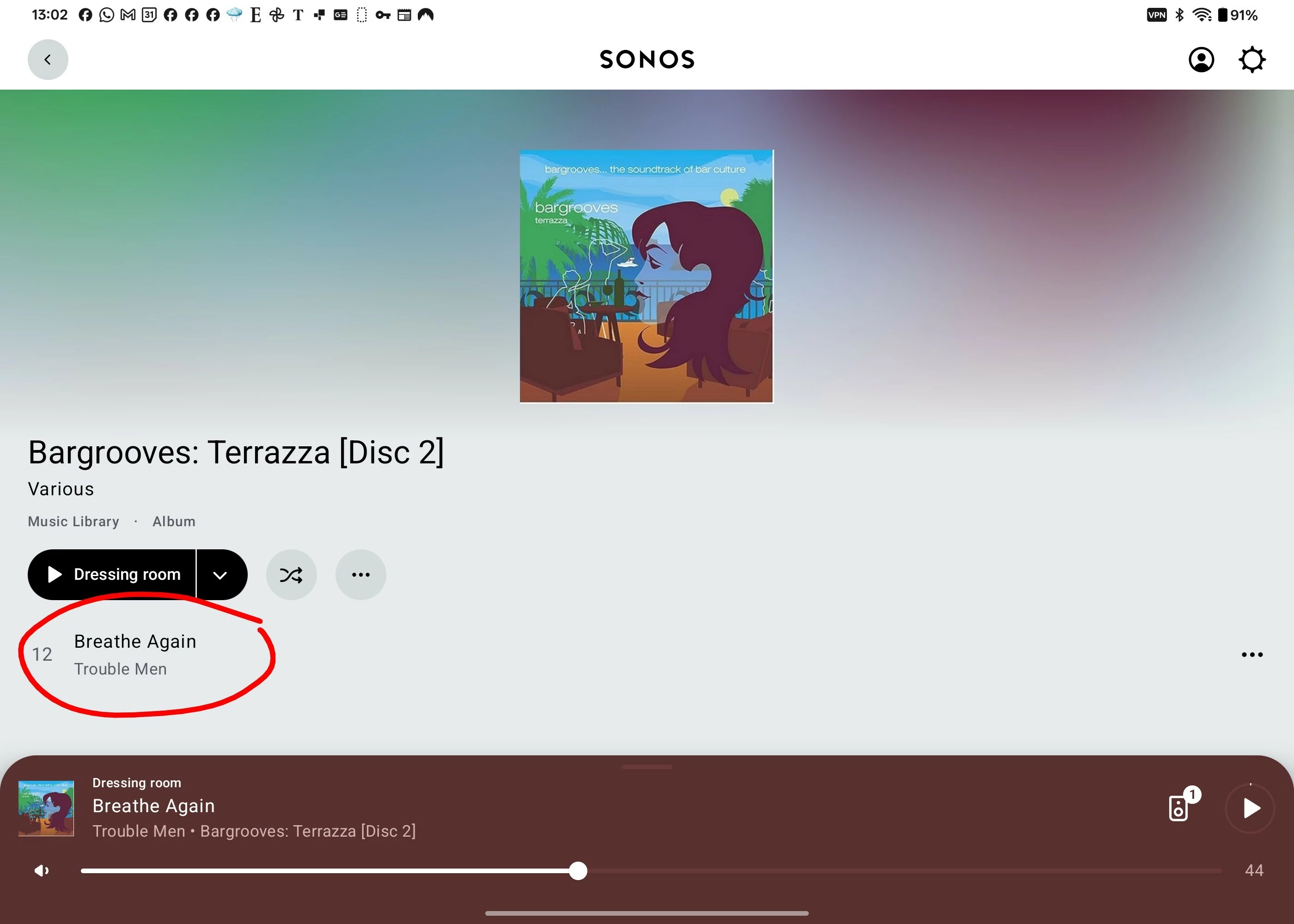
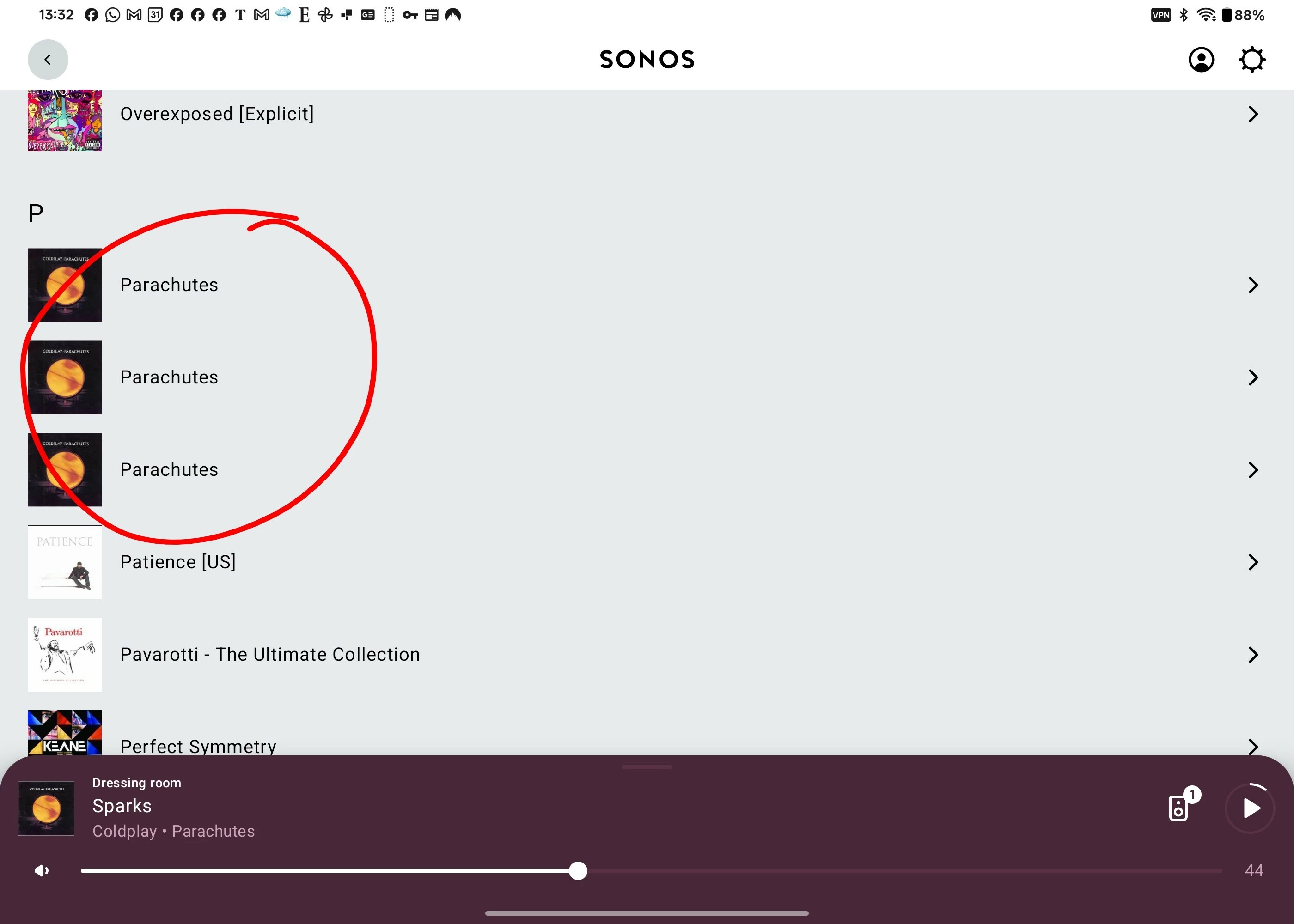
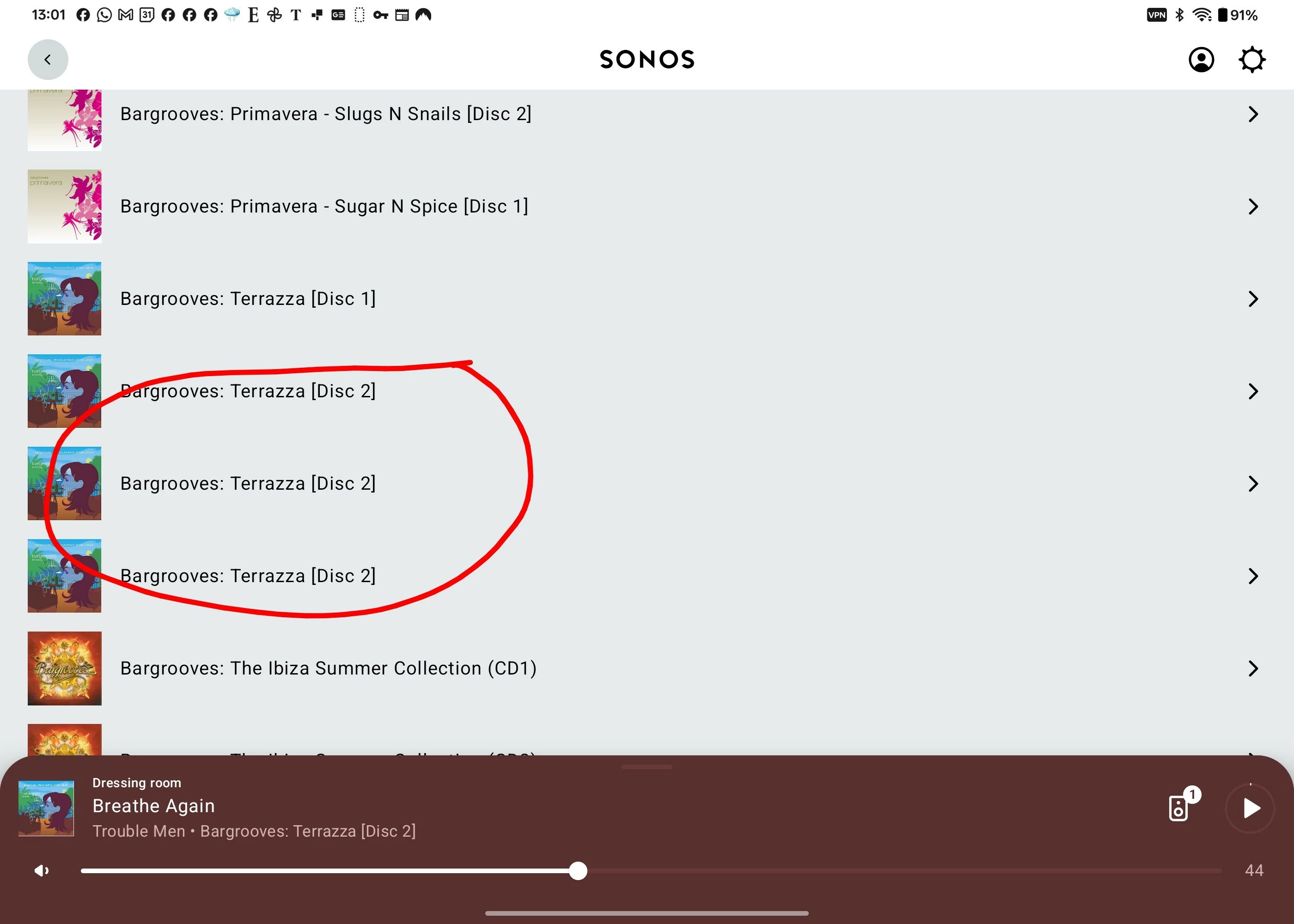
This problem is new to me. When I either scan my NAS library for more music, or remove the library and reattach it, I get two or three albums which index incorrectly. Specifically:

  • The album appears 3 times in the album list
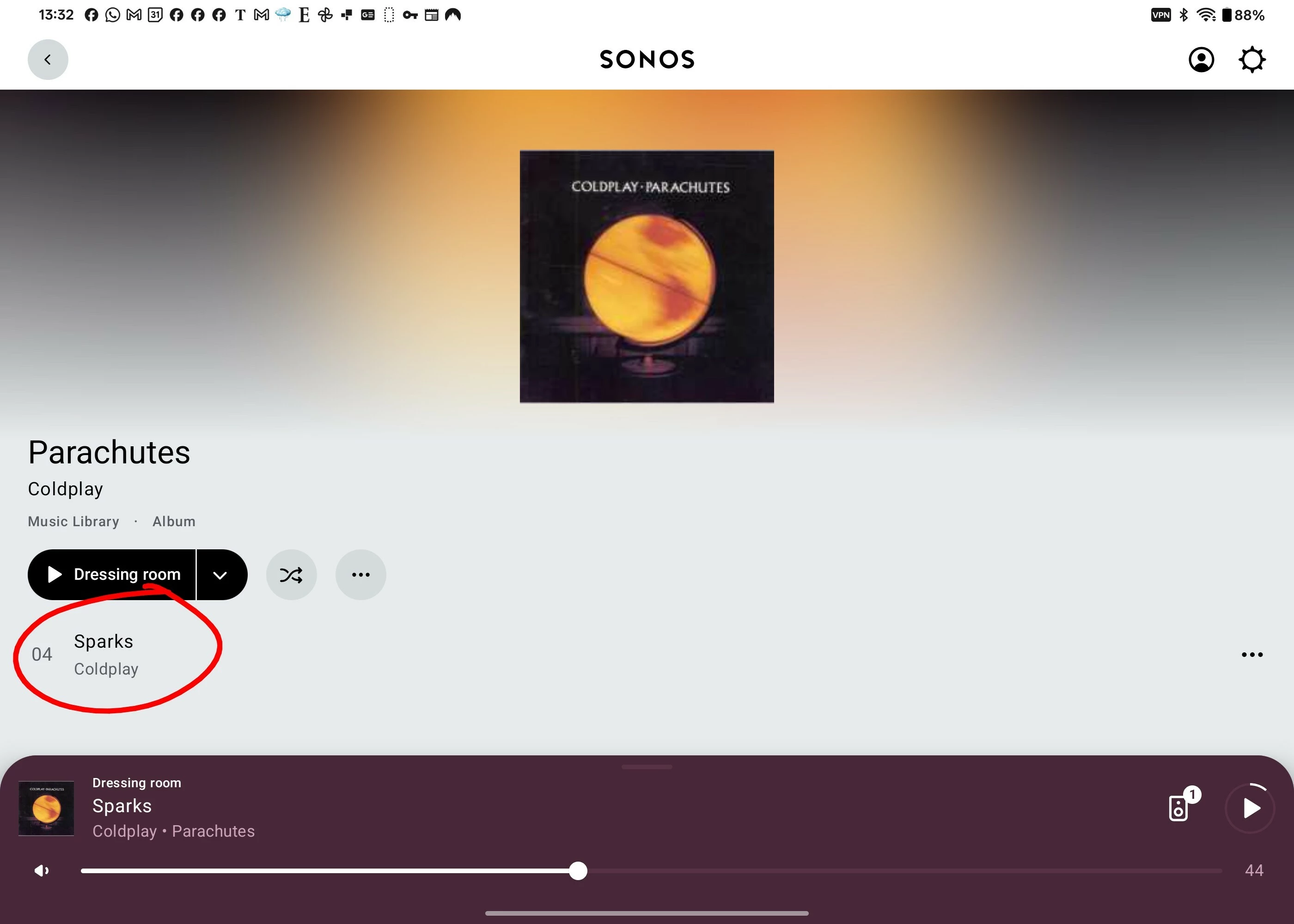
  • Each instance contains the SAME single track (not different tracks, as would be the case if there was an AlbumArtist tagging issue)
  • The other tracks in the album aren't shown anywhere
  • The album can be seen in full and played from the folder navigation
  • No changes have been made to the folder structure or tagging on the original files

I've attached screenshots. The key point seems to be each instance contains the same single track, not different tracks as happens if the tagging on a compilation album is incorrect. 

This usually corrects itself if I go into the underlying file structure and move the MP3 files into a newly created folder (a tip I saw elsewhere in this forum). But when I rescan to get that change included in the music library, another album or two will go wrong instead. And sometimes ones that have been corrected go wrong for a second time.


This is slowly rendering my music library useless. 


Anyone else experiencing this? Otherwise I'm going to raise a support ticket.
This same track appears in all three album instances
This same track appears in all three album instances 


This topic has been closed for further comments. You can use the search bar to find a similar topic, or create a new one by clicking Create Topic at the top of the page.
Best answer by Anthony_6

Hi, this has been reported to Sonos via the support line. I spoke to them on Tuesday and I was told it would be escalated to level two. They also told me that I would be kept updated, nothing so far. A number of users have reported seeing this problem.

It would be useful if you could also report it to Sonos. The more people that report it the less easy it is for Sonos to ignore it.

I started a thread on this in the Sonos community. 

Do a search for "albums have suddenly started to behave strangely"

19 replies

RLBAuthor
Trending Lyricist I
November 29, 2025

​@Anthony_6  One final thought - What's the oldest Sonos component in your system? I wondered if there a processing power or memory shortfall when indexing large libraries. I had to get rid of some very old components because they couldn't handle new larger music files. I have a 2nd generation One, 1st generation Move and Roam, and a second generation Sub. Everything else is newer. 


Collaborator II
November 29, 2025

Hi RLB,

The oldest component in my system would be my Play 3, I also have a One Sl, 3 Amps & a Port. I did do a disconnect of all components and ran the system without the Play 3, I was thinking along those lines about memory issues as well. But the problem still existed even when only an Amp was connected.

Anthony
RLBAuthor
Trending Lyricist I
November 30, 2025

Hi ​@Anthony_6 Thanks for that. I was wondering if I needed to replace my subwoofer gen2. That would be a costly experiment!

Collaborator II
December 1, 2025

Hi ​@Anthony_6 Thanks for that. I was wondering if I needed to replace my subwoofer gen2. That would be a costly experiment!

To be honest, owning Sonos has been a costly experience, replacing my 4 x ZP100, which were working perfectly when Sonos wrote them off many years ago. Not to mention the CR200, Okay, so they did give a 30% discount voucher on each one of them (in the end), but it still cost a fair bit to replace them with 3 x Amps.

Sonos do seem to have a habit of annoying their customers. Will they ever fix this issue, are they actually even interested in those of us that choose to have our own music library?

Anthony
RLBAuthor
Trending Lyricist I
December 2, 2025

​@Anthony_6 I wanted to give you an update: I replaced my Sonos Sub gen2 with a Sonos Sub 4. The gen 2 was 12 years old and only has 128MB of memory, so very outdated. It was hard to get reliable information on whether a sub was involved in indexing but I got a good black Friday deal and will sell the old one, so the cost to make the change (while high) wasn’t as bad as it could be.

I also deleted all my Sonos playlists, as I noticed some of those were referencing old file paths (and even an old NAS which has been long decommissioned). I then deleted the link to the music library and then relinked, so forced a full reindex. That resulted in 4 problem albums. I changed the name of the directories for each and updated the music library. The albums were corrected but two new ones went wrong. I renamed those directories and updated again. They corrected and no other ones went wrong, so right now I have a proper music library.

I would suggest trying the deleting of the playlists, since that's free. I’m sceptical that changing the Sub made the difference but the memory in that was extremely low, so I can’t be sure. Gemini gave me this table of Sonos component memory - I think it’s accurate. The Sub4 isn’t listed but it’s 512 MB of DDR4 memory and 4GB of eMMC storage. But I’m unsure if this is the issue as it’s not clear whether music indexing runs on the sub as it does on the normal players. 


I won’t be adding any new albums to my music library for a bit, in the hope that Sonos fix any issues with the firmware!

Product Category Model Generation RAM (Approximate) S2 Compatible
Subwoofers Sub (Gen 1) Gen 1 64 MB Yes
  Sub (Gen 2) Gen 2 128 MB Yes
  Sub (Gen 3) Gen 3 256 MB Yes
  Sub Mini - 4 GB (4096 MB) Yes
Soundbars Playbar - 128 MB Yes
  Playbase - 256 MB Yes
  Beam (Gen 1) Gen 1 1 GB (1024 MB) Yes
  Ray - 1 GB (1024 MB) Yes
  Arc - 1 GB (1024 MB) Yes
  Beam (Gen 2) Gen 2 1 GB (4GB Storage) Yes
Bookshelf/Wired ZonePlayer 100/120 Gen 1 32 MB No (S1 Only)
  ZonePlayer 90/80 Gen 1 32 MB No (S1 Only)
  Play:5 (Gen 1) Gen 1 32 MB No (S1 Only)
  Play:3 - 64 MB Yes
  Play:1 - 128 MB Yes
  Connect (Gen 2) Gen 2 256 MB Yes
  Play:5 (Gen 2) Gen 2 256 MB Yes
  Five - 512 MB Yes
  One (Gen 1) Gen 1 1 GB (1024 MB) Yes
  One SL - 512 MB Yes
  Era 100 - 1 GB (1024 MB) Yes
  Era 300 - 8 GB (8192 MB) Yes
Components Port - 512 MB Yes
  Amp - 1 GB (1024 MB) Yes
Portable Move - 1 GB (1024 MB) Yes
  Roam - 1 GB (1024 MB) Yes


Collaborator II
December 3, 2025

.@RLB

Thank you for that information. I do have a few playlists that I haven't used for ages, i’ll get rid of them and try again. I also noticed from the very helpful list of memory capacities for Sonos products that the Play 3 has only 64 MB compared to the Amp 1 GB, Port 512 MB & 1 SL 512 MB.

I’ll let you know how I get on.

Anthony
Airgetlam
December 3, 2025

I note that today’s software release contains some updates for Android to help on the tag sorting issue. Have you tried this update? Is there anything to report?

Bruce
Collaborator II
December 6, 2025

.@RLB

Thank you for that information. I do have a few playlists that I haven't used for ages, i’ll get rid of them and try again. I also noticed from the very helpful list of memory capacities for Sonos products that the Play 3 has only 64 MB compared to the Amp 1 GB, Port 512 MB & 1 SL 512 MB.

I’ll let you know how I get on.

.@RLB

Hi, I did try out removing the Play 3 from the system. I found that I didn’t have any playlist after all, I must have deleted them some time ago. Anyway, I renamed a folder that was showing as only 1 track. This fixed that particular album but as expected a new album was changed to 1 track. I decided to persevere and renamed that folder. Once again the album was corrected only to generate another album with the 1 track error. So anyway I gave it another shot, and guess what, no new errors. I reconnected the play 3 and took my life in my hands. Once again no new errors, however I do now have 3 album folders prefixed with “01” which is what I typically do to for a rename. Fortunately this doesn't show in the Sonos library as it only uses the folder name if you browse by folders otherwise Sonos shows the album by its album title tag.  I then removed the “01” from the folders that had been affected and re-scanned, I’m back to one album showing 1 track. So for me at least nothing seems fixed. 


I note that today’s software release contains some updates for Android to help on the tag sorting issue. Have you tried this update? Is there anything to report?

No, no apparent change. I think it is player firmware updates that are more likely to fix this. I say this because as far as I know all the app software is affected by this annoying bug, Apple, Android and 3rd party Apps as well, such as Sonopad etc.

It seems it's a smaller group of users because many Sonos users don’t have their own in-home music libraries they use online streaming and won’t be aware of this issue. Everyone I know that has Sonos streams content from Spotify etc. The idea of a home library on a server / NAS is totally alien to them. So I guess if you're happy to pay around £12.99 a month for your music then fair play to them.

Because of that I wonder just how much priority Sonos is giving this problem.

Anthony
buzz
Grand Maestro
December 6, 2025

Some NAS drives are configured to archive the old copy of any updated updated files. The SONOS indexer usually indexes this folder first, then ignores any other copies. This is very confusing to the user because the updates are ignored. The solution is to disable the NAS archive function and delete the archive folder.

Shares are indexed in the order shown in the library setup. Each share index is completed before moving to the next share. Beyond that the user has no control over processing order. Duplicate files can cause unexpected results. If there are any unexpected duplicates that the indexer encounters prior to the expected, recently edited file, the editing will be ignored. Editing a few files or folders may change the processing order and duplicate files that were ignored the during the last index run will now be visible. I’ve struggled with this a few times when I accidentally (I’m a typo king) saved a file in the wrong folder.