
Contributor I
August 25, 2024
Answered

Missing Soundcloud activation code

  • August 25, 2024
  • 8 replies
  • 6797 views

I am trying to connect Soundcloud to my Sonos system. Once I have chosen to add Soundcloud and logged in, I get to an activation screen where I am asked to “Enter the code from the device you are trying to activate to sign in. This code will refresh after 5 minutes.”

I do not see an activation code anywhere (doesn’t pop up on the phone, the Sonos app, or by email). Any ideas about how I can complete this process?

This topic has been closed for further comments. You can use the search bar to find a similar topic, or create a new one by clicking Create Topic at the top of the page.
Best answer by Corry P

Hi @Arnbjorn 

Welcome to the Sonos Community!

Sorry to hear of the issue you’ve been having trying to add SoundCloud to your Sonos system.

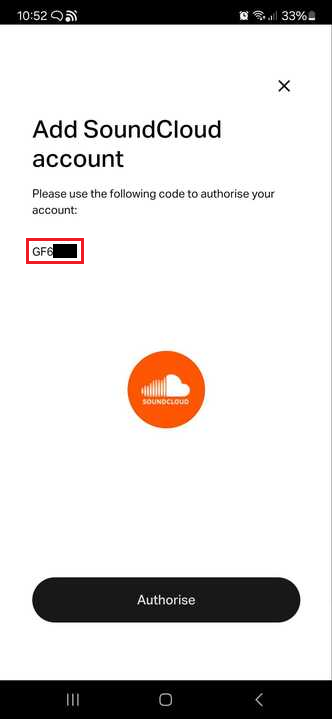
The code you need is supplied on the same page as the Authorise button:

I hope this helps.

8 replies

Corry P
Corry PAnswer
Sonos Staff
August 26, 2024

Hi @Arnbjorn 

Welcome to the Sonos Community!

Sorry to hear of the issue you’ve been having trying to add SoundCloud to your Sonos system.

The code you need is supplied on the same page as the Authorise button:

I hope this helps.

"Common sense is the collection of prejudices acquired by age eighteen." - Albert Einstein
ArnbjornAuthor
Contributor I
August 27, 2024

Not sure how I missed that, but thank you for solving my problem!

Corry P
Sonos Staff
August 27, 2024

Hi @Arnbjorn 

It’s easy enough to miss - I know because I missed it the first time too!

It could do with being bigger - I’ll see if I can feed that back to someone.

"Common sense is the collection of prejudices acquired by age eighteen." - Albert Einstein
Lyricist II
September 12, 2024

Dear all,

having this problem, too. 

How do i get to this ‘Add Soundcloud Account’  with this code?

don’t get it…can not find it ...

grtzp

Corry P
Sonos Staff
September 13, 2024

Hi @Peter Von Rosenthal 

Welcome to the Sonos Community!

To get to the page shown above, please open the Sonos app and go to User icon (top right) » Content Services » Add Content Service » use search bar to type Soundcloud and tap on SoundCloud » Add to Sonos » I already have an account (assuming that you do). You can then highlight and copy the code before moving on to the sign-in page.

I hope this helps.

"Common sense is the collection of prejudices acquired by age eighteen." - Albert Einstein
Lyricist II
September 15, 2024

Hi Corry,

that’s exactly what I do and after ‘I Already have an account’ I get ‘grand permission’ which I then do.

But then I  get the page “Activate your device” and have to enter a code.

But which code? I don’t have/get a code….

Where do I get this code?

grtzp


Lyricist II
September 15, 2024

Hi Corry,

just found it!!!


Lyricist I
October 17, 2024

SoundCloud