Contributor III
November 22, 2022
Answered

Mise à jour Contrôler

Bonjour,

Je n’arrive pas à faire la mise à jour du Contrôler sur mon Mac (MacBook Air M1 2020 avec Ventura 13.0.1).
J’ai toujours ce message d’erreur 
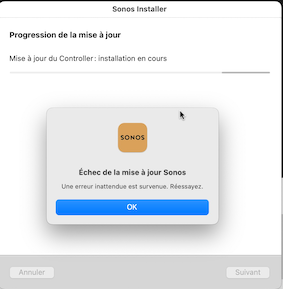
Merci de votre aide.

Fabrice

This topic has been closed for further comments. You can use the search bar to find a similar topic, or create a new one by clicking Create Topic at the top of the page.
Airgetlam
AirgetlamAnswer
November 22, 2022

Delete your current controller from your Mac. Go to the Sonos website and download the ‘new’ version, and install it. When it starts up, be sure to ‘connect to existing system’.

Bruce

3 replies

Airgetlam
AirgetlamAnswer
November 22, 2022

Delete your current controller from your Mac. Go to the Sonos website and download the ‘new’ version, and install it. When it starts up, be sure to ‘connect to existing system’.

Bruce
PepitoAuthor
Contributor III
November 22, 2022

Merci de votre aide, tout fonctionne maintenant.

Fabrice

Airgetlam
November 22, 2022


Heureux de l'entendre. Pas de quoi.


Bruce