
Headliner I
February 6, 2024
Answered

Keeping SONOS awake in Windows

  • February 6, 2024
  • 3 replies
  • 451 views

The problem I’m having with playing My Music Files in my Computer is that whenever my laptop is off/black screen, I have no access to my Music in my Computer. The music will not play when I use my app to select music from my Computer. I can still use all the other functions, Spotify, Bandcamp, etc. The laptop goes dark/sleep after about an hour. What settings do I need to set in Power & Sleep mode so I can play music from my laptop? I don’t want the laptop to be on (screen on) 24/7 as my battery will get bad faster. It’s plugged into the outlet 24/7 as I don’t use the laptop at all except for Sonos. 
This topic has been closed for further comments. You can use the search bar to find a similar topic, or create a new one by clicking Create Topic at the top of the page.
Best answer by controlav

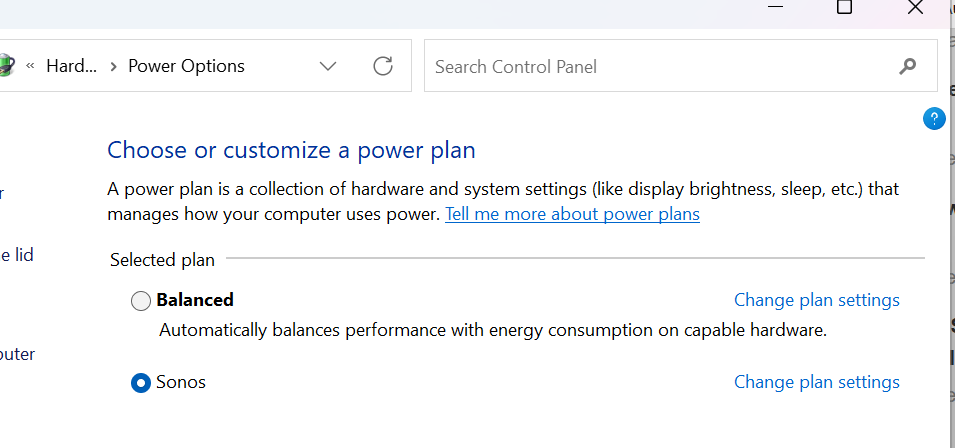
The PC Sonos app actually installs a Power Plan specifically for this:


3 replies

Schlumpf
Virtuoso
February 6, 2024

@Dcgman#1

You have to set your laptops energie mode settings to no sleep mode/ standby mode. It has to be always on but you can separately set the display to turn of after some time. 
For such an usecase I would recommend using a NAS drive. 
 

Ralf
controlav
controlavAnswer
Lead Maestro
February 7, 2024

The PC Sonos app actually installs a Power Plan specifically for this:


Author of the leading independent Sonos apps for Android, MacOS, iOS, Windows and Xbox.
controlav
Lead Maestro
February 7, 2024


Author of the leading independent Sonos apps for Android, MacOS, iOS, Windows and Xbox.