
Contributor I
Nov 26, 2026 12:47 PM UTC
Question

iOS Shortcut for tuning the Volume isnt working

I love the Action to creator Shortcut. It makes  many things much easy for me. 
 

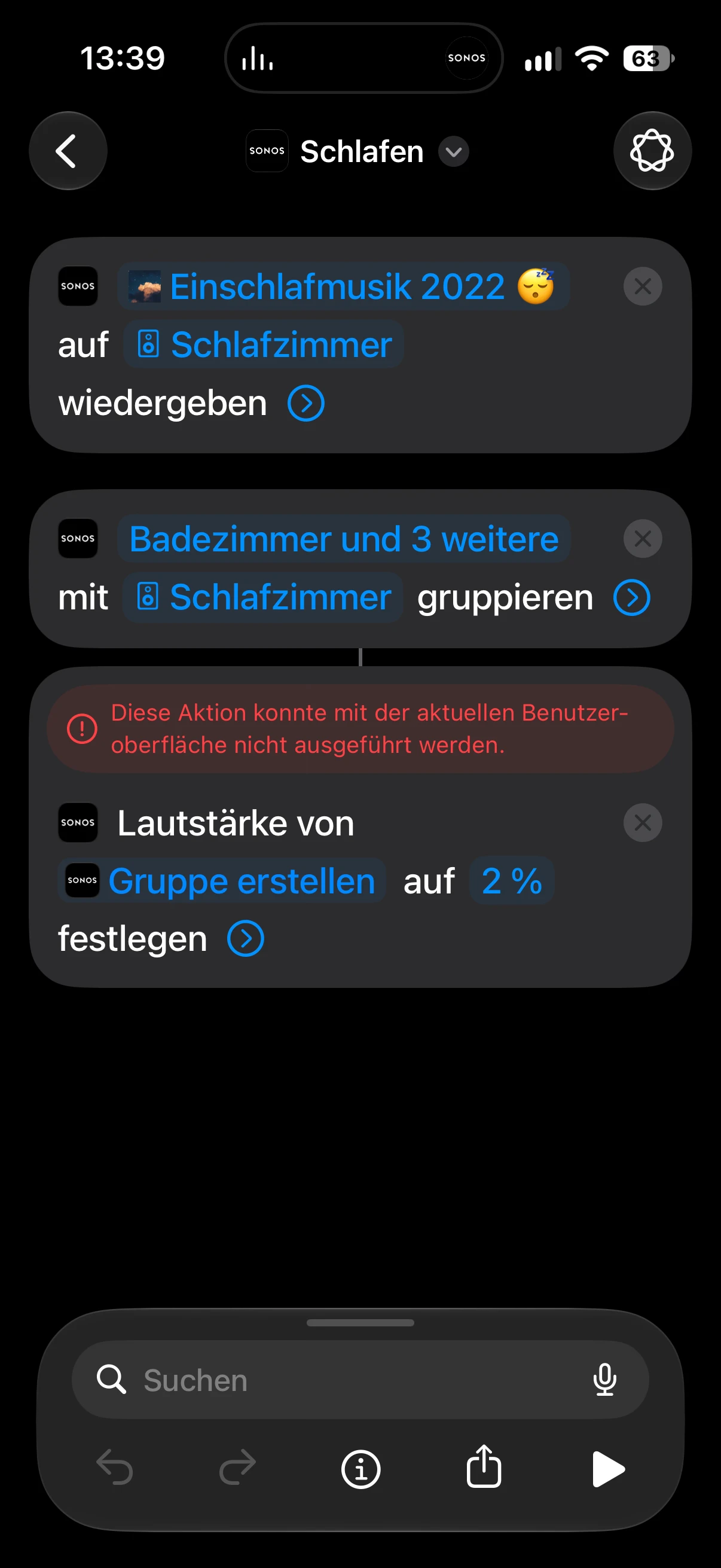
My only issue Is I I’m not able to Control the Volume over a Shortcut. I always Get the Error: “This action could not be run with the current user interface”. Screenshot Below (beware: German. tried to Translate with a I but didn’t, work properly).


Tried It with the Single Speaker Instead of the Group and God the Same Result.Yes, I Already Restarted my iPhone.

Is this a known issue or is something wrong with my Shortcut?
 

15 replies

kdowling
Nov 26, 2026 8:01 PM UTC

I just added an iOS shortcut to set my Office Era 100 stereo pair to 5%. It worked fine here. No error message, just said “Done” and it did set the volume to 5%. iOS 26.7.3 and Sonos 91.01.15.

Translate
Alex221Author
Contributor I
Nov 26, 2026 9:25 PM UTC

I just added an iOS shortcut to set my Office Era 100 stereo pair to 5%. It worked fine here. No error message, just said “Done” and it did set the volume to 5%. iOS 26.7.3 and Sonos 91.01.15.

Would you share a screenshot of your Shortcut?

Translate
kdowling
Nov 26, 2026 9:37 PM UTC


Translate
Lyricist II
Nov 26, 2026 9:46 PM UTC

That is a useful comparison with kdowling's test. His shortcut was just the one Set volume action, on iOS 26.7.3 and Sonos 91.01.15, and it worked. Would it be worth trying a shortcut with only the Set volume action for the same room, to see if the earlier Play and Group steps are getting in the way? It would also help to know which iOS and Sonos app versions you are on, in case it is a version difference.

Translate
Alex221Author
Contributor I
Nov 26, 2026 9:57 PM UTC

That is a useful comparison with kdowling's test. His shortcut was just the one Set volume action, on iOS 26.7.3 and Sonos 91.01.15, and it worked. Would it be worth trying a shortcut with only the Set volume action for the same room, to see if the earlier Play and Group steps are getting in the way? It would also help to know which iOS and Sonos app versions you are on, in case it is a version difference.

Same Sonos Version, iOS 27.0.1. 

Tried the same Shortcut, still the same issue. Tried it with every speaker I own: Era100, Play 1, Arc Ultra. Always the same Error

Translate
Alex221Author
Contributor I
Nov 28, 2026 4:03 PM UTC

@Smilja 

I always Get the Error: “This action could not be run with the current user interface”.


I just googled it. It’s apparently a known bug tied to early iOS 27 builds, and was supposedly fixed in iOS 27.2.1; the 'toolkit' error may be related. Bottom line, this means waiting for the next iOS bug fix.

Oh, couldn’t find anything specific about it. Thank you for this information. Hopefully it will get fixed 

Translate