
Chromatic Producer I
October 4, 2020
Question

FLAC files stored locally dropping out on Sonos

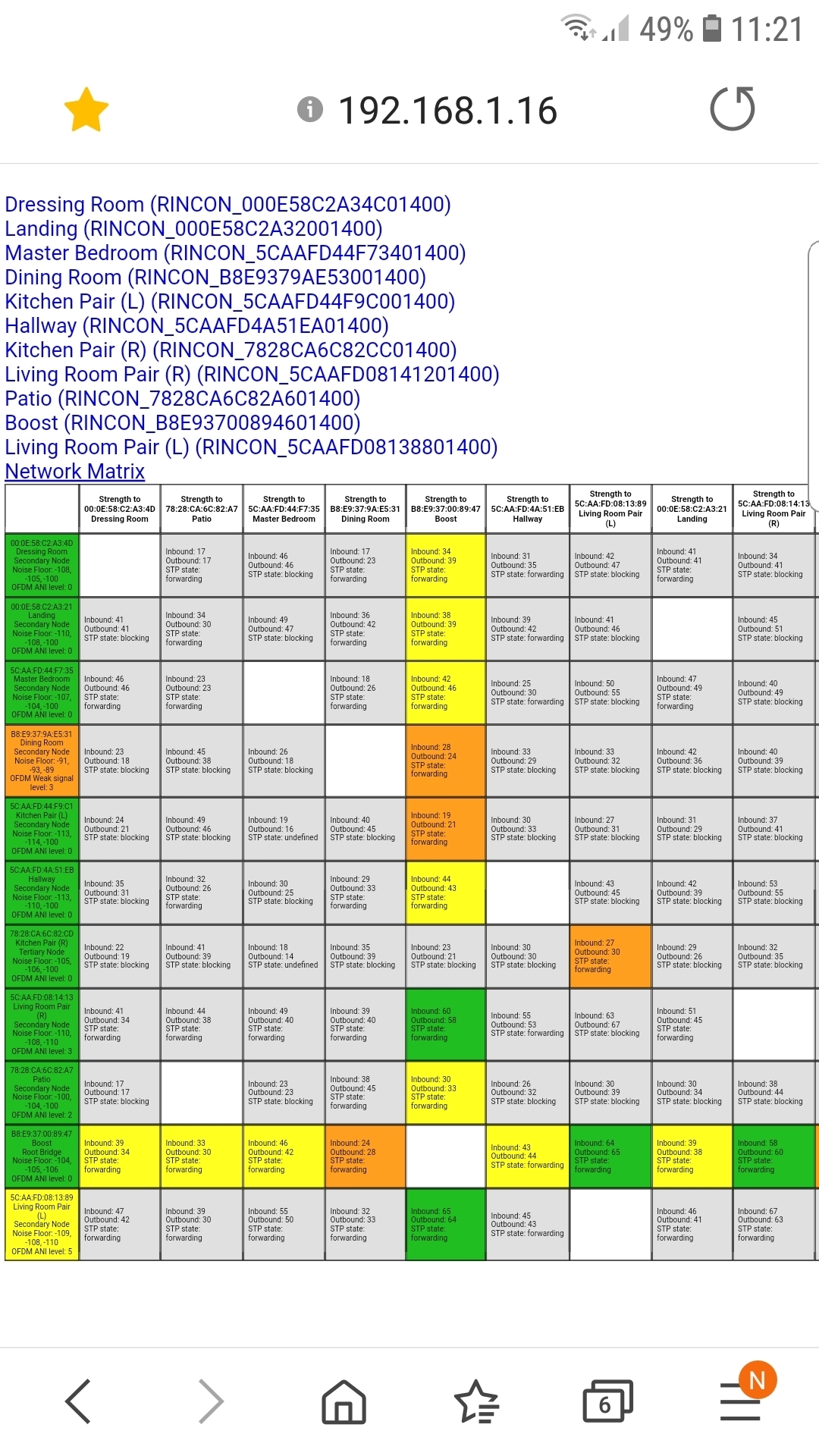
I have to ask this question again. Why is it the performance of Sonos in playing FLAC files has waned over the last couple of years since Sonos preoccupation with being all things to everyone i.e. streaming from every possible source, 5.1 etc. Despite having the matrix I have attached speakers drop out especially one side of stereo pairs. Whenever I skip to the next track speakers drop out and slowly synch up again. Does not happen on MP3s with their lower bitrate. Those of us who were early adopters can remember that Sonos was supposed to have the ability to play 32 speakers with multiple music streams in different rooms. The S2 app takes an age to load on a fast laptop. Changing volume settings can now have a delay as others mentioned. Has some of the memory capacity that used to be available been used for the new features. Don't forget the original system was just designed to play music from local sources and a bit of Internet Radio. Perceived reliability has really begun to suffer as witnessed by a lot of disillusioned contributers on this site. I may sound crass to say this but if I could go back about 30 upgrades to the old blue controller I would do so. Sonos is taking my system in a direction I appear to have little or no control over.
 

This topic has been closed for further comments. You can use the search bar to find a similar topic, or create a new one by clicking Create Topic at the top of the page.

29 replies

ratty
October 4, 2020

That won’t make Sonos on 1, or your router on 6, very happy at all. Is it yours? At -57dB it's not that far away.

ninjabobAuthor
Chromatic Producer I
October 4, 2020

The system will play flacs quite reliably for long periods if the queue is not edited. Move a song underneath the song playing (play next) or a simply click on play next track and speakers will drop out and then slowly come back into sync. The microwave in the kitchen is another story - that will wipe the floor with the system and causes the system to play the next track briefly, cut out altogether etc. On MP3 it is more reliable with little or no issues. Unfortunately I am one of those rare individuals who despite my age can tell the difference in sound quality especially on the Play5 Pair.

busy trying to edit the queue
ninjabobAuthor
Chromatic Producer I
October 4, 2020

That won’t make Sonos on 1, or your router on 6, very happy at all. Is it yours? At -57dB it's not that far away.

No it is not and unknown to me (I live in London so a lot of WiFi around). It does another nasty trick of spanning channel 2-8 on occasions!!

busy trying to edit the queue
ratty
October 4, 2020

Based on the pic above I would try Sonos on ch 11. Overlaps are especially damaging.

If the problem strikes when rooms are grouped then try starting off with a different room. The first room contains the Group Coordinator, responsible for fetching the stream and distributing to the other nodes. In a room with a stereo pair the left unit is usually the GC. The best GC is a wired node; the next best would be one with a good wireless signal.

October 4, 2020

@ratty . if practical would there be any possible benefit in wiring Livibg Room (L) instead of (or as well as) Boost?

ninjabobAuthor
Chromatic Producer I
October 4, 2020

Thanks R that is helpful as I normally group from the Living Room Pair. I 'll try one of the upstairs Play 1s.

busy trying to edit the queue
ratty
October 4, 2020

@ratty . if practical would there be any possible benefit in wiring Livibg Room (L) instead of (or as well as) Boost?

Hard to say without studying the reasons why the STP topology is the way it is. Generally the more wired, the better.

ratty
October 4, 2020

Thanks R that is helpful as I normally group from the Living Room Pair. I 'll try one of the upstairs Play 1s.

The Living Room nodes in fact have the strongest connection to the Boost. That said, Direct Routing connections between group peers might favour one of the Play:1s. YMMV. 

ninjabobAuthor
Chromatic Producer I
October 4, 2020

Channel 11 is my immediate neighbour. He had SKY fit a Mini Box to work with his SKY Q box and Sky Router. This setup was using 1,6 and 11 aarrgghhh!. Luckily on talking to him he was not having too much joy with it so when his SKY engineer turned up I suggested turning off 2.4ghz on the Q and Mini Box which makes it all use 5ghz (all on the same channel) bar the router which uses both. This limitation of the 2.4ghz band is a nightmare in urban environments. What a pity we cannot have Sonosnet on 5ghz or a combination of both wavelengths as 5ghz penetrates my house ok.

busy trying to edit the queue