
Trending Lyricist I
June 27, 2024

Fixing the "The device where the music files are stored may not be powered on" error.

  • June 27, 2024
  • 21 replies
  • 1279 views

In a recent thread I described the issue I’d faced since “The Update” that prevented me from adding my music library, hosted on a Mac Mini, to an S2 system. I had file sharing configured per Sonos recommendations (even before the update), and although Sonos could connect to the share it would fail during the indexing process with this incredibly informative error message:
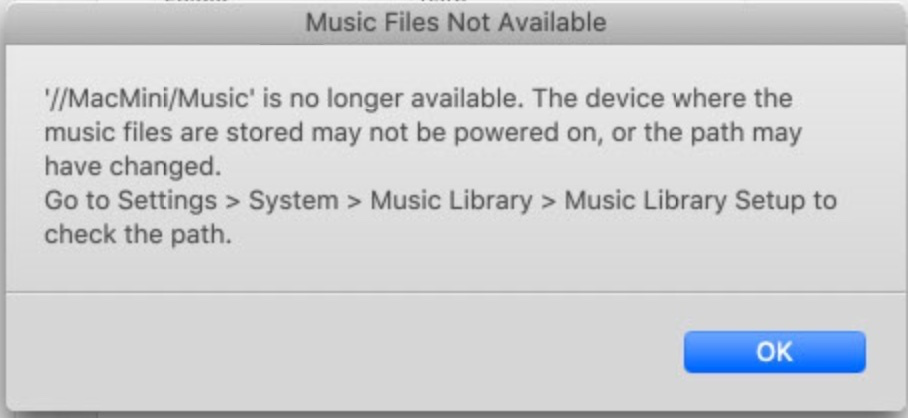
 

O RLY?


TL;DR: If you encounter the above error, it may be an issue with the cumulative volume of metadata in your music library, despite that not having been an issue before the May update. This certainly affects shares stored on MacOS using libraries managed with Apple Music, although I will note that I do not believe this represents an issue with Apple's products, as it's clearly linked to a data limit within Sonos. However, it’s one you’re more likely to encounter if your music management approach, like Apple Music, involves naming files with proper names, rather than a simple disc-track numbering system.


Troubleshooting

As you’ve probably guessed, the solution had absolutely nothing to do with (deep breath!): SMB versions, file sharing configuration, user permissions, network configuration or router settings.

I created a new share (before anyone gets excited this was done exactly the same as the existing share), copied a single album into it, completed the library setup process using the MacOS desktop app, and voila!, it instantly indexed. So this was not a file sharing issue (told ya), but something was behaving differently given I'd not added to my library since the update. I added half the library to the new share and that indexed successfully too, but adding the other half, either together or as part of an additional share, resulted in the error again. So some sort of library restriction or content issue seemed logical.

After trawling this forum and search engines I found posts about the local library limit (65k tracks), which at 19k tracks I am massively under. I also saw a couple of posts about supposed metadata character limits for album, artist, genre, track name, and file path information, although I note there appears to be no formal documentation or recommendation from Sonos regarding these. I extracted a list this information from my Apple Music library, and found dozens of files exceeding one or other of the supposed limits. So I added only those albums and repeated the indexing, which succeeded. So the length of the individual metadata wasn't a problem. So, perhaps it was just the cumulative volume of metadata? So, I renamed around 6k tracks from audiobooks, replacing the verbose chapter names with simple disc-track naming (e.g. 01-001.m4a). Fortunately this was relatively simple using MacOS Finder's bulk renaming function and the files still contained the album, artist, track name and genre information used by Sonos library indexing. Finally, I added everything back into the original share, and ran the indexing process again, and this time it was successful. So the issue was that the cumulative file path and metadata exceeded a Sonos limit, but crucially, the app is incapable of outputting any remotely useful error message to inform the user of this.

I've now split my library into two shares. One for the audiobooks (rarely added to) and another for music. This way, I can more easily take action to prune the filenames of the audiobooks should it become necessary again, and it will be easy to tell if ever the music share metadata becomes too large, as the two shares have different names that will be surfaced by the cryptic error message.


Resolving the error

My library is managed by Apple Music, which automatically names imported files using the track name from the embedded metadata. Others with similarly sized libraries may not encounter the limit if their library management involves naming files using disc-track numbering only.

It's notable that this issue only presented after the update, appearing only to impact sharing over SMB2/3, as the same library indexed perfectly prior to the May update.

  1. Does your error message match the screenshot?
  2. Have you setup your file share per the Sonos guide?
  3. How many tracks do you have?
  4. Do your files have proper names e.g. "Escape from the City of Angels.m4a" or are they simple disc-track names e.g. 01-001.m4a?

If you think you may be exceeding the library data limit:

  1. Try moving a portion of your library outside the shared location.
  2. Repeat the indexing process. If it works, you're likely hitting the data limit.
  3. Consider renaming your files in the format 01-001.m4a. Bear in mind that if you do this and you use Apple Music or iTunes you will need to disable the "allow Apple Music to manage my library" setting - with it enabled the application will name your tracks with proper names.


My suggestions to Sonos:

1. Please improve your error messages. You're clearly handling this exception, so you should be able to provide a unique error number and message to the user so they have a fighting chance of fixing the issue.

2. Please improve your documentation. I get that 90% of your customers don't use local libraries, but 10% of us do, and if you can't or won't adjust the limits on the volume of metadata, so that you can continue to support older, memory-limited hardware, then please provide some formal documentation around metadata limits, and preferably some recommendations for how to maximise the number of tracks that can be successfully added within your data limit.

This topic has been closed for further comments. You can use the search bar to find a similar topic, or create a new one by clicking Create Topic at the top of the page.

21 replies

Trending Lyricist I
June 27, 2024

Meant to post this in Community.

buzz
Grand Maestro
June 27, 2024

Large metadata causes overflow in the space allocated for indexing. The indexer attempts to load the whole share’s metadata into the space. This is why breaking the library into smaller shares is more likely to be successful. Another issue with long metadata is that each track has a ‘slot’ allocated for metadata. If the metadata overflows the slot, a second slot is opened. With excessive metadata, the library can easily max out in the 30K range.

Trending Lyricist I
June 28, 2024

Just breaking the library into smaller shares didn’t work, as the total amount of metadata still exceeded whatever Sonos’ limits are.

It’s a significant issue that Sonos does not clearly set out the limitations on metadata capacity and slot limits so that users can be aware of them. Precise error messages would be nice, too.

Notably, as my library was unchanged before and after the May update, something appears to be different with regards to how much metadata Sonos generates when indexing the exact same library, i.e. the same library information is consuming more space.

buzz
Grand Maestro
June 28, 2024

I can imagine one other little bit of mayhem. Check the About… and make note of the Associated Player. This unit will run the indexing routine. If you have an older player with less RAM and this unit is the Associated Player, indexing might fail yet the indexing might be successful using another player with more RAM. As the controller starts, the first player to respond to a general query will Associate.


Trending Lyricist I
June 28, 2024

Both units in my S2 system are Rays, so should be comparatively well-off RAM-wise.

I also have an S1 system (pre-emptively downgraded when the May update was announced) that includes a couple of Play1 and Play3’s, and that system has never had an issue in all the time I’ve owned it, even as the library has grown over the years.

Trending Lyricist I
August 5, 2024

Hello...I am having this same issue since the July 22nd release.  After Sonos broke things with their new app I was eventually able to use the NAS workaround to access my music and playlists.  However, since the July 22nd release, I can use the NAS workaround to access my Music Library (indexing starts)...but after 5-10 minutes indexing stops with the error “<PathName> is no longer available.  The device where the music files are stored may not be powered on, or the path may have changed.”


I have about 36,000 items (almost all songs) in my local Apple Music library.  i don’t think I can set up 2 Apple Music libraries (like Superunknown) because I don’t think Apple Music can access 2 libraries at once.  I would then only have access to some of my music, depending on which Library I choose when I opened Apple Music (using the Option key).  (At least that is what I think)


I have added a a minimal number of songs between the June Sonos release and the July Sonos update (less than 100)...so I don’t think I crossed some threshold...something must have changed in how Sonos handles metadata between the June Release and the July Release that broke things.


Does it make a difference where the iTunes library is stored?  I have all my music in a shared folder called Music (Hard Drive\ It has 2 sub-directories...iTunes and Music.  iTunes has the iTunes Music Library.xml file.  Music has a sub-directory called iTunes...which has a sub-directory called iTunes Music with all my music files.  Don’t ask me why it is set up like this...i think it is an historical thing from the days before iTunes became Apple Music...all I know is that is used to work with Sonos  


Someone told me to bite the bullet and upload all of my local music into Apple Music and that this will solve my problems.  Other than the fact that I hate having to subscribe to another service just to fix something that Sonos broke, are there any issues with this solution?  I have a lot of music on my MacBook hard drive that I didn’t get from Apple Music...old CDs that I ripped (some of which are not on Apple Music), music found and downloaded from the internet, etc etc...does this music load into my Apple Music account as well and will I be able to play my playlists that contain a mix of tunes that are available in Apple Music and others that come from my hard drive?


Any suggestions? 


thanks!

Trending Lyricist I
August 6, 2024

I am having this same issue.  After the Sonos App stopped working in May/June, I was eventually able to access my music (stored in iTunes/Apple Music on my MacBook) and my playlists, using the NAS workaround.  However after the July 22nd update the workaround stopped working for me.  I am able to access my library using the NAS workaround, but 5-10 minutes after indexing starts i get the error message: 

‘//MyComputer/Music’ is no longer available.  The device where the music files are stored may not be powered on, or the path may have changed.


My Music Library has about 35,000 songs so I am below the Sonos limit of 65K songs.


Does it matter where the iTunes library sits?  My Shared Folder Music that I point Sonos to has a subfolder iTunes...where the iTunes Music Library.xml file is located and another subfolder called Music.  This Music folder contains the Music Library File has a folder called iTunes ...and inside of this file sits all of my music.  I’m not sure why it is set up like this...I think it is from the days of iTunes...all I know is that it used to work before Sonos changed their app (and then again after the 1st update release) so I am hesitant to change anything.


This worked after the May/June softwareupdate...so Sonos changed something in the July 22nd update which broke this.


Any bright ideas?


It has been suggested to me that I could solve this issue by subscribing to Apple Music and syncing my local library.  Ignoring the fact that I don’t like the idea of having to subscribe to Apple Music just to fix something that Sonos apparently broke, I am hesitant to do this because I have a lot of music that i did not get from iTunes/Apple Music (my CD collection which I ripped, songs I found over the years on the internet, etc) and I am worried that not all of these songs will upload/play in Apple Music .  Does anyone have any experience with this?  Will syncing my local music library with Apple Music solve my Sonos issue?  Will I still be able to play my playlists that contain songs that I own but might not exist in Apple Music?


thanks

Collaborator II
August 7, 2024

In a recent thread I described the issue I’d faced since “The Update” that prevented me from adding my music library, hosted on a Mac Mini, to an S2 system. I had file sharing configured per Sonos recommendations (even before the update), and although Sonos could connect to the share it would fail during the indexing process with this incredibly informative error message:


O RLY?


TL;DR: If you encounter the above error, it may be an issue with the cumulative volume of metadata in your music library, despite that not having been an issue before the May update. This certainly affects shares stored on MacOS using libraries managed with Apple Music, although I will note that I do not believe this represents an issue with Apple's products, as it's clearly linked to a data limit within Sonos. However, it’s one you’re more likely to encounter if your music management approach, like Apple Music, involves naming files with proper names, rather than a simple disc-track numbering system.


FYI, in another thread where I explain how to upgrade a legacy NAS to SMB2, I discovered the following, when I got the above error. The SMB client (i.e. Sonos) is running out of SMB ‘credits’ - clearly a bug in either the client or server.


This is the message in the smb.log file that led me to this conclusion:

“smb2_validate_message_id: client used more credits than granted, mid 132097, credits_granted 0, seqnum low/range: 132097/0”

According to the Samba documentation this should never happen, but lo and behold there it is. I did try to increase (x 2) the credits in the smb.conf file, but it had no effect, indicating a subtle bug somewhere.

And this is only an issue with indexing, it doesn’t affect playback. FYI

Trending Lyricist I
August 7, 2024

It has been suggested to me that I could solve this issue by subscribing to Apple Music and syncing my local library.  Ignoring the fact that I don’t like the idea of having to subscribe to Apple Music just to fix something that Sonos apparently broke, I am hesitant to do this because I have a lot of music that i did not get from iTunes/Apple Music (my CD collection which I ripped, songs I found over the years on the internet, etc) and I am worried that not all of these songs will upload/play in Apple Music .  Does anyone have any experience with this?  Will syncing my local music library with Apple Music solve my Sonos issue?  Will I still be able to play my playlists that contain songs that I own but might not exist in Apple Music?


I have both Apple Music and iTunes Match.  While I’ve had iTunes Match for years, I’ve turned Apple Music on and off. Both services will upload music content to the cloud that is not in the Apple Music catalog, so you can listen to the music you ripped anywhere.

If you become an Apple Music subscriber and add that service to your Sonos account, you’ll be able to access all your music including your playlists and ripped content. That’s how I’m currently accessing the content and playlists in my Mac Music library since error 913 popped up and the NAS workaround failed.

Trending Lyricist I
August 7, 2024

Why is this issue surfacing now? Why did the NAS workaround work between May and (about) August without triggering the Sonos metadata limitation? Is this a bug specific to the latest the Mac Sonos controller version 16.3 build 80155014?