
Contributor I
March 28, 2024
Answered

Error messeage: "Access to the shared folder "//MYMACHINE/MYMUSIC" is denied - check the username or password"

  • March 28, 2024
  • 1 reply
  • 362 views

There is a seemingly related but frozen topic on this from a decade ago. Surprising this is still happening to people. 

This on a Macbook Pro M1 (16-inch, 2021), running Sonoma 14.4.1 (23E224)

I have a shared folder containing all my music which is not an Apple Music / iTunes library. It has read access for everyone.

I set in Privacy & Security > Full Disc Access: added Sonos and restarted it.

It isn’t connecting, here is the error dialog:
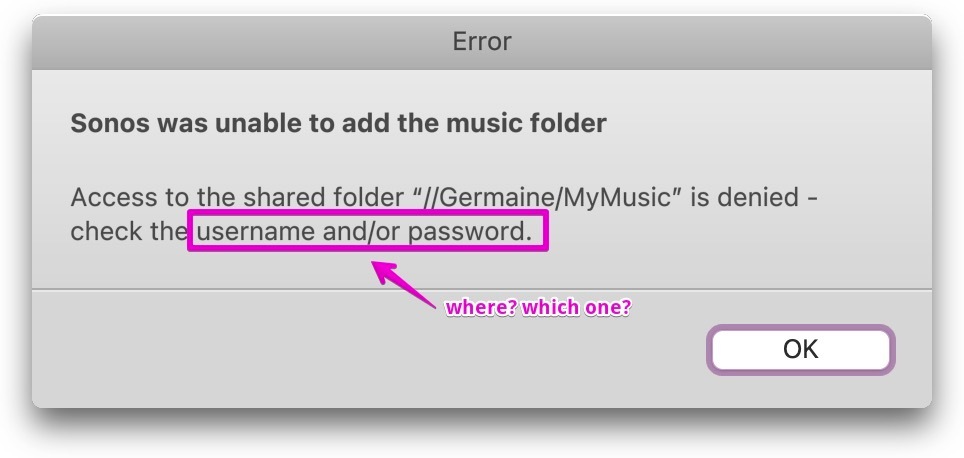
I’m not sure what username/password it’s complaining about. I’m giving it the admin credentials.

This topic has been closed for further comments. You can use the search bar to find a similar topic, or create a new one by clicking Create Topic at the top of the page.
Best answer by Stanley_4

Often the best option for this kind of problem is a call to support as tehy can see the internal logs hidden from users.


You probably need the SMB sharing user and password if your Mac is set to require them.

1 reply

Stanley_4
Stanley_4Answer
Grand Maestro
March 29, 2024

Often the best option for this kind of problem is a call to support as tehy can see the internal logs hidden from users.


You probably need the SMB sharing user and password if your Mac is set to require them.