
Contributor I
April 14, 2023
Answered

Display Music Source name in Sonos Controller

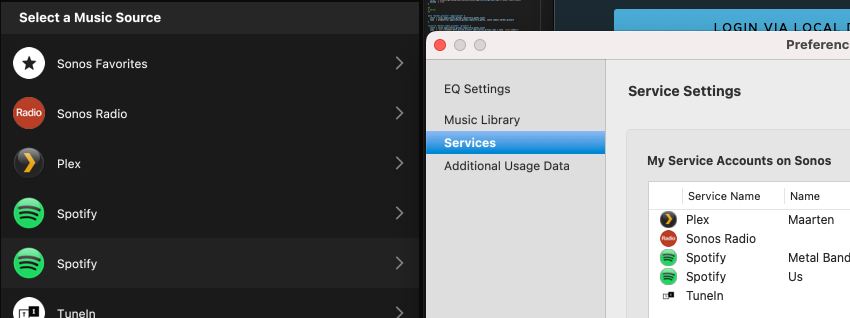
Is there a way to display the name we gave to a Service in the ‘Select a Music Source’ section?

I have 2 Spotify accounts linked in my Sonos Controllers, but I never know which one to select. It would be nice if next to the service type, you could have the option to display the name you provided as well.

This is an example on the Mac controller, but it is the same for iiPhone app
 

This topic has been closed for further comments. You can use the search bar to find a similar topic, or create a new one by clicking Create Topic at the top of the page.

5 replies

106rallye
April 14, 2023

You can rename the Spotify acounts in Setting-Services and voice, maybe not on the desktop controller, but certainly in the iPhone app. Every account can get a first name (or whatever you want) added. The Sonos app shows the chosen name.

maacarboAuthor
Contributor I
April 14, 2023

On the iPhone app, it is exaclty the same issue.

I added/uipdated the name in “Setting > Services and voice” but the only names I see in the “sources” tab are those from the services, without the given name, making it difficult to choose the correct one.

Adding the names to the service in settings
Still not showing the added names in the srouces tab


jgatie
jgatieAnswer
April 14, 2023
controlav
Lead Maestro
April 14, 2023

Like this?


PC app shows it like this with an annoying popup menu:


Author of the leading independent Sonos apps for Android, MacOS, iOS, Windows and Xbox.
maacarboAuthor
Contributor I
April 15, 2023

I had to remove one of the Spotify services and restart the procedure to add it.

Now I can switch between bother services and the name is displayed.


Thank you a lot for your help!