Contributor I
December 14, 2024
Answered

Apple Music Reauthorization on Mac

  • December 14, 2024
  • 4 replies
  • 231 views

Hello.  My Sonos on Mac says my Apple Music needs to be “re-authorized” but this can only be done on an iOS device. Apple Music is fully authorized and operational on my iPhone, but I do not see any option to re-authorize it for the Mac. Any help appreciated. Thank you.

This topic has been closed for further comments. You can use the search bar to find a similar topic, or create a new one by clicking Create Topic at the top of the page.
Best answer by AjTrek1

​@bfla 

  1. Open Apple Music
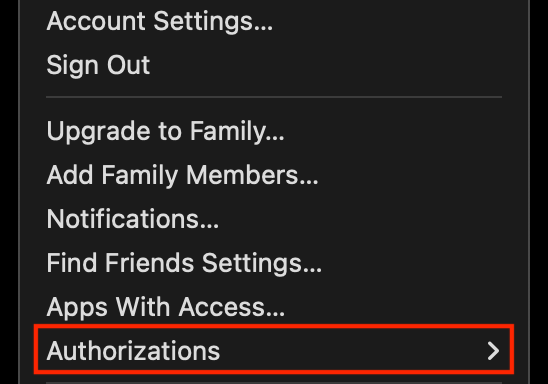
  2. In the top menu click on Account
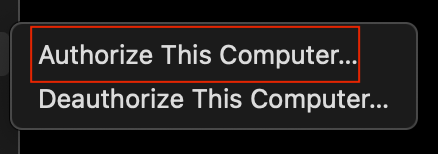
  3. Click on Authorizations
  4. Click on Authorize This Computer *

 * Apple only allows five (5) computer authorizations 


4 replies

AjTrek1
AjTrek1Answer
December 15, 2024

​@bfla 

  1. Open Apple Music
  2. In the top menu click on Account
  3. Click on Authorizations
  4. Click on Authorize This Computer *

 * Apple only allows five (5) computer authorizations 


Together Everyone Achieves More = T.E.A.M.
bflaAuthor
Contributor I
December 15, 2024

Thank you.  Tried this.  As it also turns out, there is indeed a provision to reauthorize under Content Services within the Sonos IOS app Account tab.  Problem solved.

AjTrek1
December 15, 2024

Thank you.  Tried this.  As it also turns out, there is indeed a provision to reauthorize under Content Services within the Sonos IOS app Account tab.  Problem solved.

Don’t be confused. The reauthorization in the Sonos app has nothing to do with authorizing Apple Music for Mac Computers which is how you phrased your post. What you eventually discovered was to allow Sonos to establish a link to your Apple Music account. I know it can be confusing as Sonos uses the same term (Authorize) to establish a link with Apple Music.

Together Everyone Achieves More = T.E.A.M.
bflaAuthor
Contributor I
December 15, 2024

Got it.  Yes, a little confusing.  But sorted.  Thanks again.