
Contributor I
Aug 18, 2024 1:06 AM UTC
Answered

Adding LivePhish to Sonos app

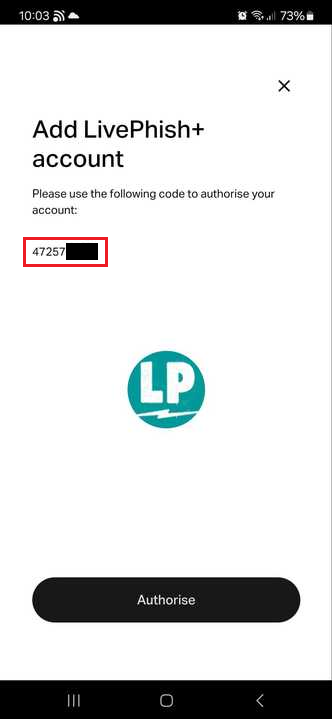
I am trying to add LivePhish to my mobile app so that I can play it on my Sonos One. When I try to add the LivePhish app, I am having issues with connecting LivePhish. I can click on the button that “I have an account.” The next page requires me to use a code to authorize my account. It asks that I verify that the “user code matches the code on the decive.” Nothing can appear on my sonos, so I cant verify the device. Anyone have any suggestions on what I’m missing? Thanks in advance!

This topic has been closed for further comments. You can use the search bar to find a similar topic, or create a new one by clicking Create Topic at the top of the page.
Corry P
Corry PAnswer
Sonos Staff
Aug 19, 2024 9:05 AM UTC

Hi @kbertschy 

Welcome to the Sonos Community!

Sorry to hear of the issue you are having when trying to add LivePhish! to your Sonos system!

The authorisation code you need to use is a number shown on the same page that has the Authorize button - just copy and paste it into the next page.

I hope this helps.

"Common sense is the collection of prejudices acquired by age eighteen." - Albert Einstein

1 reply

Corry P
Corry PAnswer
Sonos Staff
Aug 19, 2024 9:05 AM UTC

Hi @kbertschy 

Welcome to the Sonos Community!

Sorry to hear of the issue you are having when trying to add LivePhish! to your Sonos system!

The authorisation code you need to use is a number shown on the same page that has the Authorize button - just copy and paste it into the next page.

I hope this helps.

Translate
"Common sense is the collection of prejudices acquired by age eighteen." - Albert Einstein