
ranash1995
Contributor I
December 19, 2022
Answered

A removed Sonos device reappears in the list as "Not connected" How do I remove it?

I am using the IOS app and this device will not go away even after a reset, router reboot and full power down.
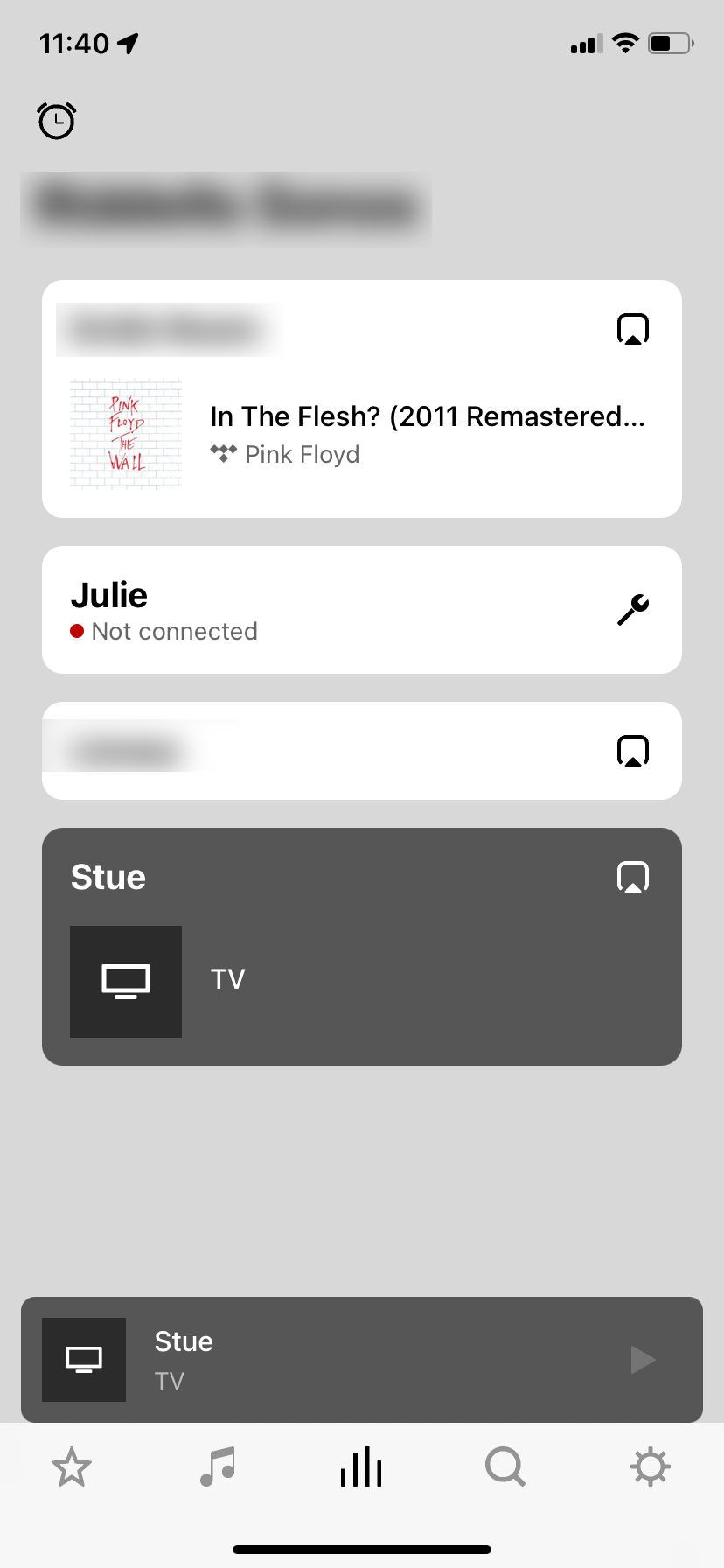
The wrench icon will only trigger a wizard to re-attach the device, nothng to actually delete it permanently. Is there some mysterious trick to getting this device to go away? It is not registered under my account (it was a house guests device, and they took it with them when they left.)

This topic has been closed for further comments. You can use the search bar to find a similar topic, or create a new one by clicking Create Topic at the top of the page.
Lyricist II
December 19, 2022

Instead of the wrench select the room itself, you will have an option to hide it until it connects back up again. 

2 replies

Lyricist II
December 19, 2022

Instead of the wrench select the room itself, you will have an option to hide it until it connects back up again. 

Enthusiast I
January 27, 2023

Unfortunately the option to hide it is not currently working in android. This is a bug they are working on and I hope they sort it out soon. This issue does not happen in Windows Desktop S2, the device just disappears when you unplug like it did with S1.