
Trending Lyricist I
December 25, 2018

Web browser controller for Sonos

  • December 25, 2018
  • 14 replies
  • 21061 views
Hi all,

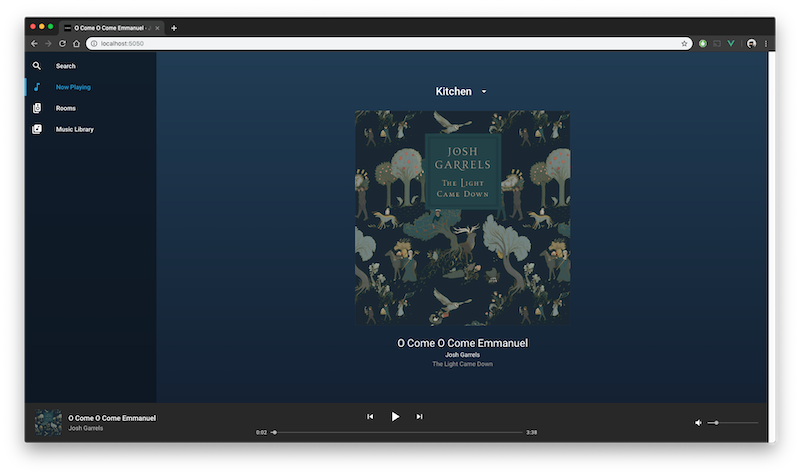
I have released a Sonos controller for the web browser. It’s still in development, but I think you’ll really enjoy it. Merry Christmas!

Check it out here:

https://github.com/Villarrealized/sonos-web
This topic has been closed for further comments. You can use the search bar to find a similar topic, or create a new one by clicking Create Topic at the top of the page.

14 replies

December 25, 2018
Looks nice. Look forward to trying it out.
Local music library with carefully constructed playlists - no shuffling!, Integration with Homeseer Automation, No touch screen devices, No streaming services, No Apple products ever
Local Superstar
December 25, 2018
Painful install process (on Windows) and then page displays but no content ... ???

Nice try - but ...
It's the courageous bee's knees - all 6 🐝🐝🐝🐝🐝🐝. - - - - - Make Sonos Great Again - - - - -
Trending Lyricist I
December 30, 2018
Painful install process (on Windows) and then page displays but no content ... ???

Nice try - but ...


Hi there! I have tried to make the install process as easy as possible. What did you find painful about it?

Also, I recently was in conversation with a friend that had the same issue of not seeing any of his speakers show up. I believe I have fixed this with a recent update. If you can, uninstall and reinstall and try again!

I’m constantly making improvements and working to add more features and fix bugs, so please let me know if you’re able to get it working.
Local Superstar
December 30, 2018
Okay! I'll try again and report back

1. Takes about 40 mins. to install ... ?

2. version 1.0.1 still shows nothing
It's the courageous bee's knees - all 6 🐝🐝🐝🐝🐝🐝. - - - - - Make Sonos Great Again - - - - -
Trending Lyricist I
December 30, 2018
Hmm. 40 mins is very unreasonable. I have installed it on macOS, Linux, and Windows 7 and for me it takes at most (on Windows 7, older machine) 5-10 mins. And at best around 1 minute on my Mac.

What are the specs of the computer you are running? Also, what web browser are you using? I have tested it on the latest versions of both Chrome and Safari with no issues.
Local Superstar
December 30, 2018
Win 7 on old netbook (Atom)

Opera and Chrome
It's the courageous bee's knees - all 6 🐝🐝🐝🐝🐝🐝. - - - - - Make Sonos Great Again - - - - -
Trending Lyricist I
January 4, 2019
Interesting. I installed it in a couple minutes on a Raspberry Pi 3. No powerhouse by any means. The issue is probably either with your internet speed in downloading the packages, or something to do with npm being slow on your machine.

I have updated the cli installer to v1.3.0. You can run npm update -g sonos-web-cli and then run sonos-web install and try again.
Lyricist I
January 30, 2019
Thank you very much for this controller. My goal is to integrate this via iFrame to my openHAB smart home dashboard. I‘m able to group/ungroup players, play and pause. Unfortunatelly the library results in a 404 error.

I‘m using Ubuntu 18.04 server and version 0.7.0 of Sonos Web. Is there anythin I‘m missing? Would it be possible to access Sonos favorites?
Trending Lyricist I
January 30, 2019
Hi tailor,

Would you please open up an issue on the repo? https://github.com/Villarrealized/sonos-web/issues

It will be more helpful to have the history and discussion there.

Glad you are finding it useful! Hopefully we can figure out your issue.

Yes, in the next release I’m planning on adding Sonos Playlists and Favorites.
Lyricist I
January 30, 2019
Ok, I have to revise my statement...I think it‘s not a bug. As soon as I added a local source for music (mp3s on NAS) the error disappeard and covers became visible.

To be honest my music sources are actually only Spotify and TuneIn.