
Contributor I
May 9, 2020
Answered

Spotify - Tracks not playing, local files.

  • May 9, 2020
  • 6 replies
  • 1249 views

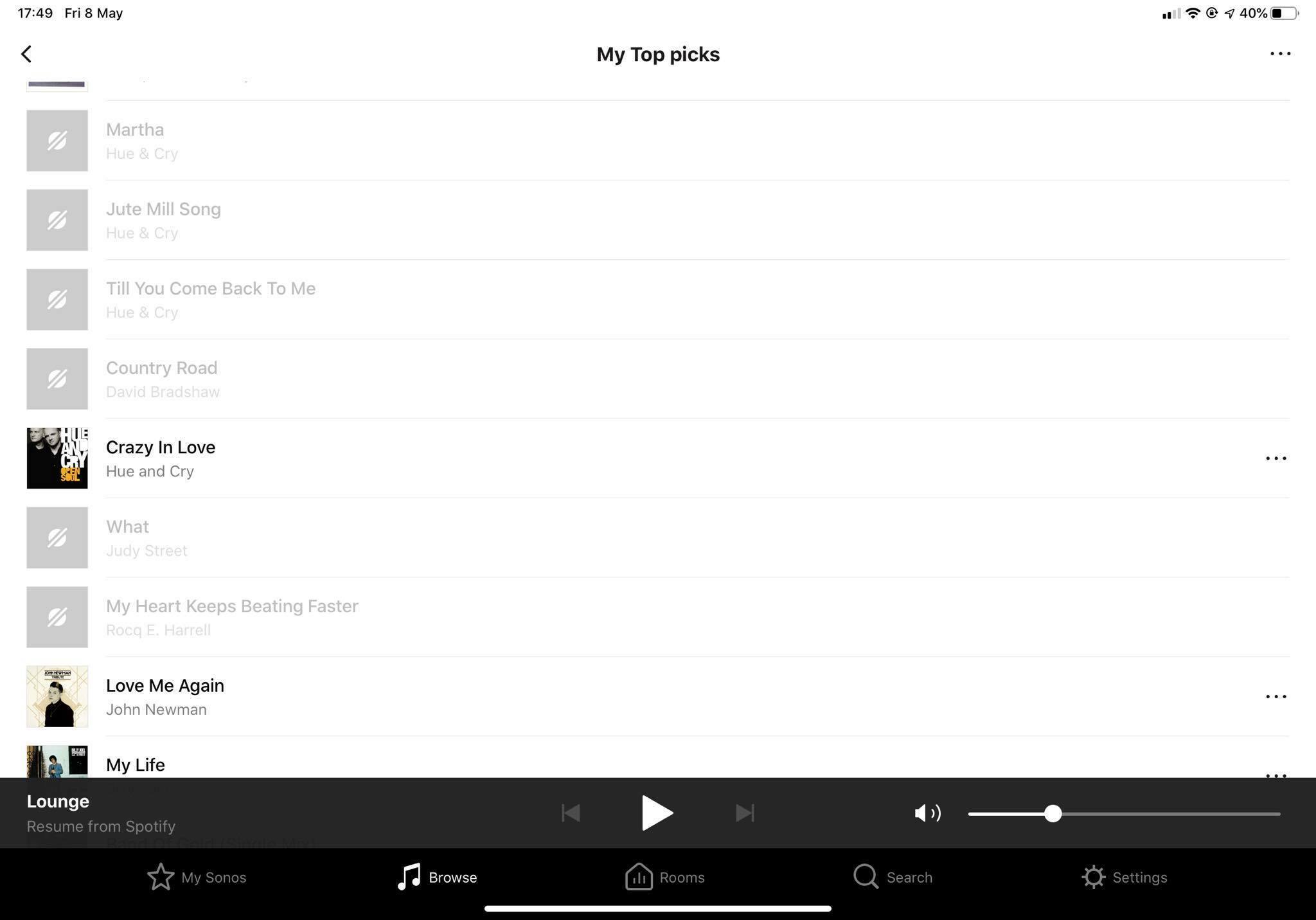
Looking for some help if possible please - some tracks in Spotify won’t play via the Sonos app or direct to Sonos via devices available in Spotify - the playlist are being accessed via Sonos, the songs are greyed out, despite them being a able to be played via the Spotify app on all of my mobile devices, IOS and Android.  
 

This topic has been closed for further comments. You can use the search bar to find a similar topic, or create a new one by clicking Create Topic at the top of the page.
Best answer by Smilja

@M57EED, It is not possible to play your own tracks that you have added to the Spotify desktop app to Sonos; this would require these tracks being uploaded to the Spotify cloud, a service Spotify does not provide. If you’d like to listen to your purchased music on Sonos either set up a Sonos music share or switch subscription to Google Music, Youtube Music or Apple Music.

6 replies

Sebastien D.
Sonos Staff
May 20, 2020

Greetings,


Many apologies for late response, I’d like to look into this with you to see what may be happening with your Spotify playback.

Over the past couple weeks; Spotify has in fact been through a service outage with their connection to Sonos which has since been resolved. This would include any issues adding or playing Spotify.

If you are still having issues, please submit a diagnostic report and respond back with the confirmation number.

Help others find useful content by clicking the like button and selecting best answer to your question.
M57EEDAuthor
Contributor I
May 20, 2020

Thanks Sebastian, files are local files deed to Spotify - play via Sonos PC desktop app - do you play, greyed out via Sonos IOS app.

Sebastien D.
Sonos Staff
May 20, 2020

What happens when go directly to the Spotify app? Are some tracks grayed out over there as well? 


Usually removing your Spotify account from the Sonos app and re-link it to your system usually helps the issue. Try these steps and let me know if that helps.

Help others find useful content by clicking the like button and selecting best answer to your question.
M57EEDAuthor
Contributor I
May 20, 2020

Thanks Sebastian, I’ll try this, revert as soon as possible.

Smilja
SmiljaAnswer
May 20, 2020

@M57EED, It is not possible to play your own tracks that you have added to the Spotify desktop app to Sonos; this would require these tracks being uploaded to the Spotify cloud, a service Spotify does not provide. If you’d like to listen to your purchased music on Sonos either set up a Sonos music share or switch subscription to Google Music, Youtube Music or Apple Music.

»And the world is like an apple whirling silently in space, Like the circles that you find in the windmills of your mind.« (›Windmills Of Your Mind‹ [1967]. Music by Michel Legrand ; English lyrics written by Alan & Marilyn Bergman)
M57EEDAuthor
Contributor I
May 21, 2020

Thank you @Smilja