
September 3, 2017
Answered

Sonos strongarm tactics?

  • September 3, 2017
  • 19 replies
  • 4328 views
Tried to run Sonos (6.4) from my iMac today. It refuses to run and gives me the message "We need Sonos running on the latest software. Choose check for updates to get started." If I follow the advice I am forced to accept the new privacy rules which I will not do. Any advice on how to make Sonos run on my iMac without accepting the new privacy conditions would be much appreciated. It was my understanding that for people like me Sonos would slowly but surely be phased out. I had never expected it to block access completely.
    This topic has been closed for further comments. You can use the search bar to find a similar topic, or create a new one by clicking Create Topic at the top of the page.
    Best answer by Insertusernamehere


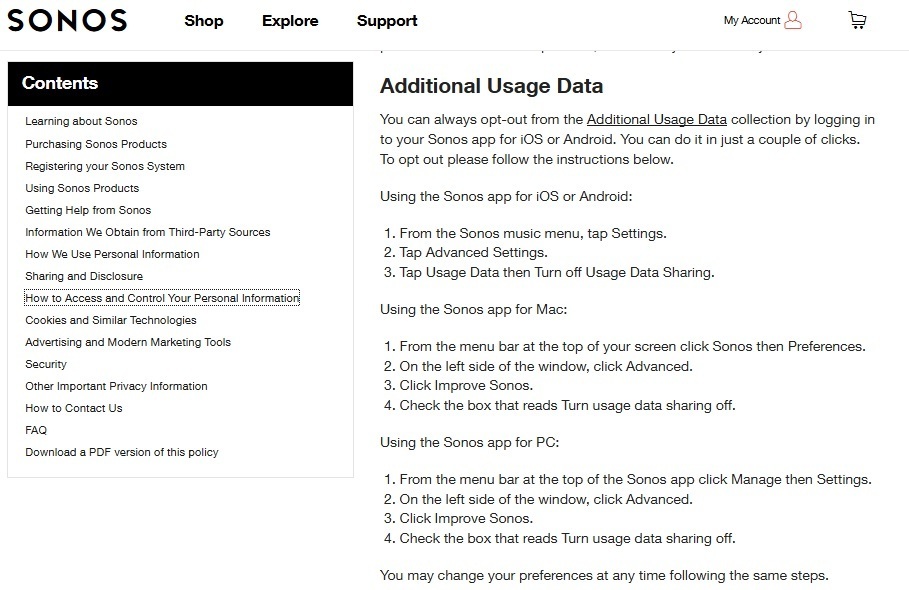
    Then turn off the collection of additional usage data in your sonos controller, instructions clearly included in the new privacy policy. This has been an option since at least 2007.


    ^Do this, then block msmetrics.ws.sonos.com. Piehole is a good tool for this. Will also allow you to easily see what new addresses Sonos inevitably adds. Your router may also have a blacklist function. This will stop the collection of the data that appears in your Sonos profile and presumably the other functional data that Sonos does not allow you to opt out of (that they've been collecting on you forever and will keep as long as they want). Works well for me but YMMV.

    19 replies

    Emile15Author
    September 4, 2017
    I would like to go back to my original question. If I understand it correctly there is no way I can update the now out of date (after 8 months) controller without accepting the new privacy policy?

    jgatie ... thanks for the ad hominem attack (posturing, paranoia ...). You sure have soured over the years on the forum. If this topic pushes the wrong buttons, why react and flame the OP? Just let it go. I started this thread with a real problem: my controller will no longer work unless I accept the new privacy statement. You have done nothing to answer that except by ridiculing my concerns for privacy. As to turning off the data collection, of course I would have done that, but as I mentioned in the other posting about privacy I could not. I asked Sonos about this and never got a decent answer. I wrote: "...your website shows how I can opt out of some data collection by going to the Advanced Settings on my iOS app and switching off Usage Data Sharing. However, the app on my iPhone does not show an Advanced Settings option, neither under the main menu nor under Settings."

    Insertusernamehere ... thanks for a constructive response that addresses an important concern I have. I found pi-hole but gather it has to run on a Raspberry where it serves as a DNS server for the whole network. From what I read it is primarily an ad-blocker. Is that right?
    Stuart_W
    World-Class Superstar
    September 4, 2017
    Sorry. But it's not a "real problem".

    You are completely free, and under no obligation whatsoever, to accept or reject the new privacy terms.
    If you make the decision that YOU cannot live with them then you need to make peace with the consequences of that decision - You will need to sell your Sonos system.
    Sonos are entitled to, and were to be expected so to do given the arrival of voice control, update their privacy policy AND require users to accept it.
    Arc + Sub (Gen 1) + 2 x Play 1/ Stereo Play 3s/ Era 100 Stereo in Kitchen, One Stereo in Bedroom, Play 1 stereo pair in Study, Play 1in Bathroom, Sonos Move 2
    Insertusernamehere
    September 4, 2017

    Insertusernamehere ... thanks for a constructive response that addresses an important concern I have. I found pi-hole but gather it has to run on a Raspberry where it serves as a DNS server for the whole network. From what I read it is primarily an ad-blocker. Is that right?


    Correct, the url is https://pi-hole.net and it is free. Blocks ads and online tracking that Google for example does.

    Pihole is just a suggestion, your router very likely has the ability to blacklist and you could add the sonos address there.

    Over time watch where your Sonos devices phone home and adjust your blocking as necessary.
    Emile15Author
    September 4, 2017
    Thanks again. I have successfully set up my Pi and rerouted the DNS server to it on my Asuswrt-Merlin powered router. I had no idea. It is amazing what flashes past! I haven't seen anything that identifies Sonos yet though.
    Insertusernamehere
    September 4, 2017
    When you open a Sonos control app it will ping the msmetrics address about every minute.
    jgatie
    September 4, 2017
    The reason your iPhone has no advanced settings is either because your version of iOS is only partially supported or your hardware and app versions are mismatched due to upgrading one and not the other.

    And I will post what I like, when I like. If you feel I have stepped outside the forum TOS, feel free to report me to the mods.
    Emile15Author
    September 4, 2017
    The reason your iPhone has no advanced settings is either because your version of iOS is only partially supported or your hardware and app versions are mismatched due to upgrading one and not the other.

    That helps. Thanks.
    Emile15Author
    September 7, 2017
    I'll answer my own question just in case someone else runs into the same problem. It was actually very easy, which may explain why it wasn't suggested by anyone else. I searched the Internet for a Desktop Controller 7.3 and installed that instead of upgrading. Presto! It works again and no need to upgrade (for the time being).

    PS. I should add that Pi-hole works like a dream.
    sdliv
    Trending Lyricist I
    July 14, 2018
    What nefarious purpose do you believe Sonos wants by requiring you to update your software. Today’s technology evolves and improves over time, software updates are simply improvements.