Contributor I
August 16, 2019
Answered

sonos app on android
  • August 16, 2019
  • 12 replies
  • 587 views


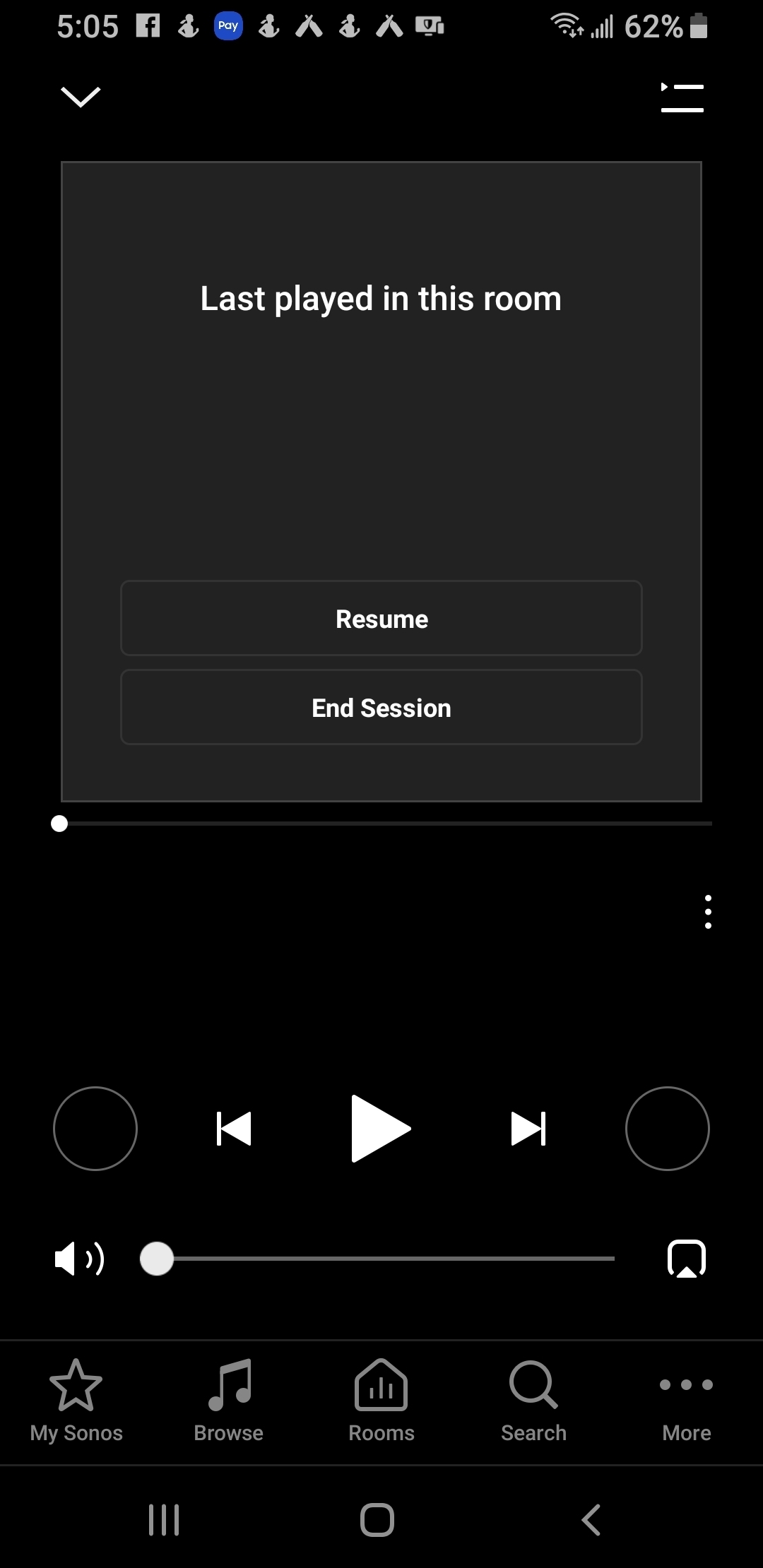
This screen is frozen and wont respond. I can only add songs or albums to my library play function stopped working 2 days ago. Nothing will play through my sonos app.

    This topic has been closed for further comments. You can use the search bar to find a similar topic, or create a new one by clicking Create Topic at the top of the page.
    Best answer by Ryan S
    @Jarobbins007, thanks for the diagnostic. The screen itself is showing that your players are looking for a direct control session, which in your case means the Spotify Connect session you have going when you use the Spotify App. However, as you noted, the End Session button isn't working, and neither is rebooting the player. So it's not a matter of the Android app not behaving, but the players themselves being stuck in this direct control mode, independent of the app.

    I have the team looking into it now, but if you want to try out a few things, make sure you've tried playing music from your music library (if you have one), and a radio station from TuneIn as well. It's possible one of these might end the session.

    Another option would be to separate out your group of speakers, and then recreate the group. This could do the trick too.

    Finally, it's not a great option, but a factory reset of your players should do the same. However, this wipes out all your settings and any Sonos playlists. We generally don't recommend going with this route. Also, your system could potentially get into this state again.

    In the mean time, the team is investigating and I'll let you know when I have an update from them.

    12 replies

    Airgetlam
    August 16, 2019
    Huh, I’ve never seen this before. I’d try two things. First, shut down the controller. I’d be tempted to reboot the device that it’s running on, but that in probably an over abundance of caution on my part. More importantly, I’d unplug my Sonos speaker(s) for a couple of minutes, then plug them back in, and see if that clears the issue.
    Bruce
    Contributor I
    August 16, 2019
    I can go to my Spotify app and choose device pick my sonos speakers and play that way. But sonos app still wont play.
    Contributor I
    August 16, 2019
    I have uninstalled and reinstalled the app restarted my phone more than once. Maybe I will unplug and replug and see what happens.
    Contributor I
    August 16, 2019
    Also the sonos app is fully functional other than that. The screen shot from the first post on that page none of the options work such as resume and end session.
    August 16, 2019
    There is some sort of communications glitch going on here. If you haven't yet followed Bruce's suggestion to reboot the speakers then you should try that. And your router too.
    Ryan S
    Retired Sonos Staff
    August 17, 2019
    If you're still having trouble, feel free to submit a diagnostic and reply back with the confirmation number. We'll check it out.
    Mark good posts by pressing the like button, and select the best answer on questions you've asked to help others find solutions.
    Contributor I
    August 17, 2019

    Ryan S
    Ryan SAnswer
    Retired Sonos Staff
    August 21, 2019
    @Jarobbins007, thanks for the diagnostic. The screen itself is showing that your players are looking for a direct control session, which in your case means the Spotify Connect session you have going when you use the Spotify App. However, as you noted, the End Session button isn't working, and neither is rebooting the player. So it's not a matter of the Android app not behaving, but the players themselves being stuck in this direct control mode, independent of the app.

    I have the team looking into it now, but if you want to try out a few things, make sure you've tried playing music from your music library (if you have one), and a radio station from TuneIn as well. It's possible one of these might end the session.

    Another option would be to separate out your group of speakers, and then recreate the group. This could do the trick too.

    Finally, it's not a great option, but a factory reset of your players should do the same. However, this wipes out all your settings and any Sonos playlists. We generally don't recommend going with this route. Also, your system could potentially get into this state again.

    In the mean time, the team is investigating and I'll let you know when I have an update from them.
    Mark good posts by pressing the like button, and select the best answer on questions you've asked to help others find solutions.
    Contributor I
    August 21, 2019
    I completely separated all the speakers in the group and recreated and it worked. Kind of a pain in the butt took 2 trys for some reason. Everything works great now thanks for the help.
    Ryan S
    Retired Sonos Staff
    August 22, 2019
    Great! Thanks for the update. Can you send in a new diagnostic now and let us know the number? I'll add it to the report for the team to look into.

    Also, if this does come up again, please let us know.
    Mark good posts by pressing the like button, and select the best answer on questions you've asked to help others find solutions.