Avid Contributor I
April 14, 2016
Answered

Severe battery drain with Sonos app in iOS

  • April 14, 2016
  • 125 replies
  • 19523 views
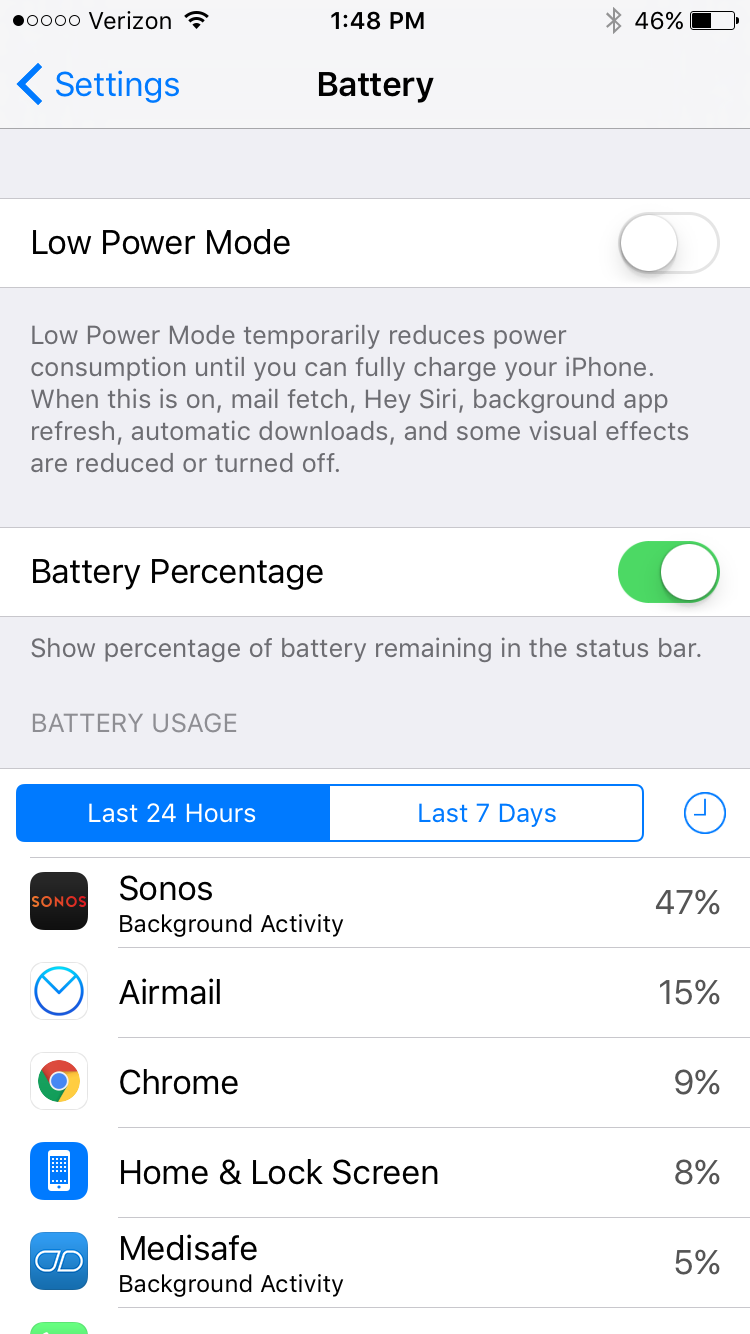
I am seeing very significant battery drain on iOS when using Sonos app. This morning I just used the app for about an hour to play music, and the battery usage report shows that Sonos has consumed 47% of the battery usage in the last 24 hours. This is a trend I've noticed a lot recently. What can I do?

This topic has been closed for further comments. You can use the search bar to find a similar topic, or create a new one by clicking Create Topic at the top of the page.
Best answer by Ryan S
Thanks for the details guys. We've been looking into iOS battery usage and so far it's all seemed pretty normal. The biggest drain on the battery that Sonos uses comes in two pieces, first off, the app is still going to try and keep alive access to your players while you're on a wireless network, which, even in background mode, will use a bit of the battery. The second piece, is that when you're using the iOS Lock Screen controls on Sonos, the app is "playing" a silent track on the phone. This is the only way to have a non-media app take control over the lock screen in iOS.

If you think your system is seeing an unusually high amount of battery usage, we're happy to take a look, and I'd encourage you to give us a call on our support line.

125 replies

Airgetlam
November 20, 2018
You've re-opened a 7 month old thread. You'd be more likely to get a quicker response if you opened a new thread....but I'd recommend that if you do, you should submit a system diagnostic within 10 minutes of replicating this issue, and either post the number here, or contact Sonos to discuss it. There may be information included in the diagnostic that will help Sonos pinpoint the issue and help you find a solution.
Bruce
Enthusiast II
November 20, 2018
Yes I have posted to an older thread, because the issue remains, and no one is responding anywhere else to this with any clear answers.

This thread seems to identify the issue and remains relevant.

What is the problem with me posting to the most relevant thread for my issue if it's a few months old?

In the sonos app it clearly says not to submit a diagnostic unless asked by staff, so I am not sure why you are encouraging me to do that unless you are staff?

I don't know perhaps you are.

But I didn't think posting on a forum topic because it was a few months old was an issue, especially when it directly addresses an issue I have, that is a new issue, and probably doesn't require a new thread, especially as new threads get buried in seconds. It seemed a better option to post to the thread with the most posts and activity than to start another.


You've re-opened a 7 month old thread. You'd be more likely to get a quicker response if you opened a new thread....but I'd recommend that if you do, you should submit a system diagnostic within 10 minutes of replicating this issue, and either post the number here, or contact Sonos to discuss it. There may be information included in the diagnostic that will help Sonos pinpoint the issue and help you find a solution.
Airgetlam
November 21, 2018
I'm sorry if I pushed a sensitive button for you, that was not intentional. As I indicated, you're more likely to get a response from Sonos if you open up a new thread, rather than posting in an older one. But I didn't suggest it was an issue. I just recommended a potential quicker avenue for you.

No, since there isn't a "Sonos Staff" next to my name in the post header, I'm not Sonos staff, just someone who was hoping to get you some assistance so that you could resolve your issue. However, at this point, you don't seem to want further assistance from anyone other than Sonos, so I'll wish you the best of luck.
Bruce
Enthusiast II
November 22, 2018
How is saying I’m wrong to post to the most relevant thread I could find helpful? And how is encouraging me to submit a diagnostic when the app clearly says only to do that if asked by Sonos staff helpful?

I appreciate the effort but for people who find their way to this site via a search engine query on their issue your response is just clutter. Can you help? Can you answer the question? Do you have the same issue? If not then while I appreciate your passion, it’s just noise.

Yes, I would 100% rather a Sonos staff member provided advice but they just don’t seem present, especially not in low traffic threads.

So your presence and commitment to the brand and the product is excellent and I admire that. But I’ve not yet seen a Sonos rep say “ah yes thanks for submitting your diagnostic let me solve that publicly where it can be indexed by search engines so others can self serve their issue”
jgatie
November 22, 2018
If you are looking for Sonos staff, you came to wrong place. This is primarily a users supporting users forum. Sonos staff sometimes replies, mostly when a user is told to post a diagnostic reference number. Sonos staff is then alerted to the diagnostic and gets back to you.

Ironic, isn't it?