
Stanley_4
Grand Maestro
January 25, 2020

One way to identify a traded Sonos device

  • January 25, 2020
  • 2 replies
  • 1058 views

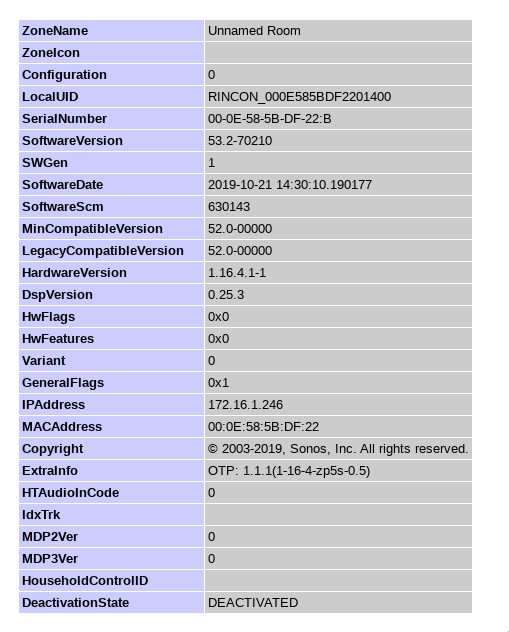
Looking at identifying a traded and deactivated Sonos device I found this screen you can check, just replace the x.x.x.x with your IP address. Make sure to keep the http and the :1400 bits.

Click the room name and then Zone Player Info to get this screen.

You can see the status at the bottom, NONE means it hasn’t been traded.

http://x.x.x.x:1400/support/review

Traded and timer expired, deactivated.
Still active and not traded unit:



    This topic has been closed for further comments. You can use the search bar to find a similar topic, or create a new one by clicking Create Topic at the top of the page.

    2 replies

    Virtuoso
    January 25, 2020

    Very risky buying a legacy device now, I suppose this is the first check you could do but at that point you'd have already bought it?.

    I bet there will be plenty the get "recycled" the same day they get posted to the new owner..

    Stanley_4
    Stanley_4Author
    Grand Maestro
    January 25, 2020

    Good point on a late trade by an old owner.

    If you follow the usual guidance to factory reset a used device at the initial power-on and then to add it to your system reasonably quickly the odds of an issue after you’ve gotten it will be minimal.