Contributor II
May 6, 2021
Answered

iTunes Playlist Not Imported

  • May 6, 2021
  • 3 replies
  • 223 views

HI - I am having a problem seeing my “imported playlists” after doing some iTunes maintenance this week. Here’s what I’ve done. 

  1. Created a new share on my Synology NAS. This is \\192.168.1.2\AppleMusic
  2. On a new PC build, I installed iTunes, mapped a network drive the above share as M:\ and told iTunes that’s where my library is. 
  3. On the new iTunes install, I downloaded all my files (~9300) via iTunes match. They are now in the share.
  4. Told Sonos that that the file share is a music library folder
  5. Re-indexed the library in the controller
  6. “Consolidated” the iTunes library a few times. 

All songs, albums, and artists are available in the Sonos App. Playlists are not. The playlists are visible in iTunes and work fine. 

I have tried copying iTunes Library.itl into the share and re-indexing but it didn’t work. 

I know I’m missing something simple. LMK if you guys have any thoughts! 

Thanks

Dave

This topic has been closed for further comments. You can use the search bar to find a similar topic, or create a new one by clicking Create Topic at the top of the page.
Best answer by James L.

Hi @dcpugh,


Try copying over the iTunes Music Library.xml file to your shared drive and re-index after that. The XML is where the playlist information is stored :slight_smile:


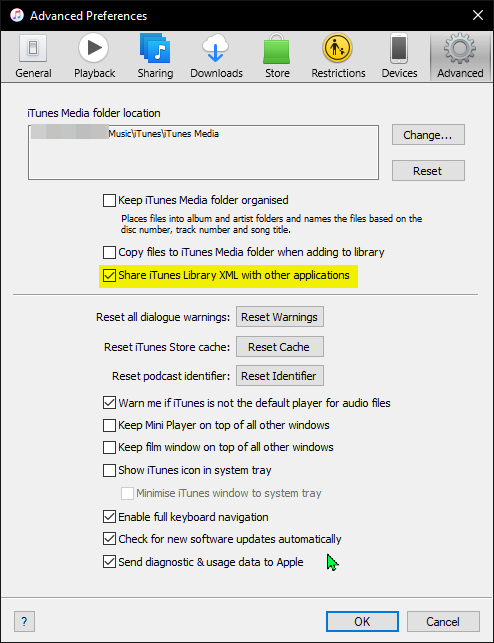
Edit: If you don’t see the xml file, make sure this option is checked in iTunes


3 replies

James L.
James L.Answer
Retired Community Staff
May 6, 2021

Hi @dcpugh,


Try copying over the iTunes Music Library.xml file to your shared drive and re-index after that. The XML is where the playlist information is stored :slight_smile:


Edit: If you don’t see the xml file, make sure this option is checked in iTunes


Mark good posts by pressing the like button, and select the best answer on questions you've asked to help others find solutions.
dcpughAuthor
Contributor II
May 6, 2021

Thanks. I’ll try that … Will this automatically place the relevant playlist files in the Synology share or will have I have to copy it? If it’s a copy, then I have to do this every time I make a new playlist which is not ideal. 

I’m really wondering why iTunes is using my C:\Users\user_name\Music\iTunes folder for anything when I told it my library was M:\

I’ll report back after I check the box and reindex. 

D

dcpughAuthor
Contributor II
May 6, 2021

Manual copy works great. I’ll see if I can find a way to have iTunes do this for me or I’ll write a script to do it. Thanks for the tip on the XML file and the checkbox!


Dave