
Contributor I
October 10, 2022
Answered

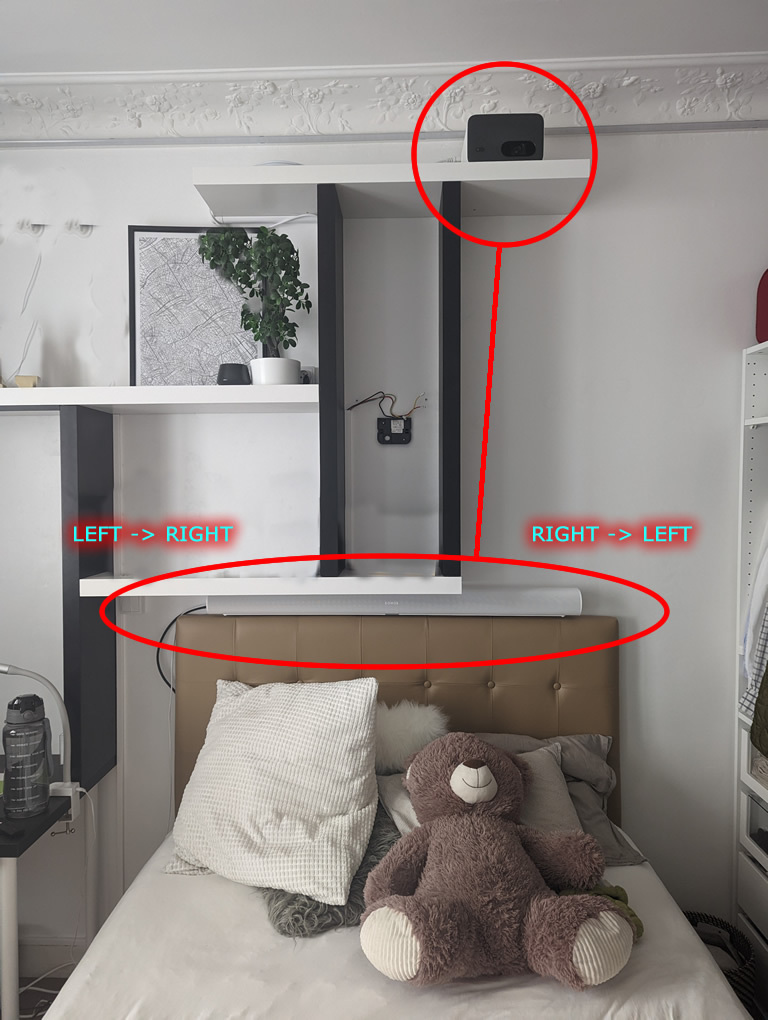
I have the soundbar in the room, not at the front but at the back.

  • October 10, 2022
  • 27 replies
  • 4002 views

Hello from France,

When you put the soundbar at the front, all works well.

When you put the soundbar at the back, the L/R audio are inverted.

Is there any feature to revert the audio channel for a entire room ?

If not, how to ask for a new feature ? This could be useful.

Best regards,


This topic has been closed for further comments. You can use the search bar to find a similar topic, or create a new one by clicking Create Topic at the top of the page.
Best answer by Corry P

Hi @Julien75013 

Welcome to the Sonos Community!

Thank you - I've marked this thread as a feature request and it will be seen by the relevant teams for consideration. Keep the ideas coming!

27 replies

October 10, 2022

Hi.  The fact that the sound is L/R inverted is not the real problem.  The real problem is that the sound that should be at the front is at the rear.  The people speak in front of you and the dialogue comes from behind you.  You just don’t put the soundbar at the back.

Contributor I
October 10, 2022

Sure it is not the best experience. However, I have no other choice.

I have no problem with the source of the sound, just the L/R inversion.

Is there a real solution for people with the same constraints / projector ?

October 10, 2022

Sorry but this is not a compromise, it is just wrong.  Of course you are entitled to set up however you wish but I cannot see Sonos investing effort into resolving the subsidiary issue.  

Y9u say you have no other choice.  What sources are you playing and how does the sound currently get to the soundbar?

melvimbe
October 10, 2022

It looks like you also have the height channels blocked on one side.  If I were in the same situation, and placing speakers in the front of the room was not an option, than I would not use an expensive soundbar like the Arc.  Use a cheaper soundbar, possible one that allow you to switch or takes analog RCA inputs so that you just switch the left and right channels via the wiring.  The only thing you can do with the Arc is flip it over.

Danny
Contributor I
October 10, 2022

The Android TV team of developpers took into consideration that the internal speakers should be reversed when the projectors are able to detect a 180° flip. So this exists for the Android TV system, however it is not a manual button (since I would prefer not to change, because I need a double inversion, so not an inversion at all).

I found on internet many and many people what were looking for this feature. Any moderator could transfer my request of feature if none exists ?


Sorry but this is not a compromise, it is just wrong.  Of course you are entitled to set up however you wish but I cannot see Sonos investing effort into resolving the subsidiary issue.  

Y9u say you have no other choice.  What sources are you playing and how does the sound currently get to the soundbar?

The room is too small, i cannot put anything in the front. This not requires big efforts into developpement, only some lines of code (I am developper but I cannot modify the Sonos Firmware). For purists, this may be hard to ear the needs of the rest of the world. I only need this feature for TV (projector), i’m just using HDMI, nothing exotic. This has no importance with music.


It looks like you also have the height channels blocked on one side.  If I were in the same situation, and placing speakers in the front of the room was not an option, than I would not use an expensive soundbar like the Arc.  Use a cheaper soundbar, possible one that allow you to switch or takes analog RCA inputs so that you just switch the left and right channels via the wiring.  The only thing you can do with the Arc is flip it over.

The height channels have 2cm on the top, but this is not my issue. The music sound is good, because there is no importance with left and right. I only have trouble with TV (projector). Thank you for your advice regarding a cheaper soundbar (but it don’t matter here). I thought about fliping the Arc it over… maybe Sonos could do better to match with people needs.

melvimbe
October 10, 2022

The Android TV team of developpers took into consideration that the internal speakers should be reversed when the projectors are able to detect a 180° flip. So this exists for the Android TV system, however it is not a manual button (since I would prefer not to change, because I need a double inversion, so not an inversion at all).

I found on internet many and many people what were looking for this feature. Any moderator could transfer my request of feature if none exists ?


It’s very common for projectors to be mounted upside down on the ceiling, so it’s not surpirsing for the 180 flip to be required.  It makes zero sense to use a soundbar, particularly one with height channel atmos speakers to the rear of the room.  I don’t see it as a simple code option either since you aren’t talking just about left and right channels, but the height and side firing speakers as well. Then there is trueplay  tuning.


It looks like you also have the height channels blocked on one side.  If I were in the same situation, and placing speakers in the front of the room was not an option, than I would not use an expensive soundbar like the Arc.  Use a cheaper soundbar, possible one that allow you to switch or takes analog RCA inputs so that you just switch the left and right channels via the wiring.  The only thing you can do with the Arc is flip it over.

The height channels have 2cm on the top, but this is not my issue. The music sound is good, because there is no importance with left and right. I only have trouble with TV (projector). Thank you for your advice regarding a cheaper soundbar (but it don’t matter here). I thought about fliping the Arc it over… maybe Sonos could do better to match with people needs.


2 cm  is well below with recommended clearance.  You likely aren’t using the height channels at all, so maybe that’s why you don’t see it as an issue.  You seriously are wasting the Arc by using it this way.  You would be better off selling it and getting a soundbar or sound system that fits your needs better, which would definitely be cheaper.  If you insist though, and your projector has RCA outputs, get a RCA to optical converter, then use Sonos optical to HDMI-ARC dongle to feed the Arc.  You can flip the left and right channels in the wiring.  You may introduce a bit more delay with this method though.

Danny
buzz
Grand Maestro
October 10, 2022

in your image I see what looks like a SONOS FIVE. If this FIVE is part of a pair or surrounds, you may want to invert L/R for the pair. At least this L/R will then agree with ARC.

melvimbe
October 10, 2022

in your image I see what looks like a SONOS FIVE. If this FIVE is part of a pair or surrounds, you may want to invert L/R for the pair. At least this L/R will then agree with ARC.


I believe the device on the top shelf is the projector. I thought it was a Five at first too.

Danny
Contributor I
October 10, 2022

It’s very common for projectors to be mounted upside down on the ceiling, so it’s not surpirsing for the 180 flip to be required.  It makes zero sense to use a soundbar, particularly one with height channel atmos speakers to the rear of the room.  I don’t see it as a simple code option either since you aren’t talking just about left and right channels, but the height and side firing speakers as well. Then there is trueplay  tuning.


The inverstion is pretty simple. It’s like counting from 9 to 0 rather than counting from 0 to 9. In the code, you must have pointers (one per speaker) that takes the opposite pointers… So more or less 10 lines of code to apply the left / right reverse. I am not asking for spacial effects, only for a basic inversion, not more.

I'm not a purist and I am not here to djudge about Atmos or whatever. For music, this is perfect. But this could be improved for videoprojectors with rear installations.

Thank you for your both solutions (that are trickies but ok) :
- Using 2 adaptors
- 180° flip of the Arc

Like previously said, the developers of AndroidTV have implemented an automatic solution for position. This could be setted if we had an option (a simple button) to invert the Left and Right channels, not an automatic way.

I am here to explain the need for the Sonos team. Not to defend the soundbar position. If Sonos want to ear the need, a lot of people would be happy. Otherwise, I am going to request the feature on Android TV that only users for this system could use.


ratty
October 10, 2022

Turn the Arc upside down. You’ll benefit from the height channels firing into your ears. 

Come to think of it, why not use headphones instead and dispense with the Arc?