Contributor I
April 18, 2016
Question

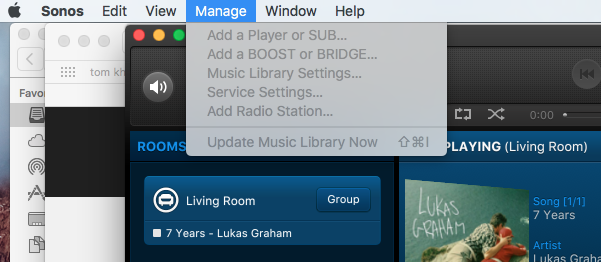
I can't select anything from the Manage tab drop down menu on my Mac desktop controller

  • April 18, 2016
  • 13 replies
  • 1148 views
I can't select anything from the Manage tab drop down menu on my Mac desktop controller ?
    This topic has been closed for further comments. You can use the search bar to find a similar topic, or create a new one by clicking Create Topic at the top of the page.

    13 replies

    Chris
    Lead Maestro
    April 18, 2016
    This means you are not on the most recent software update for the MAC.

    Goto Sonos.com / support at top and download the latest controller.
    Respect the Queue (2)Move (3)Beam (1) Era100 (2)ARC (1)SonosOne (1)Playbar (4)Play5 (4)Play1 (3)Play3 (1)Port (2)Connect (1) Roam (2) Ace (1)Connect:Amp (4)Sonos Amp (1)Sub + (9) Echo + Smartthings; (2)Play)
    Billy1664Author
    Contributor I
    April 18, 2016
    Hi Chris thanks for the reply I'm running the latest version 6.2.2 this is what happened after I did a update?
    Chris
    Lead Maestro
    April 18, 2016
    Then your Sonos units aren't updated. Is there an update now icon at top music selection panel?
    Respect the Queue (2)Move (3)Beam (1) Era100 (2)ARC (1)SonosOne (1)Playbar (4)Play5 (4)Play1 (3)Play3 (1)Port (2)Connect (1) Roam (2) Ace (1)Connect:Amp (4)Sonos Amp (1)Sub + (9) Echo + Smartthings; (2)Play)
    Billy1664Author
    Contributor I
    April 19, 2016
    Hi Chris there is no update now icon at top music selection Panel
    Chris
    Lead Maestro
    April 19, 2016
    Under help. Ably my Sonos what controller version does it say and what version do the players say. There is a mismatch.
    Respect the Queue (2)Move (3)Beam (1) Era100 (2)ARC (1)SonosOne (1)Playbar (4)Play5 (4)Play1 (3)Play3 (1)Port (2)Connect (1) Roam (2) Ace (1)Connect:Amp (4)Sonos Amp (1)Sub + (9) Echo + Smartthings; (2)Play)
    Lyricist I
    December 27, 2016
    I have exact issue and have uninstalled and reinstalled the latest version. cannot manage any setting on my mac
    Lyricist II
    December 27, 2016
    Same issue here, help!!
    Lyricist II
    December 27, 2016
    using version 7
    Lyricist II
    December 27, 2016
    I have had this issue for some time and have just updated the Sonos SW but no change. My music library is not working and i need to resync or delete and add again but obviously can't without access to the menu bar. Please fix this asap
    ratty
    December 27, 2016
    I have had this issue for some time and have just updated the Sonos SW but no change. My music library is not working and i need to resync or delete and add again but obviously can't without access to the menu bar. Please fix this asap
    If your Sonos software is up to date then you must be using an older macOS -- 10.7 or 10.8. These are now only partially supported. There's no fix, apart from an operating system upgrade.

    Alternatively, use a different controller.
