
Contributor I
January 29, 2018
Answered

How to disable Chrome Sonos notifications on Mac

  • January 29, 2018
  • 3 replies
  • 545 views
I have gone into my Notification preferences panel and disabled Sonos per Auni's post here:

https://en.community.sonos.com/controllers-software-228995/alerts-from-sonos-are-irritating-6757175

However, I am still getting Sonos notifications, which are coming through Chrome (?!).
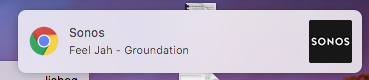


I checked my Chrome Extensions, and I don't have any kind of "Sonos" chrome extension, so I'm a little puzzled why this is coming from Chrome, and how to stop it?
This topic has been closed for further comments. You can use the search bar to find a similar topic, or create a new one by clicking Create Topic at the top of the page.
Best answer by jishaq
Ah! I think I fixed it.

I am using the Chrome MightyText extension, which is a system for syncing SMS messages from my Android phone to my desktop computer, so that I can reply and send SMS from my desktop, over my phone. But apparently I also have MightyText configured to sync all notifications from my Android phone. Every time a new song begins on Sonos, the Sonos Android app, by virtue of updating its playback controller in my Android Notification pulldown, is causing the Chrome MightyText extension to transmit Sonos notifications to my desktop under the guise of a Chrome notification. PHew. But anyway I can sort this out with my MightyText extension, I believe, so please consider this problem solved.

3 replies

Keith N
Sonos Staff
January 30, 2018
Hello there, jishaq. Thanks for posting about this. Certainly odd. What plug-ins or extensions do you have running in Chrome? Some extensions will create notifications for any audio being played/controlled from your computer.

Thanks!
Building community is like building a garden. You build the frame, till the ground, plant the seeds, feed the plants & sometimes you gotta pull the weeds.
jishaqAuthorAnswer
Contributor I
February 9, 2018
Ah! I think I fixed it.

I am using the Chrome MightyText extension, which is a system for syncing SMS messages from my Android phone to my desktop computer, so that I can reply and send SMS from my desktop, over my phone. But apparently I also have MightyText configured to sync all notifications from my Android phone. Every time a new song begins on Sonos, the Sonos Android app, by virtue of updating its playback controller in my Android Notification pulldown, is causing the Chrome MightyText extension to transmit Sonos notifications to my desktop under the guise of a Chrome notification. PHew. But anyway I can sort this out with my MightyText extension, I believe, so please consider this problem solved.
Airgetlam
February 10, 2018
Thanks for the info. I'm with you, I find those extra notifications annoying...my ears can tell me what song is playing 🙂
Bruce