
Roel Janssens
Trending Lyricist I
Jun 15, 2021 9:42 AM UTC
Answered

Error 1402 while installing Sonos Controller on Windows 10 21H1

My laptop was running WIndows 10 20H2 and the Sonos app was running fine. A week ago my laptop upgraded to Windows 10 21H1 and since then the Sonos app doesn’t work anymore. When starting it gives a few popups about updating itself but that fails. I deinstalled the app and tried from scratch but it doesn’t want to install anymore.

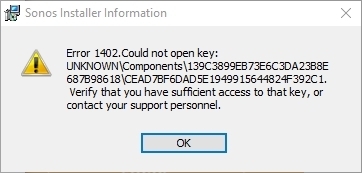
This is the error I get when I try to install:
 

This topic has been closed for further comments. You can use the search bar to find a similar topic, or create a new one by clicking Create Topic at the top of the page.
Roel Janssens
Trending Lyricist I
Jun 15, 2021 11:39 AM UTC

I downloaded the file SonosDesktopController1312.exe from the Sonos website to my Downloads folder. I start it from there and choose Run As Administrator. 

I fixed it by searching the registry for CEAD7BF6DAD5E1949915644824F392C1 (that’s the last part of my screenshot above). While searching I deleted all keys/values with that name and some of them gave a permission error. I gave Administrators full control over that key and afterwards I could delete them. 

Somehow the Windows 10 21H1 upgrade has corrupted registry persmissions, I have seen the same behaviour for Adobe software.

6 replies

Ken_Griffiths
Jun 15, 2021 9:48 AM UTC

I would perhaps first try uninstalling the controller App software and then reinstall it again from the below link and on launch, choose the option to connect back to your ‘existing system’ and accept any firewall settings etc. See if that solves the issue.

https://support.sonos.com/s/downloads

Translate
Roel Janssens
Trending Lyricist I
Jun 15, 2021 10:19 AM UTC

Thanks, but that’s what I already tried.

Translate
Ken_Griffiths
Jun 15, 2021 10:34 AM UTC

Did you install/run the ‘executable’ from the desktop location? It looks to me like the location where the installer is running does not have read/write (admistrative) permissions, perhaps place the installer in a folder in the root of your ‘C’ drive and choose the option to run it as an ‘administrator’, or by using the local administrators account on the local PC and see if that sorts it.

Translate
Roel Janssens
Roel JanssensAuthorAnswer
Trending Lyricist I
Jun 15, 2021 11:39 AM UTC

I downloaded the file SonosDesktopController1312.exe from the Sonos website to my Downloads folder. I start it from there and choose Run As Administrator. 

I fixed it by searching the registry for CEAD7BF6DAD5E1949915644824F392C1 (that’s the last part of my screenshot above). While searching I deleted all keys/values with that name and some of them gave a permission error. I gave Administrators full control over that key and afterwards I could delete them. 

Somehow the Windows 10 21H1 upgrade has corrupted registry persmissions, I have seen the same behaviour for Adobe software.

Translate
Roel Janssens
Trending Lyricist I
Aug 4, 2021 1:42 PM UTC

I still have issues with the latest controller on Windows 21H1

Even if I do a complete uninstall, search the registry for Sonos (name & guid), delete everything, delete Sonos folder in Program Files and reboot. After reinstalling it keeps popping up that WIndows Installer needs to repair things. Event Viewer is full of these messsages:

MsiInstaller

EventID 1001

Detection of product '{6FB7DAEC-5DAD-491E-9951-4684423F291C}', feature 'SONOS_Controller_for_Windows_Files' failed during request for component '{A2BBC6CC-DD5B-45A1-BC1C-7D2646B4E8FA}'

What is wrong with this installer?

Translate
Ken_Griffiths
Aug 4, 2021 1:53 PM UTC

I still have issues with the latest controller on Windows 21H1

Even if I do a complete uninstall, search the registry for Sonos (name & guid), delete everything, delete Sonos folder in Program Files and reboot. After reinstalling it keeps popping up that WIndows Installer needs to repair things. Event Viewer is full of these messsages:

MsiInstaller

EventID 1001

Detection of product '{6FB7DAEC-5DAD-491E-9951-4684423F291C}', feature 'SONOS_Controller_for_Windows_Files' failed during request for component '{A2BBC6CC-DD5B-45A1-BC1C-7D2646B4E8FA}'

What is wrong with this installer?

Does it work for you if your current Windows account is given administrative privileges, or maybe if you logon to the machine as Administrator?

Translate