Avid Contributor I
March 28, 2022
Answered

Desktop S2 app shows no players

  • March 28, 2022
  • 9 replies
  • 275 views

This morning I noticed the desktop app on my PC is empty:
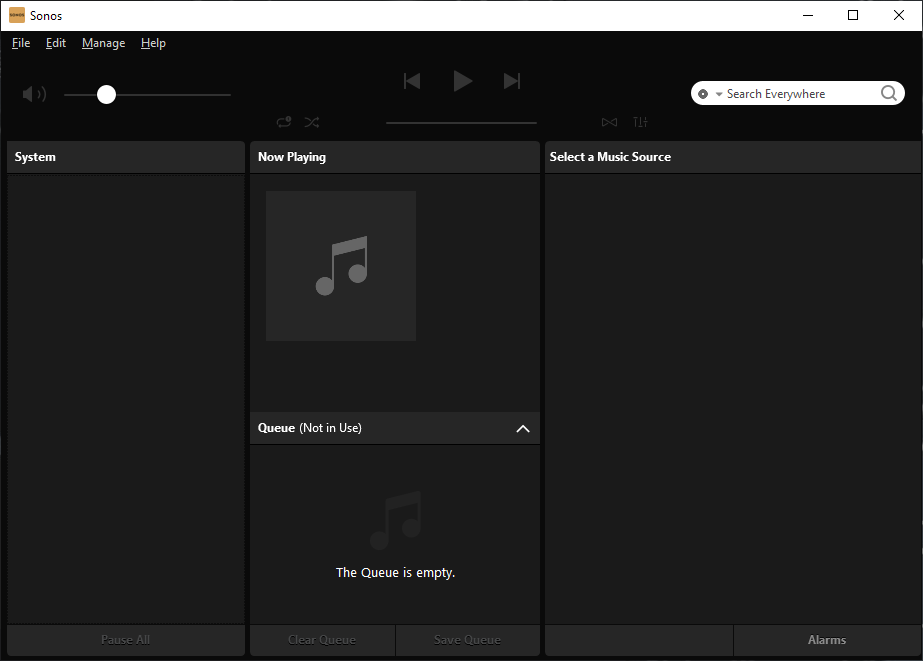


On my iPhone its fine, but for some reason today the desktop app is empty. The PC has just been rebooted and the problem remains.

This topic has been closed for further comments. You can use the search bar to find a similar topic, or create a new one by clicking Create Topic at the top of the page.
Best answer by controlav

Showing no players is weird, because if it cant find any players on startup it will refuse to run. So in this case it started up, must have found some players, then at some point those players dropped off the network. Which is pretty hard to do unless the PC switched to a network frequency that the router screwed up (or it jumped subnets), and that is definitely possible when using a WiFi extender, as the OP is. Sonos do not support WiFi extenders. Recommend switching to a (properly configured) mesh system.

https://support.sonos.com/s/article/126?language=en_US

9 replies

Lead Maestro
March 28, 2022

Try rebooting your router and making sure your PC is connected to the same network as your Sonos system.

"Receive with simplicity everything that happens to you." - Rashi
controlav
Lead Maestro
March 29, 2022

Is your PC using WiFi? If so ensure your WiFi network is marked as Private. A Wifi network marked as Public network will not work.

If all else fails, try my PC app (see profile).

Author of the leading independent Sonos apps for Android, MacOS, iOS, Windows and Xbox.
KorporalAuthor
Avid Contributor I
March 29, 2022

I’m frankly sick of this entire SONOS run around. Stability is a thing of the past.

The PC is direct wired to a WIFI extender, the extender is connected over WIFI to a central modem.

This has been running fine for ages, today for some reason I look at my desktop app (which runs all the time and I rarely reboot the PC) and the app is just empty, no devices listed whatsoever.

Man, nothing works any more, everything is just fiddle/hack/reboot/tweak 24/7.


UKMedia
March 29, 2022

Please see my post : https://en.community.sonos.com/troubleshooting-228999/tips-tricks-resolving-random-issues-impacting-sonos-devices-6845346

Remember: Sometimes Red Wine helps :)
controlav
controlavAnswer
Lead Maestro
March 29, 2022

Showing no players is weird, because if it cant find any players on startup it will refuse to run. So in this case it started up, must have found some players, then at some point those players dropped off the network. Which is pretty hard to do unless the PC switched to a network frequency that the router screwed up (or it jumped subnets), and that is definitely possible when using a WiFi extender, as the OP is. Sonos do not support WiFi extenders. Recommend switching to a (properly configured) mesh system.

https://support.sonos.com/s/article/126?language=en_US

Author of the leading independent Sonos apps for Android, MacOS, iOS, Windows and Xbox.
KorporalAuthor
Avid Contributor I
March 29, 2022

I heard the claim about WiFi extenders and it is just confusing as hell.

The base station modem and the extender, each use the same SSID, so devices will establish connections with whichever of the two signals (they are on different RF channels) is strongest.

This is how it was all setup a few months ago and I was valuably assisted by several people, see this thread as it explains the setup in more detail.


KorporalAuthor
Avid Contributor I
March 29, 2022

OK This is half resolved. I had a ROAM linked to two players (this was done a day or two ago) and I recall that ROAM can’t be linked like that for some reason (it lets you but sometimes warns you).

So I unlinked the ROAM (using iPhone) and the desktop app woke up, in the app I now see the ROAM and nothing else!


KorporalAuthor
Avid Contributor I
April 5, 2022

A few days ago devices reappared in the desktop controller but none of them can connect to external music source. The Roam can be played but none of the players from the desktop or the phone app - great system guys!


106rallye
April 5, 2022

You seem to be using an unsupported set up. Why not try to sove this by cable connecting one of your players (not a surround or sub) to your router?