
Contributor I
August 14, 2022

Changing Input Names on Sonos App when using multiple Sonos products
  • August 14, 2022
  • 8 replies
  • 514 views

Hello,

First of all I apologize if this question has been asked before. I tried to search for the solution but was unable to find the answer.

I have two Sonos systems at home:

  1. In the Pantry: Beam Gen 2 + Sub Gen 3, connected to a Toshiba TV in the Pantry
  2. In the Living Room: Arc + Sub Gen 3, also connected to a Sony TV in Living Room

Things are working fine for both systems. I also have no problem playing same source in both systems.

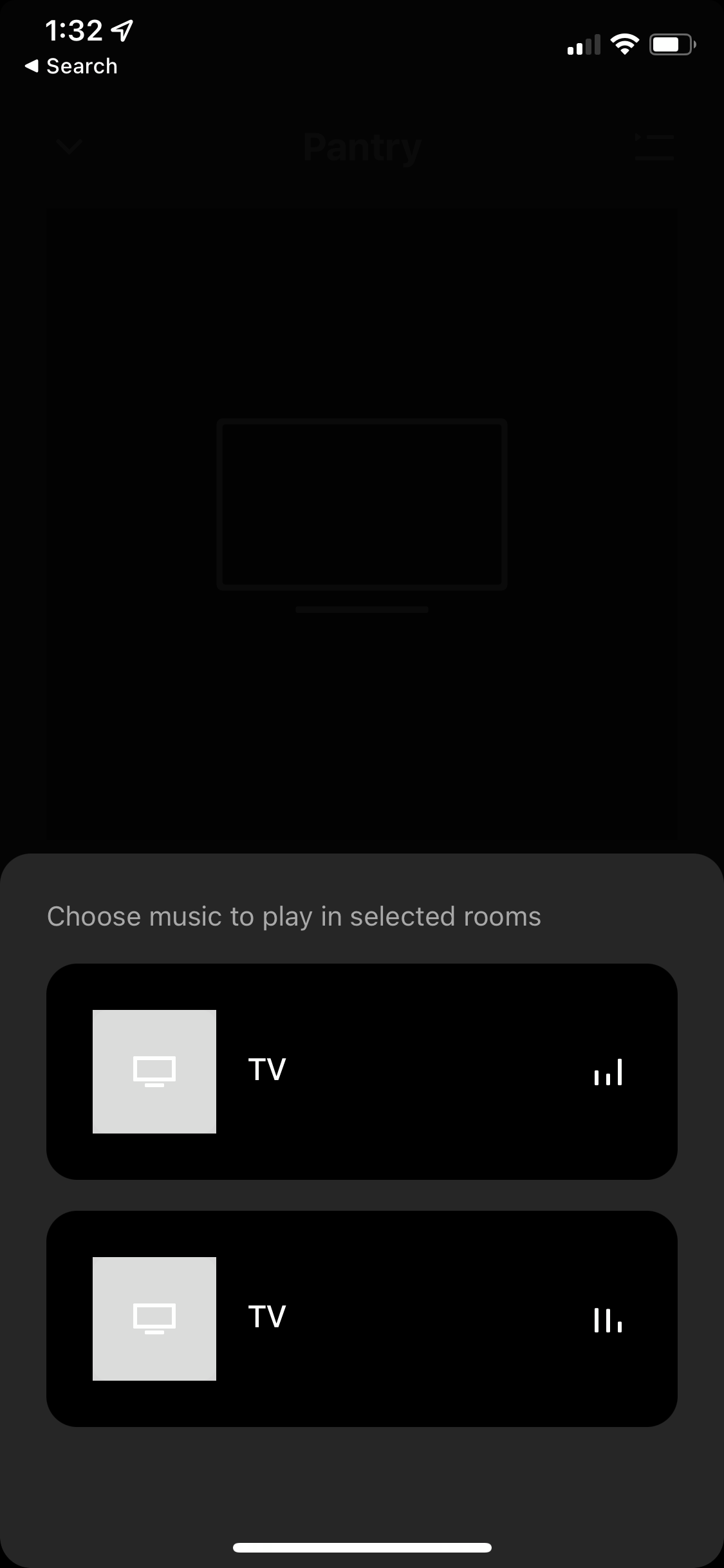
The issue is when I have to select which TV to play/disconnect from any of the system. Since both are connected to a TV, the Sonos App shows the same “TV” as the input names. I keep selecting the wrong TV as the source I want to keep playing because I have no clue which to select.

Screenshot of what I’m trying to explain is attached.

It would be perfect if I can rename the “TV” to “ TV-Pantry” and “TV-Living Room”.

Is that possible?

Thanks,

Danny

    This topic has been closed for further comments. You can use the search bar to find a similar topic, or create a new one by clicking Create Topic at the top of the page.

    8 replies

    Prodigy III
    August 14, 2022

    I think it is the same on S2 as S1.

    Settings > system > select one of the rooms > select the room name > change it to a more meaningful name. Note just over type the current name to one of your choice. You don't have to use the predefined names

    Ken_Griffiths
    August 14, 2022

    I haven’t gone onto test this fully, but IIRC, whichever TV you are starting grouping from (ie. Pantry or Living Room) is what as known as the ‘Group Co-ordinator’, anyhow I seem to think that appears as the top TV, so if you start from Pantry then that is the top TV in the two you see listed on screen, but I completely agree, it would help to see the ‘room’ name on that screen rather than just ‘TV’.

    Ken_Griffiths
    August 14, 2022

    I think it is the same on S2 as S1.

    Settings > system > select one of the rooms > select the room name > change it to a more meaningful name. Note just over type the current name to one of your choice. You don't have to use the predefined names

    I think the OP may have different names already for their HT products - this is my setup and as you can see the rooms are named in the App:


    But if I want to group the playing rooms I see this screen…


    Which allows the user to select which audio to play on the Group and it’s not very clear which room is which🤔?

    However it appears that the top TV is the ‘group co-ordinator’ and the HT Room from which the grouping is started by the user.

    I think that’s what the OP might be referring to here.. er.. perhaps?

    Either way, it would be quite helpful if that particular screen in the App showed the device ‘room’ name.

    Dank861Author
    Contributor I
    August 14, 2022

    I think it is the same on S2 as S1.

    Settings > system > select one of the rooms > select the room name > change it to a more meaningful name. Note just over type the current name to one of your choice. You don't have to use the predefined names

    I think the OP may have different names already for their HT products - this is my setup and as you can see the rooms are named in the App:


    But if I want to group the playing rooms I see this screen…


    Which allows the user to select which audio to play on the Group and it’s not very clear which room is which🤔?

    However it appears that the top TV is the ‘group co-ordinator’ and the HT Room from which the grouping is started by the user.

    I think that’s what the OP might be referring to here.. er.. perhaps?

    Either way, it would be quite helpful if that particular screen in the App showed the device ‘room’ name.


    Hello,

    Yes that’s precisely what I meant. Once grouped, it really doesn’t help that only “TV” is shown as the input names.

    It seems correct that the top one is the “starter”. Problem is if someone else is trying to change it and he/she does not know which TV is the “starter”, he/she might disconnect the wrong input/source.

    Sonos, please fix this 🙁

    Thanks

    controlav
    Lead Maestro
    August 14, 2022

    Some third-party Sonos apps do not have this problem. Just sayin’.

    Den also has  TV device in it


    Author of the leading independent Sonos apps for Android, MacOS, iOS, Windows and Xbox.
    Corry P
    Sonos Staff
    August 18, 2022

    Hi @Dank861 

    Welcome to the Sonos Community!

    Thank you - I've marked this thread as a feature request and it will be seen by the relevant teams for consideration.

    "Common sense is the collection of prejudices acquired by age eighteen." - Albert Einstein
    Contributor I
    December 23, 2023

    Hello,


    I have this same issue.  Was it ever addressed?


    Thanks!

    Stephen

    Stanley_4
    Grand Maestro
    December 25, 2023

    Sonos never tells us more than “we are looking into it” so maybe.