This topic has been closed for further comments. You can use the search bar to find a similar topic, or create a new one by clicking Create Topic at the top of the page.
I had this issue with Sonos Album art, but also with my Sony Walkman player which was even pickier.
My solution was to use Mp3tag application to tidy up all my music. I imbedded the album art onto each track of the album and problem solved. Took a while to do my full collection but well worth it, I also used AlbumArtExchange website to update with decent resolution album art files.
I had this issue with Sonos Album art, but also with my Sony Walkman player which was even pickier.
My solution was to use Mp3tag application to tidy up all my music. I imbedded the album art onto each track of the album and problem solved. Took a while to do my full collection but well worth it, I also used AlbumArtExchange website to update with decent resolution album art files.
Thanks for this. I'll play around with mp3 tag.
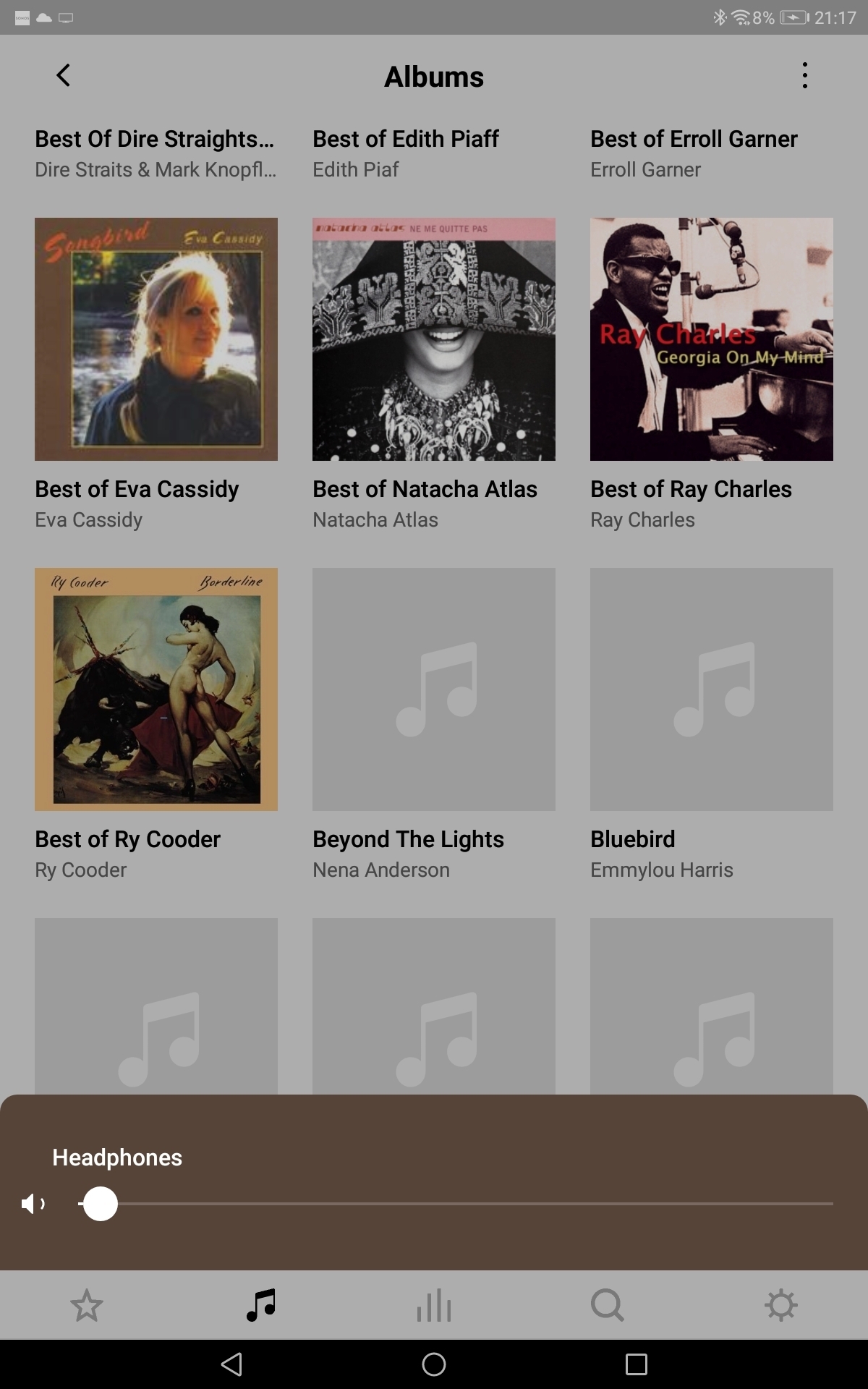
What puzzles me is that each attempt to view the library can result in different outcomes. For example, run 1 displays with the art missing for the third album. Run 2 has third album art displayed but missing for other albums.
There's no consistency or obvious pattern.
It's the courageous bee's knees - all 6 🐝🐝🐝🐝🐝🐝. - - - - - Make Sonos Great Again - - - - -
This was my issue. All albums had folder art but some would always fail, not just on my Sonos. The embedding, making sure the same art was imbedded for each track of the album, sorted all the issues. Sometimes the artwork is slow to appear though, that’s pretty rare and random now though.
Artwork delivery times will vary, depending on current network traffic and interference. I can also speculate that if the controller associates with an older SONOS player, delivery might be slower. Plus, the path through the SonosNet mesh could vary depending on the current network topology traversed by the associated player.
Artwork delivery times will vary, depending on current network traffic and interference. I can also speculate that if the controller associates with an older SONOS player, delivery might be slower. Plus, the path through the SonosNet mesh could vary depending on the current network topology traversed by the associated player.
Same missing artwork on Roam.
It's the courageous bee's knees - all 6 🐝🐝🐝🐝🐝🐝. - - - - - Make Sonos Great Again - - - - -
Artwork delivery times will vary, depending on current network traffic and interference. I can also speculate that if the controller associates with an older SONOS player, delivery might be slower. Plus, the path through the SonosNet mesh could vary depending on the current network topology traversed by the associated player.
Same missing artwork on Roam.
It doesn’t matter which room you’re controlling, the artwork gets fetched the same way: via the current Associated Product.
I’d say you have some wireless network issues with your Sonos nodes. The LMS controller obviously has a completely different path to the stored art.