
Enthusiast II
May 14, 2024
Answered

Apple Music Lossless on the new app

  • May 14, 2024
  • 41 replies
  • 18192 views

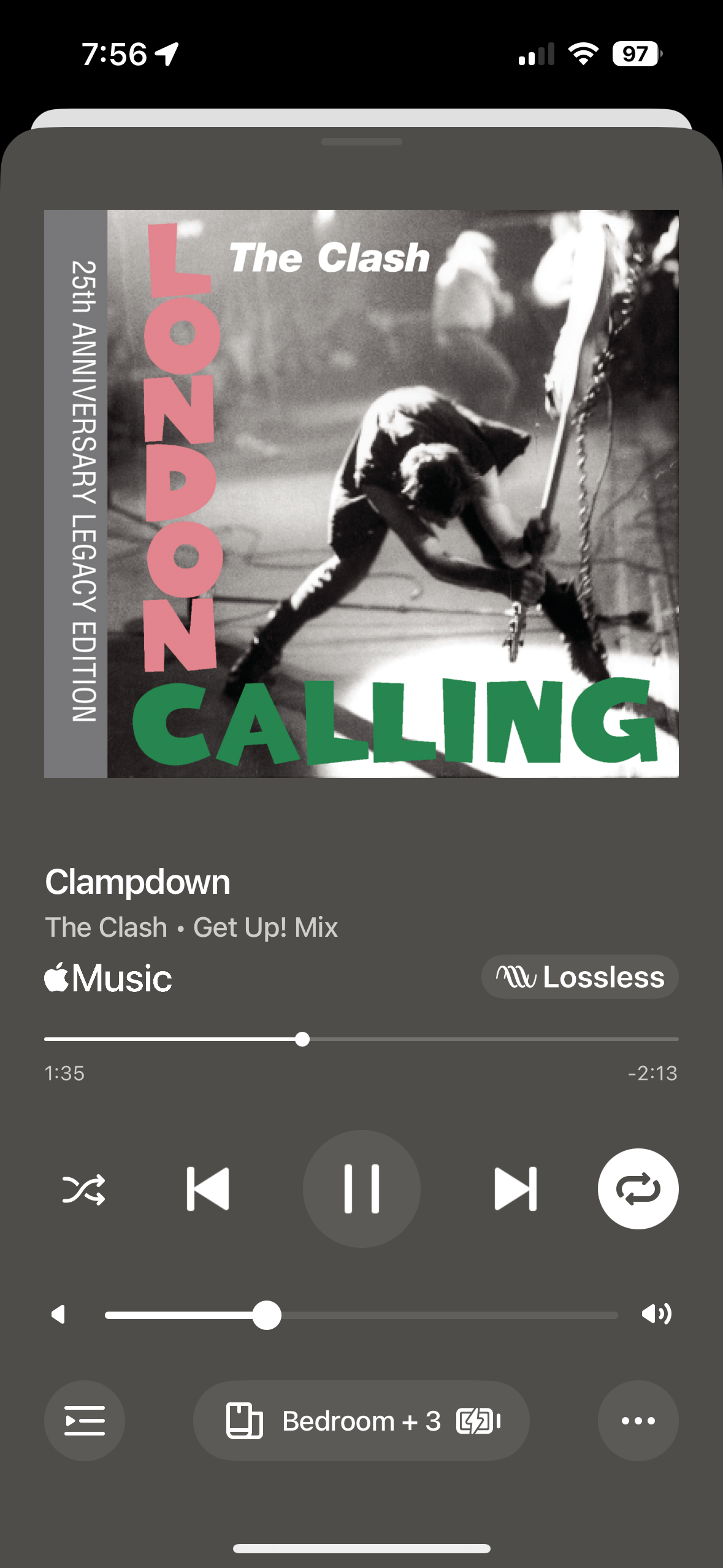
Not a fan of the new app, but I listened to a playlist on Apple Music this morning. And a saw a Lossless logo on one of the songs. It came and went and hasn’t showed up for other songs, but thought it was interesting. 
 

Is lossless playback coming?  Was it already here and I missed it?


This topic has been closed for further comments. You can use the search bar to find a similar topic, or create a new one by clicking Create Topic at the top of the page.
Best answer by Nollind

The recent system update (to your speakers, not the app) added Apple Music lossless support but you need the new app updates to see the lossless indicator.

That said though, if you launch an Apple Music song from the old app, it will still play lossless but the indicator just won’t show on the old app (but will be seen on the new app).

PS. BTW the lossless indicator may not show immediately. A workaround to force it to appear is to scrub the song progress forward or backwards a few times and then it will kick in. Not sure why. 

41 replies

Enthusiast II
May 16, 2024

Brave. 

Got it, thanks.
Haven’t you tried the latest 16.2 firmware with the 16.1 app?
Or does the FW update force the app update as well?

Sarge_72
Avid Contributor I
May 16, 2024

Just noticed this today when I was listening to some ATMOS mixes… put on a song I know is NOT Atmos encoded and was like hmmmm glitch….  great surprise as I was going back & forth about Amazon Music  - AirPlay of same song NOT showing lossless


One thing I DID notice while I was trying to confirm lossless/HD….   if I play FLAC from NAS it no longer plays with the HD tag….  what gives?!?!  :-) 

Bumper
May 16, 2024

Brave. 

Got it, thanks.
Haven’t you tried the latest 16.2 firmware with the 16.1 app?
Or does the FW update force the app update as well?

I’m on the latest firmware. If you are still on 16.1 with the s2 app DONT UPDATE- not worth it yet. 

Enthusiast II
May 16, 2024

Brave. 

Got it, thanks.
Haven’t you tried the latest 16.2 firmware with the 16.1 app?
Or does the FW update force the app update as well?

I’m on the latest firmware. If you are still on 16.1 with the s2 app DONT UPDATE- not worth it yet. 

Yes, I’m still on the 16.1 FW and the old 16.1 app (downgraded it after playing with the latest “courageous” app for a while).
I keep the FW auto-update off, so it wasn’t forcibly updated to the latest version.
What I was thinking about is to upgrade the FW to enable Apple lossless but stay with the old 16.1 app until they get the new one into shape.
But it’s not clear whether this combination would work, and there’re no way to downgrade the FW in case of trouble - so I’d rather stay with the current config for now.

Lyricist II
May 20, 2024

Does the update to the speakers allow lossless via Airplay 2? I would prefer to use the Sonos app but I’m a victim of the ‘not encoded correctly’ bug that has rendered a number of my purchases from Apple unplayable via the Sonos app.

Bumper
May 20, 2024

Does the update to the speakers allow lossless via Airplay 2? I would prefer to use the Sonos app but I’m a victim of the ‘not encoded correctly’ bug that has rendered a number of my purchases from Apple unplayable via the Sonos app.

Airplay doesn’t support Apple Lossless AFAIK

Lyricist II
May 20, 2024

It’s such a shame. I have so many playlists where certain tracks, some purchased some ripped, just won’t play. I’ve dying for lossless from Apple to come in too.

Enthusiast I
May 23, 2024

Actually Sonos first supported Apple Lossless 18 years ago in Version 1.3.

Trending Lyricist I
May 23, 2024

It would be good if Sonos could provide a list of supported devices, I’ve been unable to get lossless to work with a Era100 stereo pair and Gen 2 Sub. Remove the Sub and lossless works, could be the gen 2 sub just isn't supported.

Yeah you would think they could provide that, put it in the release notes etc. 


I’m also having a lot of issues with Apple Lossless. I can get it to play but initial issues: pausing, skipping tracks are delayed. Can’t use the slider to advance in the song reliably. Lots of audio glitches. Would prefer to use lossy while they fix the bugs tbh. 

I’m experiencing something similar. Apple Lossless seems to work on Move and a fairly new Amp (v 1.24.1.19-1.2) but not on older Amps (v. 1.17.3.1-1.1) or older Ports/Connect (v. 1.17.5.5-1.1). I contacted Sonos about this but support was useless. They cited ‘latency’ as the culprit vs. compatibility. 

Enthusiast II
June 8, 2024

Does the update to the speakers allow lossless via Airplay 2? I would prefer to use the Sonos app but I’m a victim of the ‘not encoded correctly’ bug that has rendered a number of my purchases from Apple unplayable via the Sonos app.

I would rather use the native Apple Music app over the Sonos app as I can add artists and tracks as well as do simple things like shuffle all my tracks in Songs. 
 

does anyone know if using the native Apple Music app allows lossless audio to Sonos equipment?