
Enthusiast II
May 14, 2024
Answered

Apple Music Lossless on the new app

  • May 14, 2024
  • 41 replies
  • 18192 views

Not a fan of the new app, but I listened to a playlist on Apple Music this morning. And a saw a Lossless logo on one of the songs. It came and went and hasn’t showed up for other songs, but thought it was interesting. 
 

Is lossless playback coming?  Was it already here and I missed it?
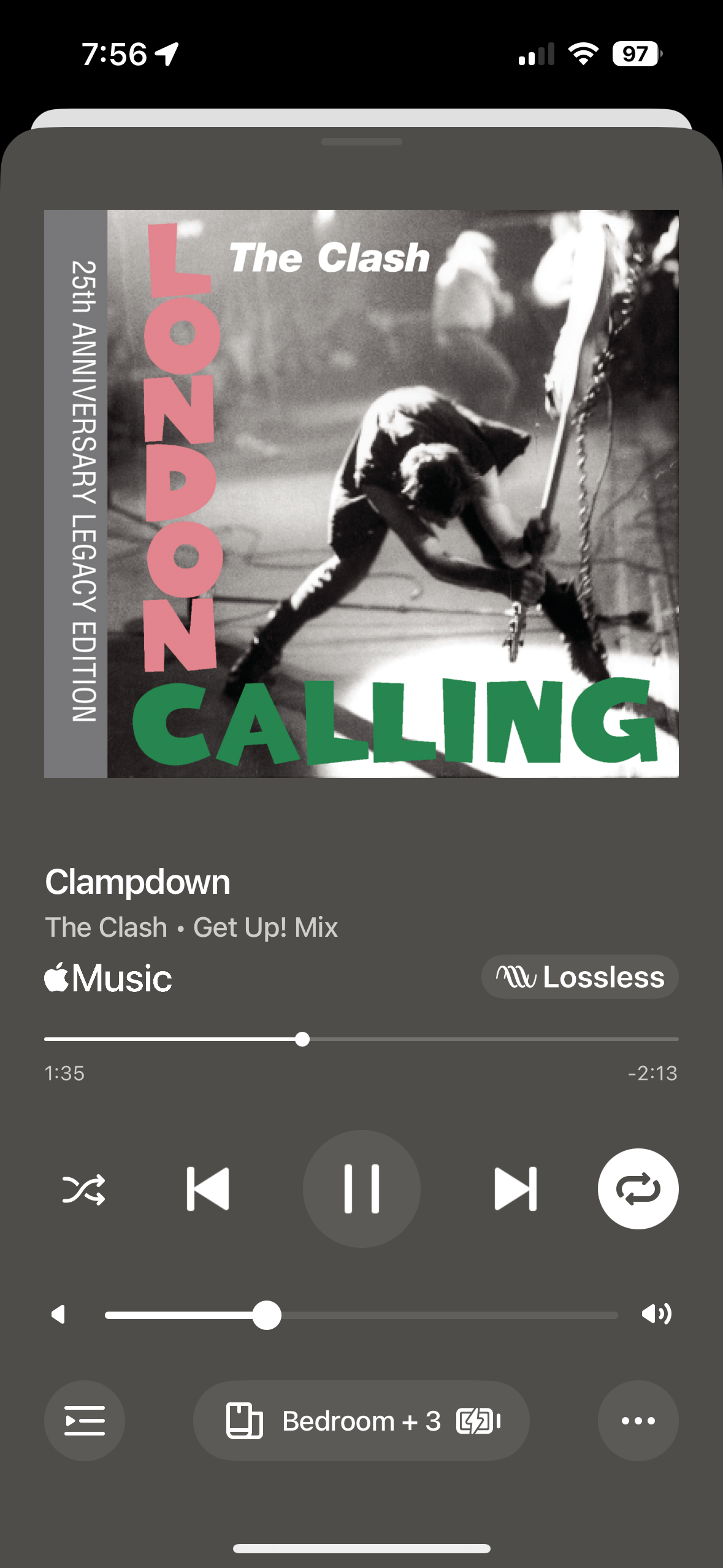


This topic has been closed for further comments. You can use the search bar to find a similar topic, or create a new one by clicking Create Topic at the top of the page.
Best answer by Nollind

The recent system update (to your speakers, not the app) added Apple Music lossless support but you need the new app updates to see the lossless indicator.

That said though, if you launch an Apple Music song from the old app, it will still play lossless but the indicator just won’t show on the old app (but will be seen on the new app).

PS. BTW the lossless indicator may not show immediately. A workaround to force it to appear is to scrub the song progress forward or backwards a few times and then it will kick in. Not sure why. 

41 replies

NollindAnswer
Prominent Collaborator I
May 14, 2024

The recent system update (to your speakers, not the app) added Apple Music lossless support but you need the new app updates to see the lossless indicator.

That said though, if you launch an Apple Music song from the old app, it will still play lossless but the indicator just won’t show on the old app (but will be seen on the new app).

PS. BTW the lossless indicator may not show immediately. A workaround to force it to appear is to scrub the song progress forward or backwards a few times and then it will kick in. Not sure why. 

Lyricist I
May 14, 2024

The recent system update (to your speakers, not the app) added Apple Music lossless support but you need the new app updates to see the lossless indicator.

That said though, if you launch an Apple Music song from the old app, it will still play lossless but the indicator just won’t show on the old app (but will be seen on the new app).

PS. BTW the lossless indicator may not show immediately. A workaround to force it to appear is to scrub the song progress forward or backwards a few times and then it will kick in. Not sure why. 

Literally signed up for Amazon Music like 20 minutes ago just for lossless music. I can also confirm that lossless is showing up for me.

For the indicator, I’ve read that for Amazon Music at least, the system needs time to check if the internet is fast and reliable enough to stream HIFI. After the initial check, it seems to stream lossless for the next songs instantly.


Prodigy III
May 14, 2024

I can’t believe that with all the negative furore about the new app, Sonos didn’t make any noise about the very welcome addition of Lossless audio for Apple Music. I only just found out it was on 80.00.04 [also requiring the firmware update] when I happened to read the release notes while updating to 80.00.08..!

tg1Author
Enthusiast II
May 14, 2024

It is weird…

Lyricist III
May 15, 2024

Does anyone know whether only certain speakers will play Apple Music Lossless? When I play on my Ray soundbar the lossless symbol shows up but not on my symfonisk lamps?

Prodigy III
May 15, 2024

Does anyone know whether only certain speakers will play Apple Music Lossless? When I play on my Ray soundbar the lossless symbol shows up but not on my symfonisk lamps?

My Symfonisk lamps are my surrounds, connected to my Arc and Sub, and I get the Lossless symbol there, so it must apply to all the speakers. I didn’t get the Lossless symbol at all on my speakers until I scrolled back and forth on a song a few times (which strangely is a solution advised on here), so maybe play through your Symfonisk while scrolling back and forth for a bit to see if it helps?

Lyricist III
May 15, 2024

Does anyone know whether only certain speakers will play Apple Music Lossless? When I play on my Ray soundbar the lossless symbol shows up but not on my symfonisk lamps?

My Symfonisk lamps are my surrounds, connected to my Arc and Sub, and I get the Lossless symbol there, so it must apply to all the speakers. I didn’t get the Lossless symbol at all on my speakers until I scrolled back and forth on a song a few times (which strangely is a solution advised on here), so maybe play through your Symfonisk while scrolling back and forth for a bit to see if it helps?

Thanks. This may sound like a daft question but how do you scrub back and forth? I can’t figure out how to do it 😂

Prodigy III
May 15, 2024

Does anyone know whether only certain speakers will play Apple Music Lossless? When I play on my Ray soundbar the lossless symbol shows up but not on my symfonisk lamps?

My Symfonisk lamps are my surrounds, connected to my Arc and Sub, and I get the Lossless symbol there, so it must apply to all the speakers. I didn’t get the Lossless symbol at all on my speakers until I scrolled back and forth on a song a few times (which strangely is a solution advised on here), so maybe play through your Symfonisk while scrolling back and forth for a bit to see if it helps?

Thanks. This may sound like a daft question but how do you scrub back and forth? I can’t figure out how to do it 😂

When playing a song (in full screen), the line which shows how far into a song you are (the circle moves along the line as the song plays) - slide the circle forward to a point further into the song, let it play, then slide it back again to earlier in the song, then repeat a couple of times. Miraculously this worked for me and the Lossless symbol now appears on all speakers. 

Enthusiast II
May 15, 2024

The recent system update (to your speakers, not the app) added Apple Music lossless support but you need the new app updates to see the lossless indicator.

That said though, if you launch an Apple Music song from the old app, it will still play lossless but the indicator just won’t show on the old app (but will be seen on the new app).

PS. BTW the lossless indicator may not show immediately. A workaround to force it to appear is to scrub the song progress forward or backwards a few times and then it will kick in. Not sure why. 

So apart from not showing the lossless indicator, are you saying that the old 16.1 app works for you without issues with the latest 16.2 (80.00.04) firmware, and update to the latest “greatest” app is not forced with the latest FW?
I’m eager to get Apple lossless audio on my Sonos ASAP but I definitely want to stay away from the new buggy app for now.

Bumper
May 15, 2024

This is a good and surprise addition. Kudos to Sonos for finally adding this.