
Contributor I
December 12, 2017
Answered

App volume control too sensitive

  • December 12, 2017
  • 4 replies
  • 1529 views
When choosing a low volume, it seems impossible to choose the right loudness by just using the app volume control. the difference between silent, and the next setting is too large, and thr only way to get the right volume is too use the controls on the speaker device itself. Is there a way to change app volume sensitivity?
This topic has been closed for further comments. You can use the search bar to find a similar topic, or create a new one by clicking Create Topic at the top of the page.
Best answer by Jayfree

4 replies

Enthusiast II
December 12, 2017
I have similar issues. Have you tried turning the volume all the way down then tapping once on the volume slider?

Depending on source material and the speaker this is usually very quiet in my experience.
December 12, 2017
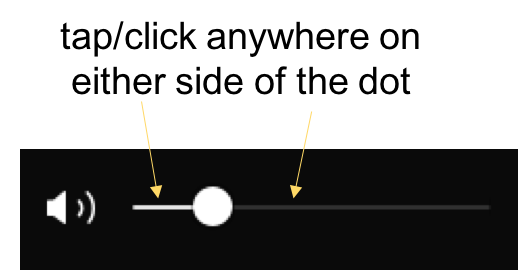
Try tapping to the side of the button in the direction you want the volume to change.
Contributor I
January 7, 2019
I agree with Kumar. Tapping on the line on either side of the dot will increase or decrease the volume the smallest increment it can go at a time.
JayfreeAnswer
Contributor I
January 7, 2019