
Contributor I
November 4, 2020
Question

Alphabetic order (Apple Music)

  • November 4, 2020
  • 6 replies
  • 255 views

Hi,

I've been using the Sonos app for a while, but I've been bothered by the fact that the alphabetic order isn't working as it's supposed to, as shown below: 
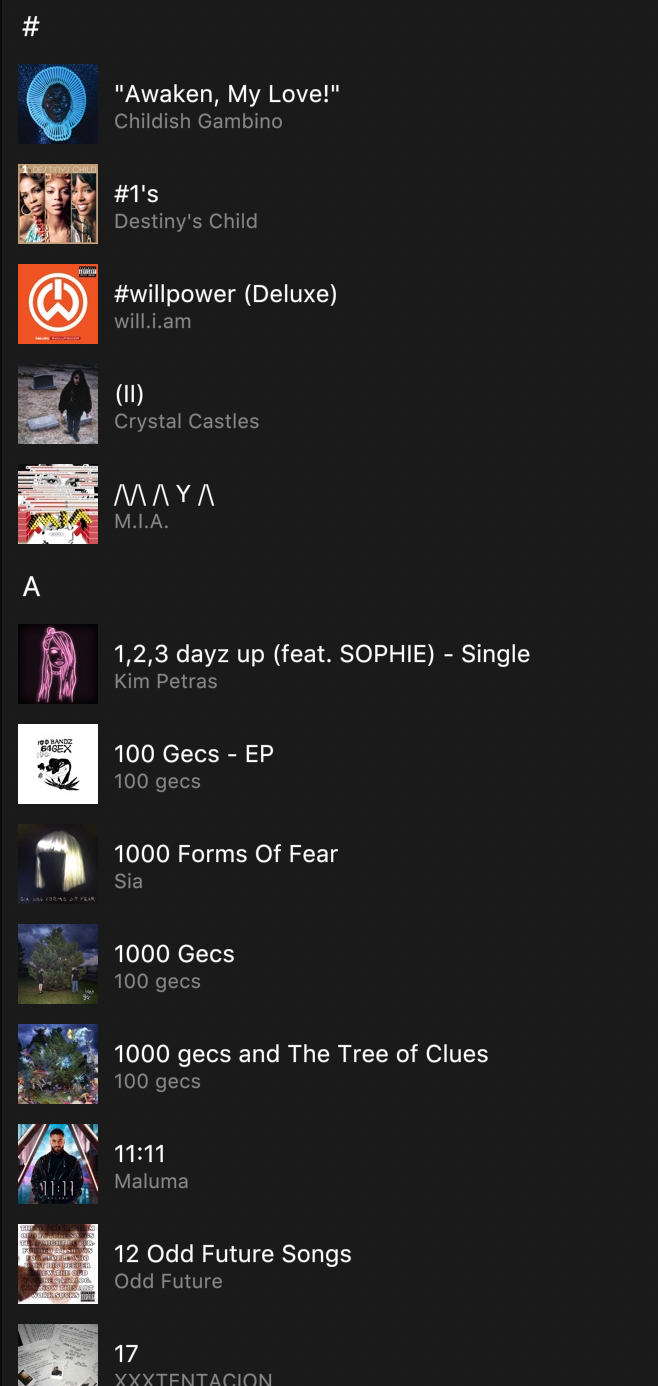
 

Even though it says 'A', the first album to show up is starting with an '1' - I have no clue what to do with this. Is it an known bug or am I doing something wrong? I use Apple Music and the Sonos application for Mac. Help would be appreciated!


Dani

This topic has been closed for further comments. You can use the search bar to find a similar topic, or create a new one by clicking Create Topic at the top of the page.

6 replies

Lyricist III
November 4, 2020

It doesn’t start with an ‘A’ it starts with a “ (double quote mark)

dani98Author
Contributor I
November 4, 2020

I understand, that one’s correct, but the album 1, 2, 3 dayz up stands under the ‘A’ mark and it doesnt start with an A - get it?

Lyricist III
November 4, 2020

Possibly ‘A’ means Alpha Numeric not Alphabetic. 

dani98Author
Contributor I
November 4, 2020

I'm afraid you don't understand, maybe I'm not clear enough. Let me give another example:


Both O and P show albums that start with N, because the alphabetic order is messed up. Hope it's clearer now. 

Enthusiast I
November 4, 2020

Yeah mines been like that for as long as I’ve been using Apple Music on Sonos. All the alphabetical markers are out of place.

controlav
Lead Maestro
November 4, 2020

Yeah, Apple Music are calculating their scroll indices wrongly. First reported a month or two ago, no sign of a fix from them so far.

The API that has the bug is described here: https://developer.sonos.com/reference/sonos-music-api/getscrollindices/

Author of the leading independent Sonos apps for Android, MacOS, iOS, Windows and Xbox.