Avid Contributor I
Nov 5, 2016 5:40 PM UTC
Answered

Alerts from Sonos are irritating.

After the last update my mac computer now shows alerts up in the top right of my screen like the low battery type of alert very time Sirius Radio goes to a commercial on, for example, Fox News. The alert box shows the information from the advertiser... which is both irritating and distracting.

How can this be turned off?
    This topic has been closed for further comments. You can use the search bar to find a similar topic, or create a new one by clicking Create Topic at the top of the page.
    AuniAnswer
    Avid Contributor I
    Nov 5, 2016 7:58 PM UTC
    Thank you. You are correct and you helped me. I thought it was something like this that was about the mac operating system. I knew that my iPhone has a section for notifications. I figured that the Mac had this as well and I'm getting too lazy when it is so easy to ask a question especially on this Sonos forum which has a lot of smart people, like you.

    So, I'll try and pay it forward and help someone else by explaining what I did to turn it off.

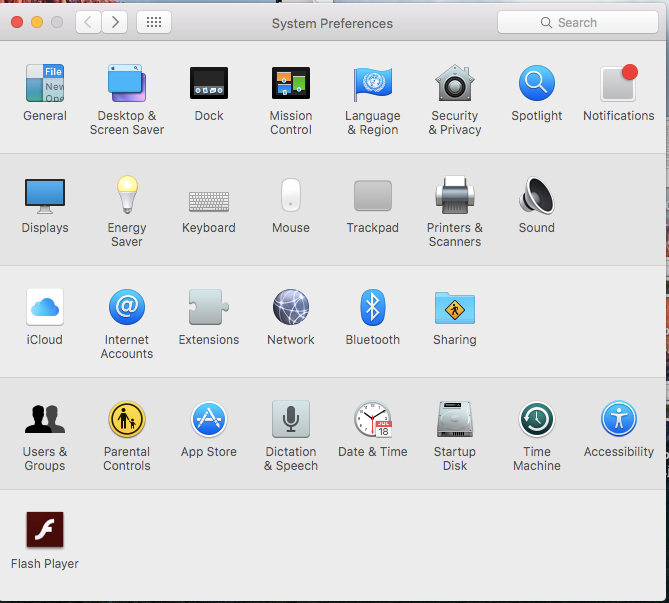
    Go to System, and at the top left is Notification:


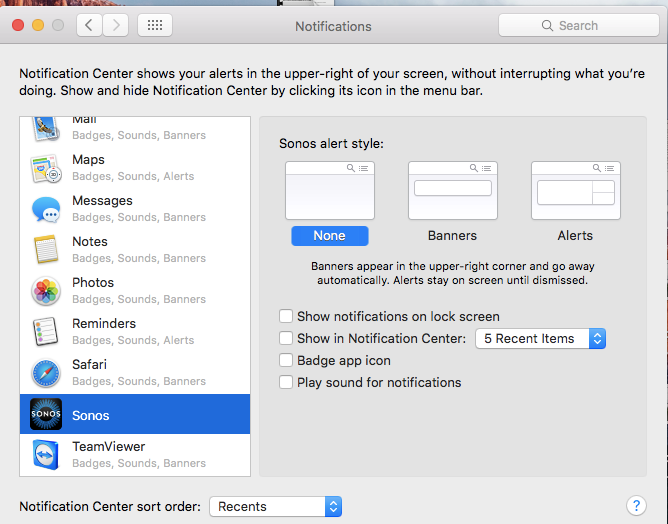
    Then go to Sonos and turn it off:


    Thanks

    3 replies

    AuniAuthor
    Avid Contributor I
    Nov 5, 2016 7:18 PM UTC
    Here is an example:

    Translate
    jgatie
    Nov 5, 2016 7:31 PM UTC
    You have to turn off notifications for Sonos in your Mac settings. I think it's called Growler or something (sorry, not a Mac person).
    Translate
    AuniAuthorAnswer
    Avid Contributor I
    Nov 5, 2016 7:58 PM UTC
    Thank you. You are correct and you helped me. I thought it was something like this that was about the mac operating system. I knew that my iPhone has a section for notifications. I figured that the Mac had this as well and I'm getting too lazy when it is so easy to ask a question especially on this Sonos forum which has a lot of smart people, like you.

    So, I'll try and pay it forward and help someone else by explaining what I did to turn it off.

    Go to System, and at the top left is Notification:


    Then go to Sonos and turn it off:


    Thanks
    Translate