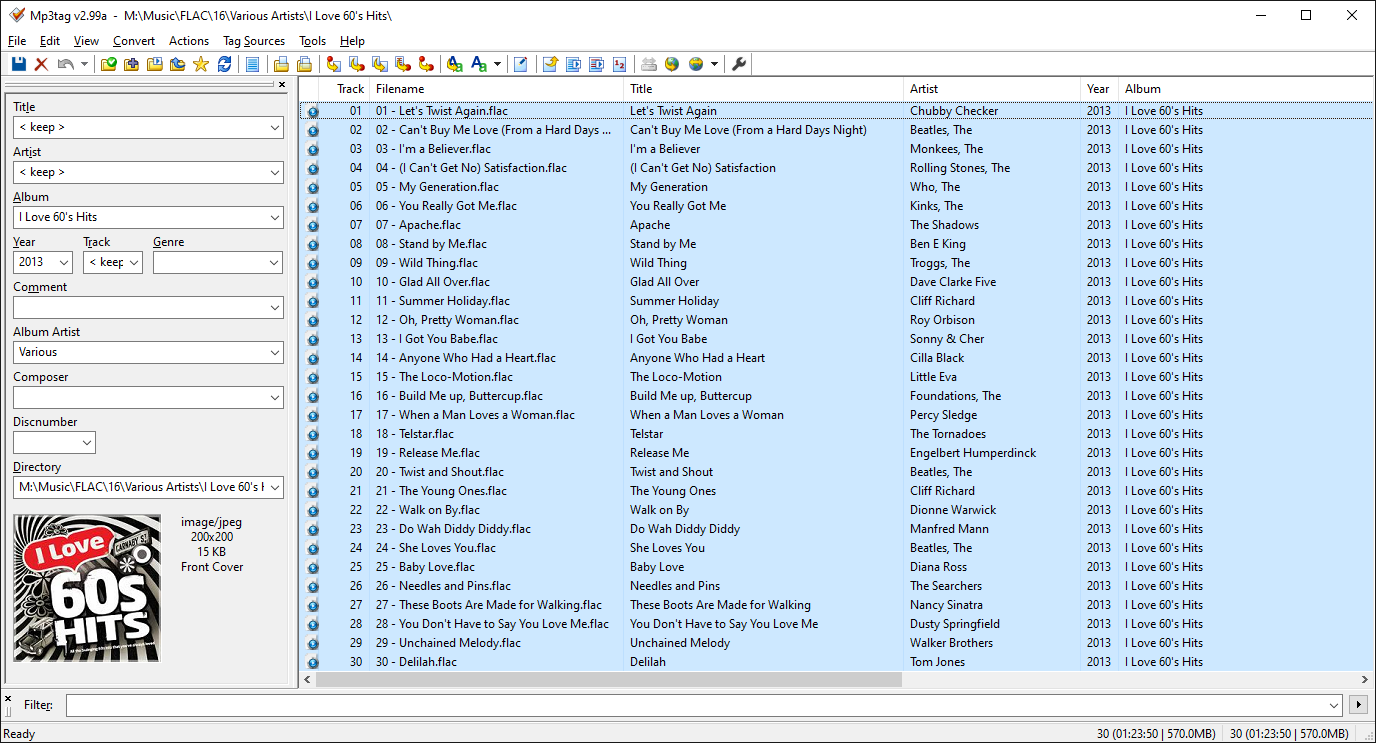
Does the Sonos system honour the ‘Album Artist’ tag? I suspect not, but why not? Or is there way round it….. Everything works - I can see my library, I can play music, I can play radio stations etc etc. Just cannot fathom how to get the darned set up to honour the ‘Album Artist’ tag. All other tools/systems I have do honour the tag (J River, Logitec media server, plex etc). Any info/advice gratefully recieved.
This topic has been closed for further comments. You can use the search bar to find a similar topic, or create a new one by clicking Create Topic at the top of the page.
Best answer by PaulR01
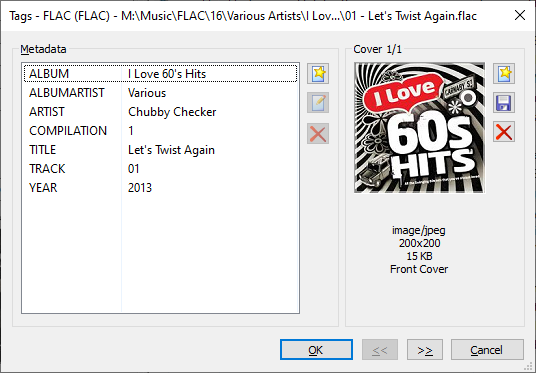
Hi folks. Sorted with your help. The albums which were listed by the track artist had a blank ‘ALBUMARTIST’ tag. Ive set all those to ‘Various’. Voila! Re MP3tag (which I use) - the screen has text saying ‘Album Artist’ with a field below - as per the screen shot from Smilja. However, it displays (if present) the ‘ALBUMARTIST’ tag value.
I have some music ripped from before I understood too much about this stuff which has entries in ‘Album Artist’ (with a space). I don’t really use ‘Albumartist’ (or variations) except for compilations and classical stuff (a different ball game!). I’ve spent ages tidying up various issues with tags - unneccessary entries, inconsistencies, inaccuracies etc, and this ‘Sonos’ issue was bugging me. I was also under the (mis) understanding that simply setting ‘Compilation’ to ‘1’ was enough to trigger the software to treat it as various. Thank you all once again, especially ratty, Smilja and John B.
And make sure the tag is 'ALBUMARTIST' without a space.
I wonder if this will turn out to be an important point in your case. From what I have read in the past, some ripping software will create a tag called ‘Album Artist’ (i.e. with a space), which Sonos would not then recognise. Does that make sense, please, @ratty ?
@PaulR01 - Which program have you used to rip the tracks?
John B - I’d use dbpoweramp generally to rip, and I’d also use Mp3tag to inspect for any oddities.
And make sure the tag is 'ALBUMARTIST' without a space.
I wonder if this will turn out to be an important point in your case. From what I have read in the past, some ripping software will create a tag called ‘Album Artist’ (i.e. with a space), which Sonos would not then recognise. Does that make sense, please, @ratty ?
@PaulR01 - Which program have you used to rip the tracks?
John B - I’d use dbpoweramp generally to rip, and I’d also use Mp3tag to inspect for any oddities.
All mine is ripped with dbpoweramp and it’s never given me a problem with Sonos, so that probably isn’t the issue.
And make sure the tag is 'ALBUMARTIST' without a space.
I wonder if this will turn out to be an important point in your case. From what I have read in the past, some ripping software will create a tag called ‘Album Artist’ (i.e. with a space), which Sonos would not then recognise. Does that make sense, please, @ratty ?
@PaulR01 - Which program have you used to rip the tracks?
John B - I’d use dbpoweramp generally to rip, and I’d also use Mp3tag to inspect for any oddities.
All mine is ripped with dbpoweramp and it’s never given me a problem with Sonos, so that probably isn’t the issue.
Agree John, no issues with any of the tools, it’s my understanding rather!. A large amount of my library was ripped quite a while ago when my knowledge was even less than it is now. I use the dbpoweramp suite for a couple of other things too (format conversion mainly).