
Contributor III
July 29, 2021
Answered

Album Artist displaying with incorrect capitalisation

  • July 29, 2021
  • 14 replies
  • 212 views

Hi

Just noticed a very strange problem in the Sonos app. I have albums by the group FireHouse (note the capital H in the middle). I also have albums by the group HammerFall (note the capital F in the middle).

In both cases the correct case artist names are stored in both the Artist and AlbumArtist tags in the FLAC tracks.

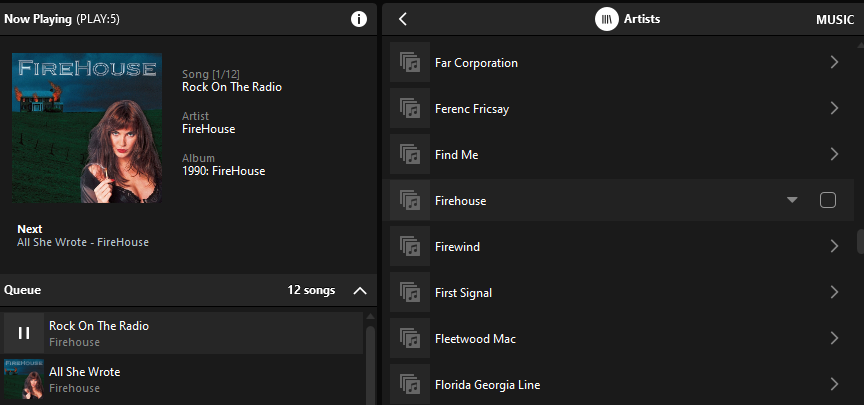
In the screenshot below you can see that for some reason FireHouse is displaying as Firehouse (with no capital H) in the artist list and also the track queue, but is showing correctly in the Now Playing screen!! I have tried removing my music library and setting it up from scratch and re-indexing and I get the same result
You can see from the screenshot below for HammerFall that the artist name is displaying correctly in all 3 parts of the screen
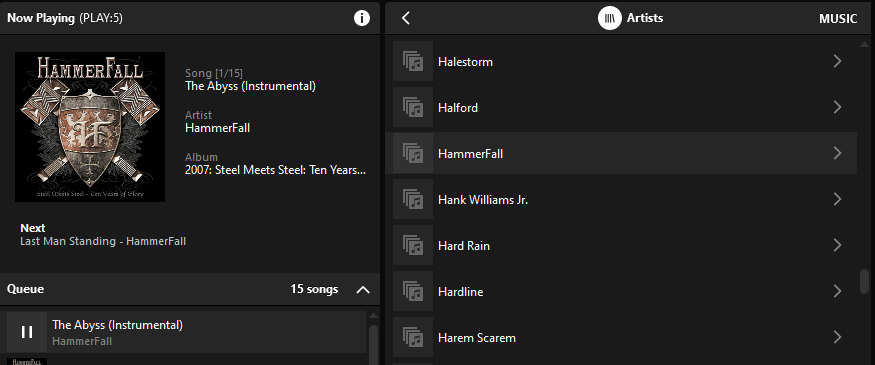
This is same issue in the PC app and iPhone and iPad apps

Any idea what is causing this?

Thanks

G

This topic has been closed for further comments. You can use the search bar to find a similar topic, or create a new one by clicking Create Topic at the top of the page.
Best answer by ratty

This is a longstanding issue. To save index space Sonos evidently uses a single-instance string store for tag values. On the first instance of the string it’s written to memory, with subsequent instances then referencing that storage location. The problem is that the string matching is case insensitive. 

In this example an instance of ‘Firehouse’ must have been encountered in the index scan before getting to ‘FireHouse’. ‘Firehouse’ was the string that was stored. Because the matching wasn’t case sensitive, the artist tag ‘FireHouse’ looked the same and hence points back to the location of ‘Firehouse’.

The Now Playing metadata displays ‘FireHouse’ correctly as this is fetched from the file at play time, not from the index.


14 replies

Corry P
Sonos Staff
July 30, 2021

Actually IIRC radio was also an available source, with the list curated by Sonos pre-TuneIn.

That makes sense - I think I was listening to SHOUTcast on WinAMP over 20 years ago. “Grove Salad” - still running today and on TuneIn!

"Common sense is the collection of prejudices acquired by age eighteen." - Albert Einstein
ratty
July 30, 2021

Actually IIRC radio was also an available source, with the list curated by Sonos pre-TuneIn.

That makes sense - I think I was listening to SHOUTcast on WinAMP over 20 years ago. “Grove Salad” - still running today and on TuneIn!

If you mean SomaFM’s Groove Salad then it’s not on TuneIn (or Sonos Radio) in the UK owing to legal issues. It’s on myTuner Radio though.

Corry P
Sonos Staff
July 30, 2021

If you mean SomaFM’s Groove Salad then it’s not on TuneIn (or Sonos Radio) in the UK owing to legal issues. It’s on myTuner Radio though.

I did indeed! Ah yes - I think it’s been a while since I listened. I have a dead My Sonos link to it on TuneIn.

"Common sense is the collection of prejudices acquired by age eighteen." - Albert Einstein
buzz
Grand Maestro
July 31, 2021

On other Music Library Index fumble can be caused by a NAS drive’s Recycle bin. In case of duplicate tracks, the Indexer ignores the second and following occurrences. If the tag editor places the original  copy of an edited track in the recycle bin and the recycle bin is scanned first, the old track is discovered first and the updates are ignored. (the indexer does not check every character in the metadata) This can be very frustrating for the user because updates are seemingly ignored and the user can prove that the updated data is being ignored. The NAS typically will allow the recycle bin to be disabled.