
Contributor I
April 14, 2025

Windows 11 Native Audio Play Integration for Sonos

  • April 14, 2025
  • 12 replies
  • 2503 views

I’d like to request a feature that lets my PC’s audio play through my Sonos One (and all other speakers and groups) directly from Windows 11’s “Select a sound output” menu.
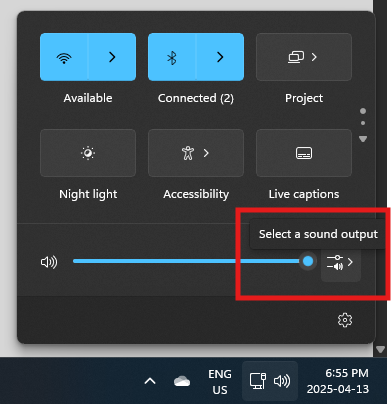
Windows 11 Task Manager

Ideally, this capability would not require the Sonos Windows App but of course this would be acceptable.

I am aware that I could buy the Sonos port for $550 to achieve this but this is very expensive and want to avoid the extra wires and clutter.

This topic has been closed for further comments. You can use the search bar to find a similar topic, or create a new one by clicking Create Topic at the top of the page.

12 replies

May 13, 2025

Try this "hack”:

https://github.com/dheijl/swyh-rs/

Set FMT to WAV

I'm using the same. It's not ideal but it works.

Lyricist I
May 30, 2025

Would love to see this happen natively too! Right now, Sonos still doesn't offer direct integration with Windows 11's audio system like Bluetooth or system audio routing. You’re stuck using the Sonos app or third-party tools like Stream What You Hear or SonosTube for workaround streaming.

It’s a bit frustrating — especially when you're in a design studio setting like mine😀 and want to just hit play from your PC and fill the space with ambient music without switching apps. 😅

Until Sonos adds this feature, best workaround is using a network-based streamer app or casting from a compatible app like Spotify.