
Avid Contributor III
June 30, 2024
Question

Turntable & CD Line in not working

  • June 30, 2024
  • 11 replies
  • 323 views

I have been away for a couple of weeks and after updating the app, I am unable to play from my turntable or CD player from my grouped Play 5s (with SubGen2)

I have an input connected to each speaker, which have always worked perfectly.

I am aware that autoplay is currently disabled in this update. But I cannot get any sound at all from either external player.

I tweaked the source level from 2 from 2 to 3 for the turntable but still nothing.

Overall I have had much better stability from the new app while streaming BUT I tend to listen to vinyl and CD inputs more than 70% of the time so this is really annoying.

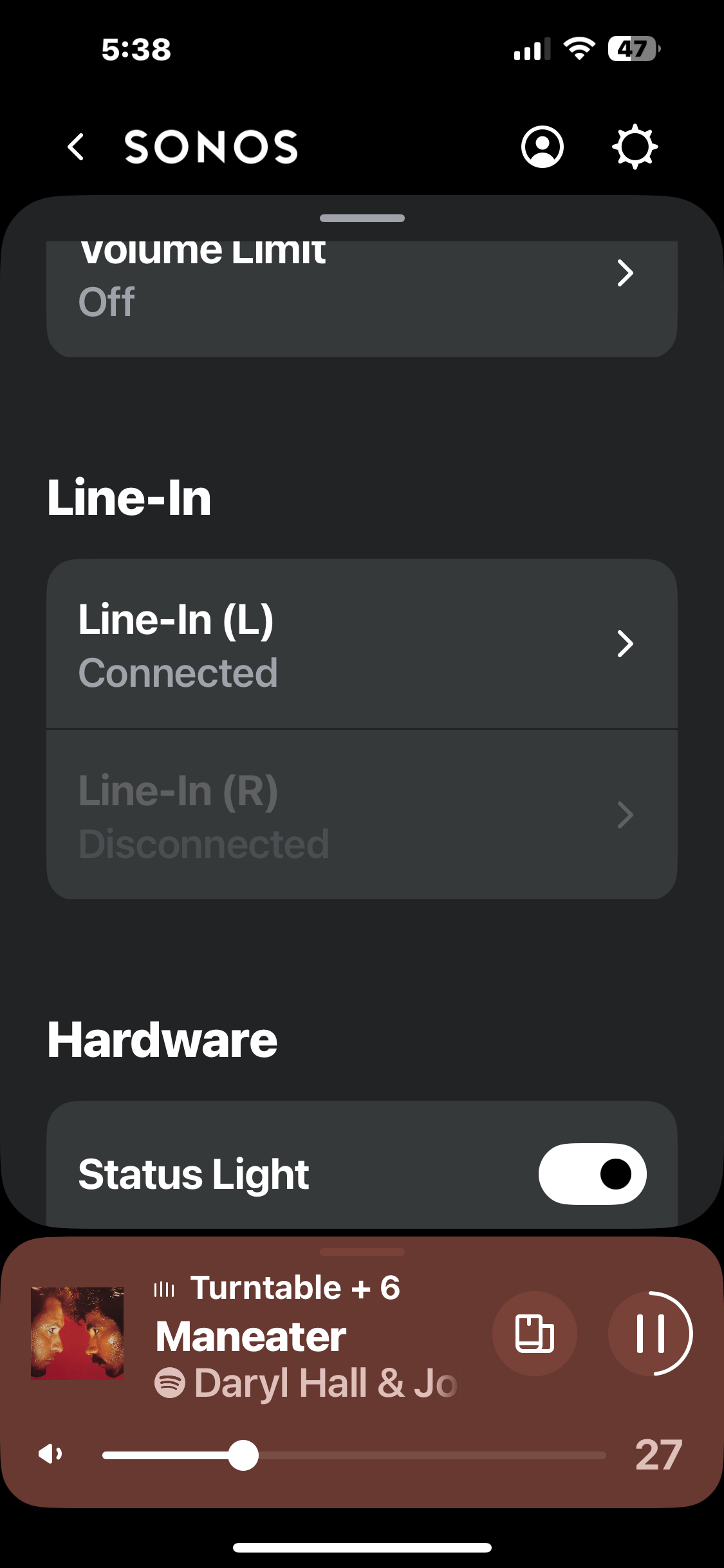
I have attached a screenshot, Line in (L) connected ...which would be my turntable

Is there a fix presently?

Thanks in advance
Stu

This topic has been closed for further comments. You can use the search bar to find a similar topic, or create a new one by clicking Create Topic at the top of the page.

11 replies

Ken_Griffiths
June 30, 2024

If you ungroup your 7 rooms and play the line-in to one room only does it then work for you? Also what is the line-in audio delay set to?

Avid Contributor III
June 30, 2024

Ken,

delay is set to medium 

and I did originally have everything ungrouped I believe…. I could retry?

Ken_Griffiths
June 30, 2024

Ken,

delay is set to medium 

and I did originally have everything ungrouped I believe…. I could retry?

Okay, my thoughts are to maybe try with the rooms ungrouped and set the line-in audio delay to ‘Max’ 2 seconds and see if that works for you.

AjTrek1
June 30, 2024


I am aware that autoplay is currently disabled in this update. 

I

Stu

Maybe I missed the part where upon AutoPlay would be disabled in the App update? However, My Autoplay for my Turntable (TT) works perfectly. I can also group rooms to my TT; although not as you have described which to me is a bit confusing.🤔

My TT setup is as follows:

  • Project Carbon (Sonos Edition) > Cambridge Audio Pre-Amp > Sonos AMP > (Wired) Definitive Technology D7’s and (Wireless) Sonos Sub

I can group as many Sonos speakers as desired once I start the TT Audio. In fact I’m listening to TT audio over my Sonos Move2’s in my upstairs office with the TT located downstairs in my media room.

IMO, although in repeating myself this may sound like a broken record (pun intended 😊) ...I believe you have some network issues afoot.

Together Everyone Achieves More = T.E.A.M.
Avid Contributor III
July 1, 2024

I have tried tonight by unpairing all speakers and playing a CD through line in on right speaker BUT it still says disconnected and not working. I havent tried the turntable.

Avid Contributor III
July 1, 2024

Have tried the turntable as well, nothing. :(

AjTrek1
July 1, 2024

Please post pictures of your line-in connection coming from the source and into the speaker.

Together Everyone Achieves More = T.E.A.M.
Avid Contributor III
July 1, 2024

@AjTrek1 They are connected properly, have been using the same set up for 2 years without any issues.

Ken_Griffiths
July 1, 2024

@Stuart Dammery,
I have a stereo pair of Fives & Sub (gen3) and use the line-in on the left speaker and that’s working fine here so it’s probably something local.m

Avid Contributor III
July 2, 2024

Functionality restored after todays app update :)