Contributor I
January 15, 2021

Speakers not working properly despite Boost

  • January 15, 2021
  • 27 replies
  • 607 views

Hi,


About a year ago, i bought 4 Symfonisk speakers to my old apartment. I had issues reaching my bedroom, so I was recommended by Sonos to buy a mesh network, so I bought the Deco M5 3 pack, and where one is used as the main router. It still didn’t really worked properly but I was too tired to troubleshoot more at that time. 


I now live in a new apartment, thought it would work better here, but no. Since I’ve spent +30 hours on troubleshooting and trying to fix it (including wiring a speaker to my router), I bought the Sonos Boost hoping to eliminate all problems. 


However, it’s still basically the same, where I can’t play music via Spotify properly for more than 5-10 minutes on all the speakers. I have issues when using airplay, the sonos app, as well as spotify connect. The problem is most apparent when using all four speakers at the same time. The sound is hacking, speakers drop out, and the sonos app works slowly. 


Although some other programs works slightly better, it is still not working properly for more than 2 minutes in any way i use it. It seems to be internet interference that is the issue based on what I’ve read. I’ve tried to change the sonos net channel from 1, to 6, to 11. None of them is working properly. I have al speakers on WM:0 and have removed all wifi credentials to eliminate interference. I have tried to have the sonos boost as far away from the router as possible. And I have of course reset the app, the internet, and the speakers at multiple times.


My mesh router can’t be set to a specific wifi channel, it only has automatic mode. Maybe that is the main issue but i’m not accepting that to be enough for making this all not work. If that would be the case no one with deco would be able to have it work properly. All other products works perfectly with my internet. I have high speed everywhere (50-100mbit wifi average all around the apartment) and I live in an apartment of 68 sqm, so there is no big distances between the speakers. 


I would never had bought all this if I knew how hard it is to make it work, but now I just want everything I’ve bought to work properly. 


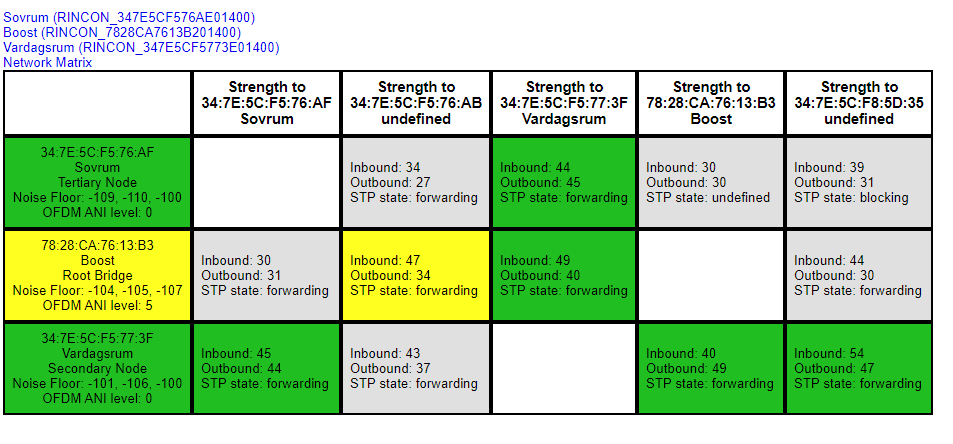
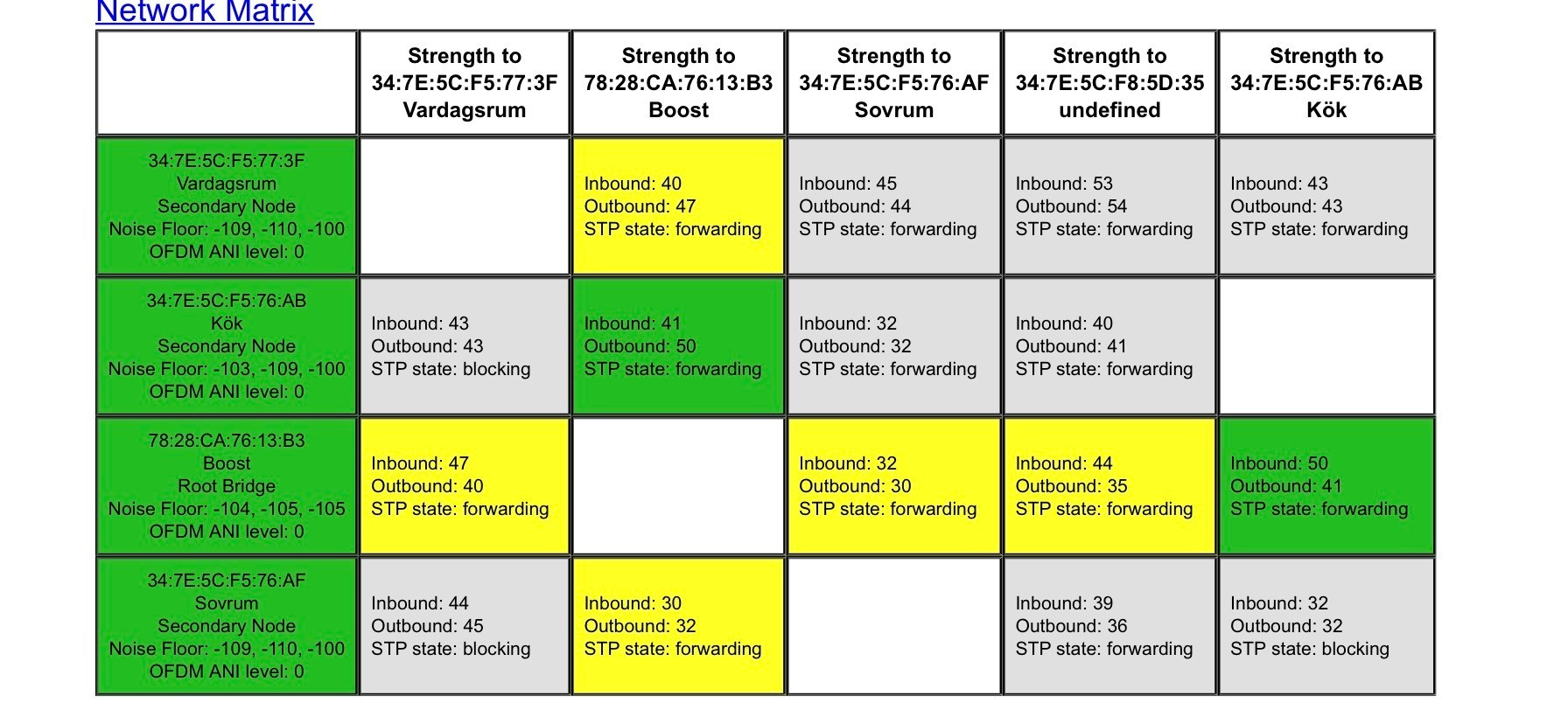
Any help is highly appreciated. Below you find some network matrixes. The one at the top is from yesterday, the one in the bottom is from today. 


This topic has been closed for further comments. You can use the search bar to find a similar topic, or create a new one by clicking Create Topic at the top of the page.

27 replies

January 15, 2021

Hi. This is strange, as the matrices look very healthy. I am surprised that Sonos Support advised getting a mesh system, though.

Is the Deco mesh everything there is or does it connect to an ISP router?

LurtzAuthor
Contributor I
January 15, 2021

It’s connected to an ISP modem. And the modem is not working as a router.


I moved the boost again further away from the router, as well as i moved one speaker that was close to the tv and apple tv, to a more lonely place, with the hope to make it more stable. Now the matrix look like this. So all speakers are showing again: 


January 15, 2021

As an experiment, would you power off the mesh satellites and just use the primary device / router.

Give it a few minutes to reconfigure then please provide another matrix. Then see how it goes like that?

Does the Deco allow you to reserve IP addresses?

LurtzAuthor
Contributor I
January 15, 2021

I’ve now switched all speakers to english, and also attached a print screen from the sonos system. The sonos speakers have changed ip a few times after reset. Could that be the issue you think?


LurtzAuthor
Contributor I
January 15, 2021

As an experiment, would you power off the mesh satellites and just use the primary device / router.

Give it a few minutes to reconfigure then please provide another matrix. Then see how it goes like that?

Yes i’ll try that! coming back soon! 

January 15, 2021

I edited my previous post to ask about IP addresses but our posts crossed.

LurtzAuthor
Contributor I
January 15, 2021

Here is the new network matrix after i removed the 2 satellite routers/nodes:


LurtzAuthor
Contributor I
January 15, 2021

As an experiment, would you power off the mesh satellites and just use the primary device / router.

Give it a few minutes to reconfigure then please provide another matrix. Then see how it goes like that?

Does the Deco allow you to reserve IP addresses?

Yes it does, I can’t do that now though, but can try to reserve ip adress in like 1-2 hours


January 15, 2021

I think you should definitely do that. Then power off the primary Deco and all Sonos. Power on primary Deco and let it come up fully. Then do the same with the Boost.  Then power on your speakers.

Leave the satellites powered off for the time being.

I'll look out for a post later.

LurtzAuthor
Contributor I
January 15, 2021

I think you should definitely do that. Then power off the primary Deco and all Sonos. Power on primary Deco and let it come up fully. Then do the same with the Boost.  Then power on your speakers.

Leave the satellites powered off for the time being.

I'll look out for a post later.

I’ve done all you asked for now. I have the secondary decos still switched off, and there is zero improvement. If anything, it works worse than yesterday.


2 new matrixes below from just now.