kamau
Trending Lyricist II
December 9, 2020
Answered

Sonos S1 Desktop Controller not displaying Connect Amp Gen 1

  • December 9, 2020
  • 10 replies
  • 330 views

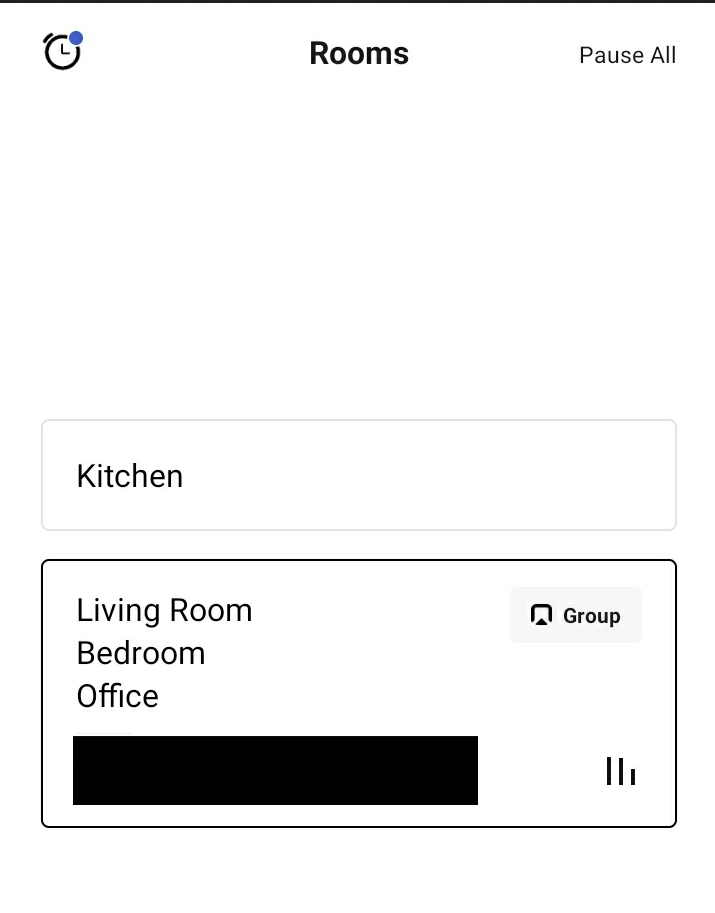
So this is a weird annoying bug or issue. I have a sonos connect amp gen 1 and a few other sonos speakers. On the mobile app, it works just as expected, no issues.


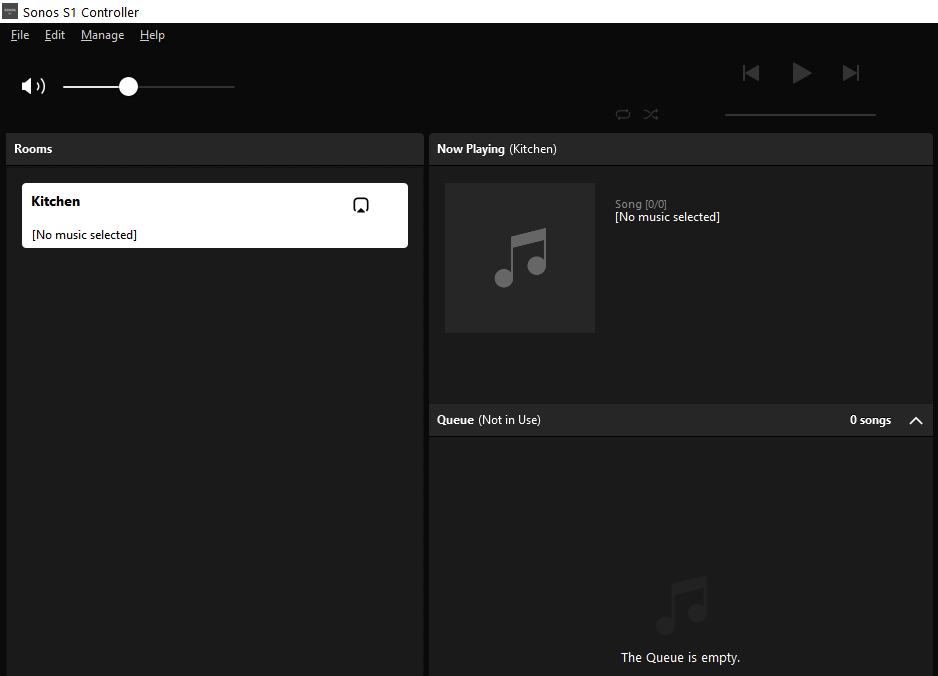
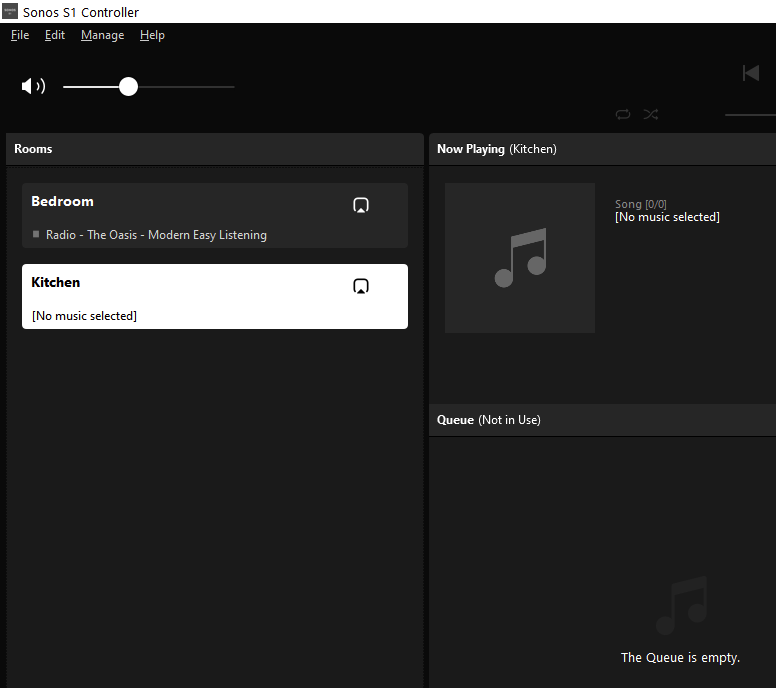
However, in Windows (10), the s1 desktop controller lists all other speakers except the connect amp. If I group a speaker together with the connect amp, it also vanishes from the desktop controller, ungroup it, and it returns, instantly. It’s like once grouped, the desktop controller cant’ see it anymore.

Is this a bug or a feature?


Things I’ve tried that haven’t worked

  1. Resetting the desktop controller
  2. Rebooting everything

On desktop:


On android.


When I ungroup.


Speakers:

Bedroom & Kitchen: Play 3 gen 1
Office: Play 5 gen 2
Living Room: Connect Amp gen 1


This topic has been closed for further comments. You can use the search bar to find a similar topic, or create a new one by clicking Create Topic at the top of the page.
Best answer by John B

Probably just a temporary communications glitch on the desktop then.

10 replies

Annazel S
Retired Sonos Staff
December 12, 2020

Hi there @kamau.

Thanks for reaching out, let me check it for you.

To better understand what’s going on, kindly submit diagnostic reports through the Sonos app using different controllers (Android and desktop), when the issue occurs, and another one when  Amp is showing, then reply with the confirmation number. I'd start by reviewing your system and go from there, it will help in identifying what's possibly causing the issue.


Let me know how that goes.

Help others find useful content by clicking the like button and selecting the best answer to your question
kamau
kamauAuthor
Trending Lyricist II
December 14, 2020

Hi, thanks for your reply.


WIndows Desktop controller diagnostics #: 1784952676 (Connect amp not listed, only other sonos speakers).


Android controller  diagnostic #: 1519516212 (all devices showing)


Thanks

John


kamau
kamauAuthor
Trending Lyricist II
December 17, 2020

Weird. After a windows update, the connect amp seems to have appeared. Will monitor and update this thread if it vanishes again.

Annazel S
Retired Sonos Staff
December 17, 2020

Hi there @kamau.

Thanks for your response and effort in submitting the diagnostic.

Upon checking the diagnostic reports, it shows that the Windows controller is not connected to the same WiFi network where Sonos and Android controller is connected. It's best if you can trigger another diagnostic while it is working and if in case it happens again, so we can further check and review your system.


Hopefully, the issue will not re-occur and if you have any questions and run into any issues, please let us know.

Help others find useful content by clicking the like button and selecting the best answer to your question
kamau
kamauAuthor
Trending Lyricist II
December 18, 2020

Hi,

I have submitted the diagnostic while the desktop controller is working. Diagnostic # 685651076


Let me explain my network. I have 2 routers, one from the ISP, and another regular off the shelf switch (ASUS) that is in Access Point mode.  The two are connected via ethernet. My PC is connected to the Asus switch via ethernet as well, while the sonos speakers are connected to the wifi network from the ISP. Hope this makes sense.

December 18, 2020

To function, all Sonos speakers and controllers must be on the same subnet.  So my best guess is that somehow you have two subnets and the ‘missing’ speaker is missing when it is connected to a different subnet from the controller.

kamau
kamauAuthor
Trending Lyricist II
December 18, 2020

Hi John B. 

They are on the same subnet. The missing speaker was only in the desktop controller. On phone, tablet etc it was visible etc. 

John BAnswer
December 18, 2020

Probably just a temporary communications glitch on the desktop then.

Ken_Griffiths
December 18, 2020

Hi John B. 

They are on the same subnet. The missing speaker was only in the desktop controller. On phone, tablet etc it was visible etc. 

Is the Access point broadcasting the same SSID’s as the main router, are the passwords, Wifi channels and channel-width the same as the main router too?

kamau
kamauAuthor
Trending Lyricist II
December 21, 2020

Is the Access point broadcasting the same SSID’s as the main router, are the passwords, Wifi channels and channel-width the same as the main router too?


No, the access point’s SSID is different from the main one, also using a different channel from the main router. I think John B’s statement that it was probably a temporary glitch is the answer. Everything is working ok now.