Trending Lyricist I
May 25, 2021
Answered

Slight audio dropouts in the rears

  • May 25, 2021
  • 14 replies
  • 302 views

Hi.


I have some slight audio dropouts in my Sonos One SLs that i use as rears in a Setup of Arc+Sub+LS+RS.

As my main listening position is usually close to the RS rear, this is obv. somewhat annoying when watching movies.

My diagnostic number: 121101499

Setup: Arc is wired into a FRITZ!Box 7590 (latest firmware). Rest is on SonosNet.

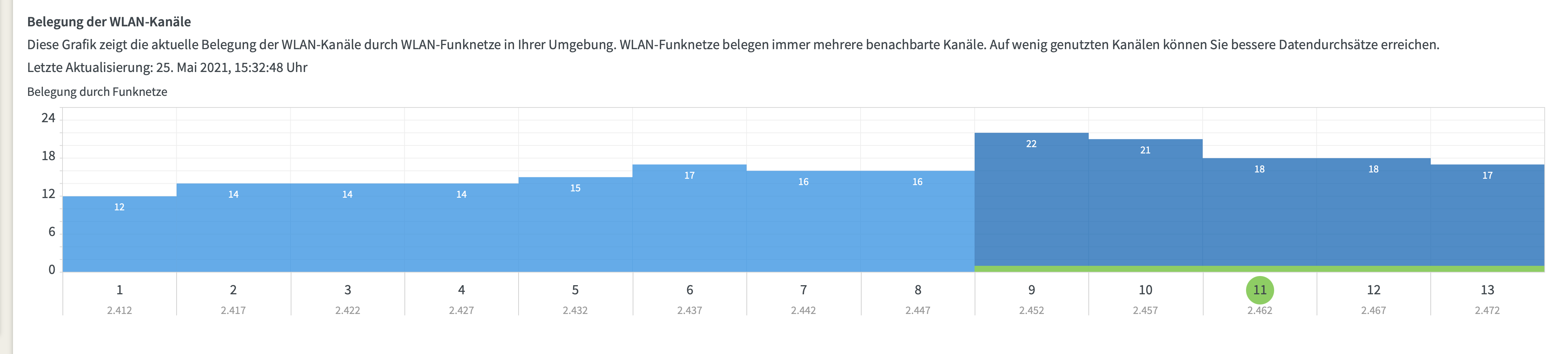
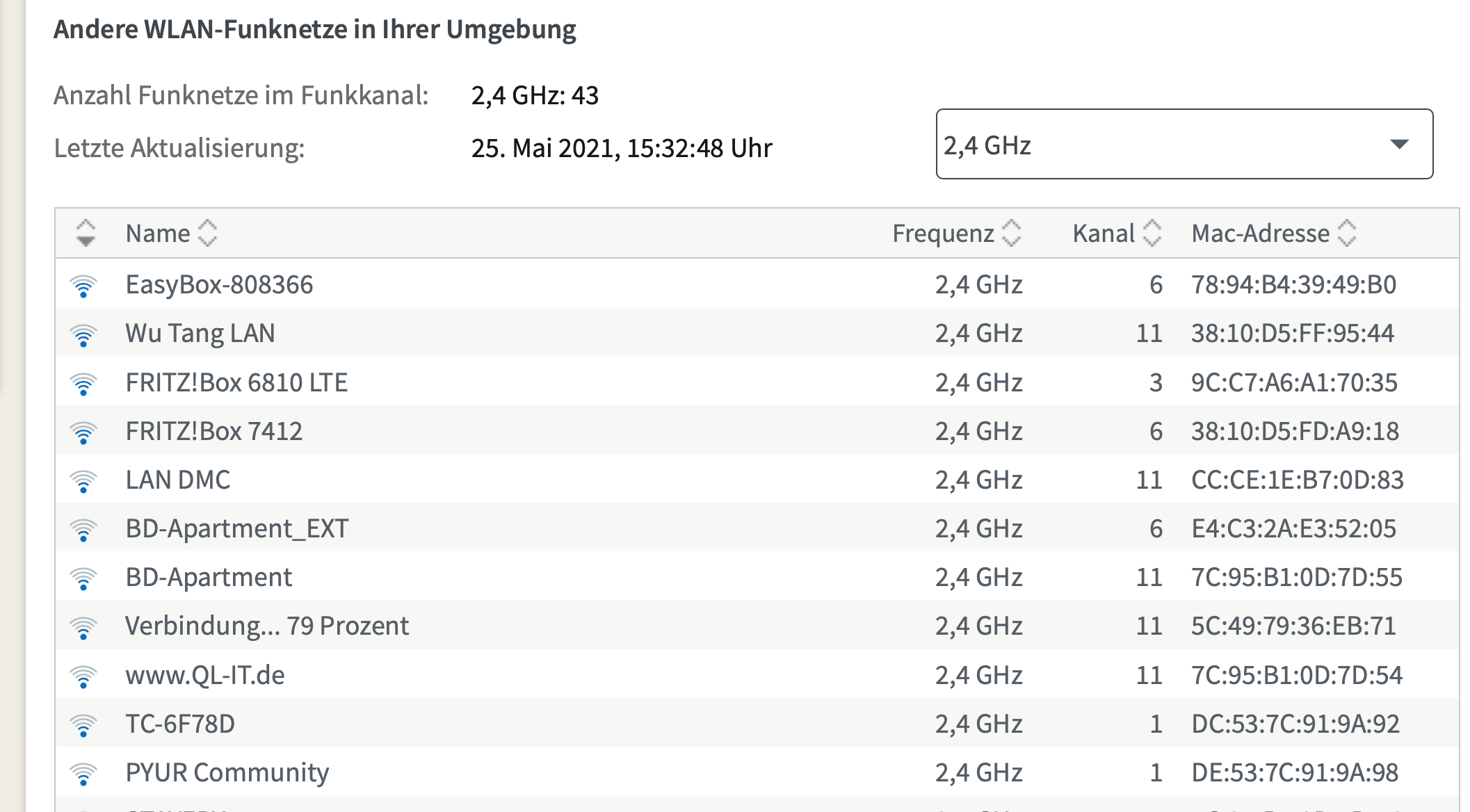
I checked with the FRITZBox which channel has the least amount of devices and the strongest other accesspoints seem to be on channels 6 and 11.

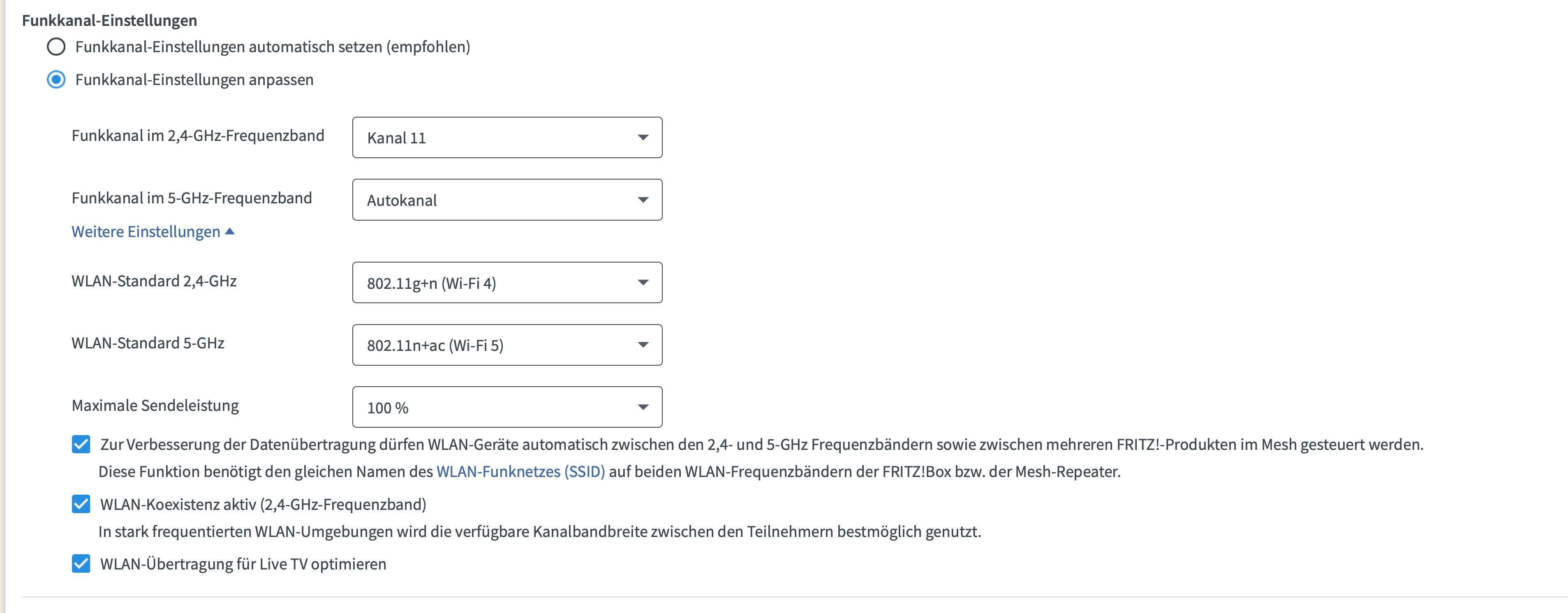
In the app, i set SonosNet to Channel 1 and my router to Channel 11.
 

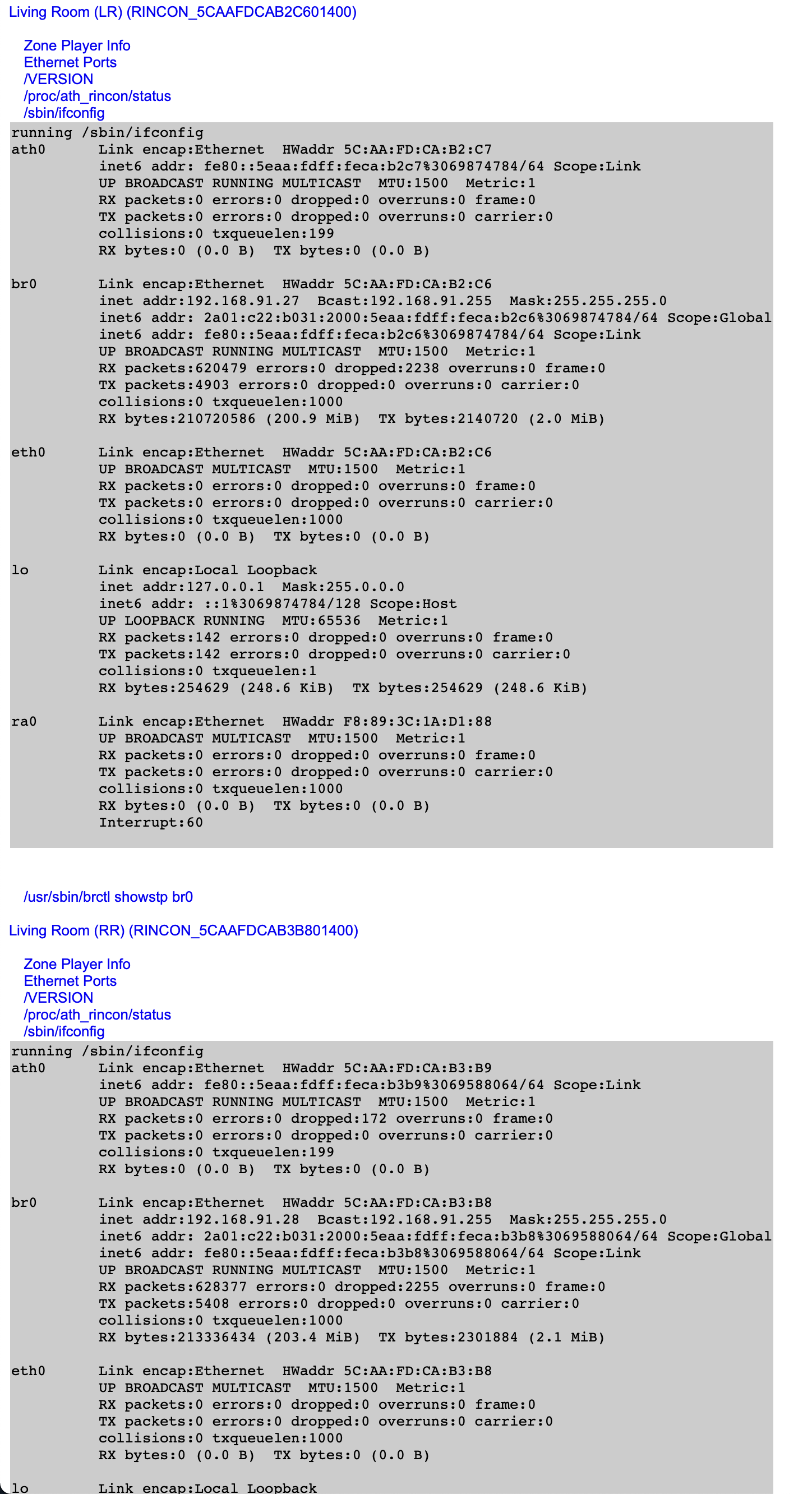
However, no matter what SonosNet channel i pick, i still have a lot of dropped packets in the /support/review site.
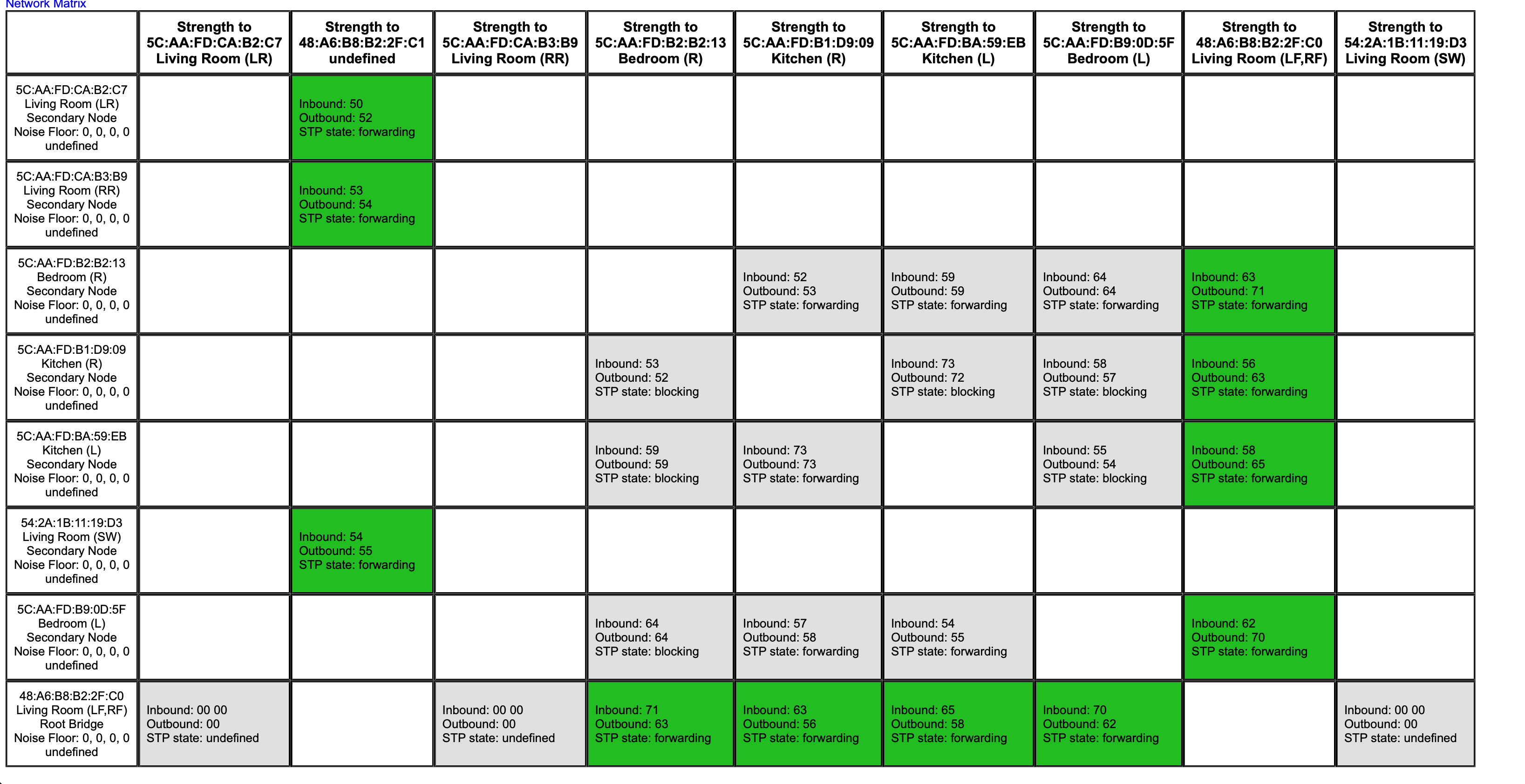


I’m left with two ideas:

  1. don’t use SonosNet
  2. hardwire the rears

Both of which i would rather no do if the problem can be solved by a different way.


What’s the suggested approach to fix this? Could this also be a hardware defect by the Arc or something?

Is there any way to find more information about why a lot of packets get dropped?


Thanks

This topic has been closed for further comments. You can use the search bar to find a similar topic, or create a new one by clicking Create Topic at the top of the page.
Best answer by Corry P

Hi @breiti 

Yes - I saw dropped packets between the Arc and each of the satellites. I would not make the call that disabling 5GHz on your router did not help until I have seen diagnostics from the Arc confirming it (you may still get interruptions but the packet error rate may be reduced, suggesting that you’re part-way there but have more to do). The ifconfig pages you posted above do not indicate how the PER changes over time.

The problem with disabling 5GHz is that you restrict your internet access speed to the maximum that 2.4GHz can support, which may be lower than the internet connection speed you’re paying for. This is why it’s recommended to move the router.

HDMI switches such as the HD Fury Arcana are not supported, but I consulted with a colleague and if there were decoding issues the Arc would drop audio too, so I think we’re back to interference.

I recommend you get in touch with our technical support team, to go through some real-time troubleshooting/data-gathering steps with you. They’ll be very likely to suggest moving the router once they find out where it is, however. I understand that you’ve altered the cabinet so that you can keep your router tidy, but I highly recommend at least moving it temporarily to test if it helps. If it does help, nothing we can do will produce the same result - the router and Arc are just too close. If moving the router doesn’t help, then we’ve discounted the most probable cause and can move on to other possibilities.


14 replies

breitiAuthor
Trending Lyricist I
May 25, 2021

Just did the reboot dance - dropped packets rate still about the same (as expected).

Corry P
Sonos Staff
May 26, 2021

Hi @breiti 

Have you moved your router? I would expect no improvement on dropped packets until this is done.

I also saw some decoding errors on your Arc - I wonder if the problem is with the stream itself, and not the act of getting it to the surrounds? Please unplug your TV from power for at least 30 seconds.

Once it’s back on, please test again and submit new diagnostics immediately after hearing any issues. Thanks.

Please also try playing different audio formats to see if the problem is specific to just one.

"Common sense is the collection of prejudices acquired by age eighteen." - Albert Einstein
breitiAuthor
Trending Lyricist I
May 26, 2021

Hi @Corry P,

Have you moved your router? I would expect no improvement on dropped packets until this is done.

No. I drilled Holes in the tv board and have cables running through the wall (e.g. the Arc’s Ethernet cable) - so it’s not trivial. But as you said Arc+Sub+LS+RS are communicating on 5GHz… do you think there is a high chance of this actually helping - even turning off the 5Ghz radio of the router didn’t change anything? Because i personally would rule the router out for now based on this?


I also saw some decoding errors on your Arc - I wonder if the problem is with the stream itself, and not the act of getting it to the surrounds? Please unplug your TV from power for at least 30 seconds.

I use HDfury Arcana to avoid any funnyness with the TVs crappy firmware. So i think decoding errors would be coming from either the Apple TV 4k (2nd gen / tvOS 14.6) or the Arcana (don’t think so - they claim they don’t touch the actual stream). However - i have this problem since forever and in that timeframe, i obv. powercycled and switched basically everydevice. I upgraded my TV, i upgraded the Apple TV - but still the slight dropouts never gone away.


Please also try playing different audio formats to see if the problem is specific to just one.

As in 5.1 instead of Dolby Atmos?


Additional questions:

Your surrounds and Sub, however, communicate with the Arc over 5GHz and are having trouble doing so.

What did you mean by that exactly? Did you also see a lot of dropped packets?


I also saw some decoding errors on your Arc

Decoding happenes on the Arc itself right? So this would indicate also more of an Arc problem i guess, esp. since i changed the streaming hardware (upgraded ATV4k 1st gen to 2nd gen)?

Corry P
Corry PAnswer
Sonos Staff
May 26, 2021

Hi @breiti 

Yes - I saw dropped packets between the Arc and each of the satellites. I would not make the call that disabling 5GHz on your router did not help until I have seen diagnostics from the Arc confirming it (you may still get interruptions but the packet error rate may be reduced, suggesting that you’re part-way there but have more to do). The ifconfig pages you posted above do not indicate how the PER changes over time.

The problem with disabling 5GHz is that you restrict your internet access speed to the maximum that 2.4GHz can support, which may be lower than the internet connection speed you’re paying for. This is why it’s recommended to move the router.

HDMI switches such as the HD Fury Arcana are not supported, but I consulted with a colleague and if there were decoding issues the Arc would drop audio too, so I think we’re back to interference.

I recommend you get in touch with our technical support team, to go through some real-time troubleshooting/data-gathering steps with you. They’ll be very likely to suggest moving the router once they find out where it is, however. I understand that you’ve altered the cabinet so that you can keep your router tidy, but I highly recommend at least moving it temporarily to test if it helps. If it does help, nothing we can do will produce the same result - the router and Arc are just too close. If moving the router doesn’t help, then we’ve discounted the most probable cause and can move on to other possibilities.


"Common sense is the collection of prejudices acquired by age eighteen." - Albert Einstein