
Contributor I
December 27, 2022
Answered

Port / Turntable Help!

  • December 27, 2022
  • 24 replies
  • 253 views

Hi !

I just received a new Port to work with my Pro-Ject turntable ( purchased at Sonos...)

All seems well, easy to set up and recognized. Line-in is all set up in my Sonos Input Services. Lights are all white on my Port….. I even checked all my System Preferences, and it all seems in-line.

The hitch, there is no sound. It looks like it is playing in all rooms, etc…..

HELP!!

Thx, Jim
This topic has been closed for further comments. You can use the search bar to find a similar topic, or create a new one by clicking Create Topic at the top of the page.
Best answer by jgatie

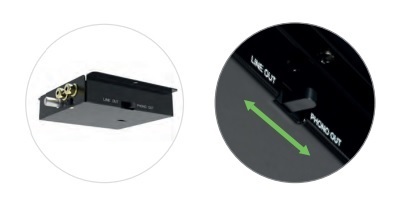
That would be the T1 SB.  The switch is on the right side of the connections box on the rear of the turntable.  


24 replies

buzz
Grand Maestro
December 31, 2022

Audio does not automatically pass through PORT as you might expect from traditional audio gear. The turntable is simply an audio source on the network. You must explicitly select this source (as you would select an Internet radio station or audio track), even when listening through an amplifier connected to PORT.

Lyricist I
December 31, 2022

I have selected in-line in the app and it appears to be playing but there is still no sound coming from my Symfonisk lamp


buzz
Grand Maestro
December 31, 2022

Start reviewing silly things, such as no power for the preamp or using the wrong set of jacks on PORT or preamp. Make sure that the RCA plugs are fully seated.

Lyricist I
December 31, 2022

Start reviewing silly things, such as no power for the preamp or using the wrong set of jacks on PORT or preamp. Make sure that the RCA plugs are fully seated.

Well what do you know! Turned out to be a silly thing 🙈 I thought the RCA plugs were quite loose. Turns out I need to give them a good push to seat  them properly. THANK YOU! 🙏🏽