

Stuart_W
World-Class Superstar
November 16, 2021

Music Library Drop Outs

  • November 16, 2021
  • 6 replies
  • 188 views

Today and yesterday have had lots of drop-outs whilst listening to music on My Library.

My system components as per my signature. Music is stored on a NAS wired to the router. Basically music kept stopping and then skipping forward. Finally had enough so turned all Sonos units off and re-started the router and then the Sonos units nominally nearest first.


But that hasn’t solved the problem. The diagnostic after that latest failure is 2013370740

This is the matrix. The room I’m “working” in is “Study” but I also had drop-outs in the “Dining Room”. To my untrained eye it looks horrible!
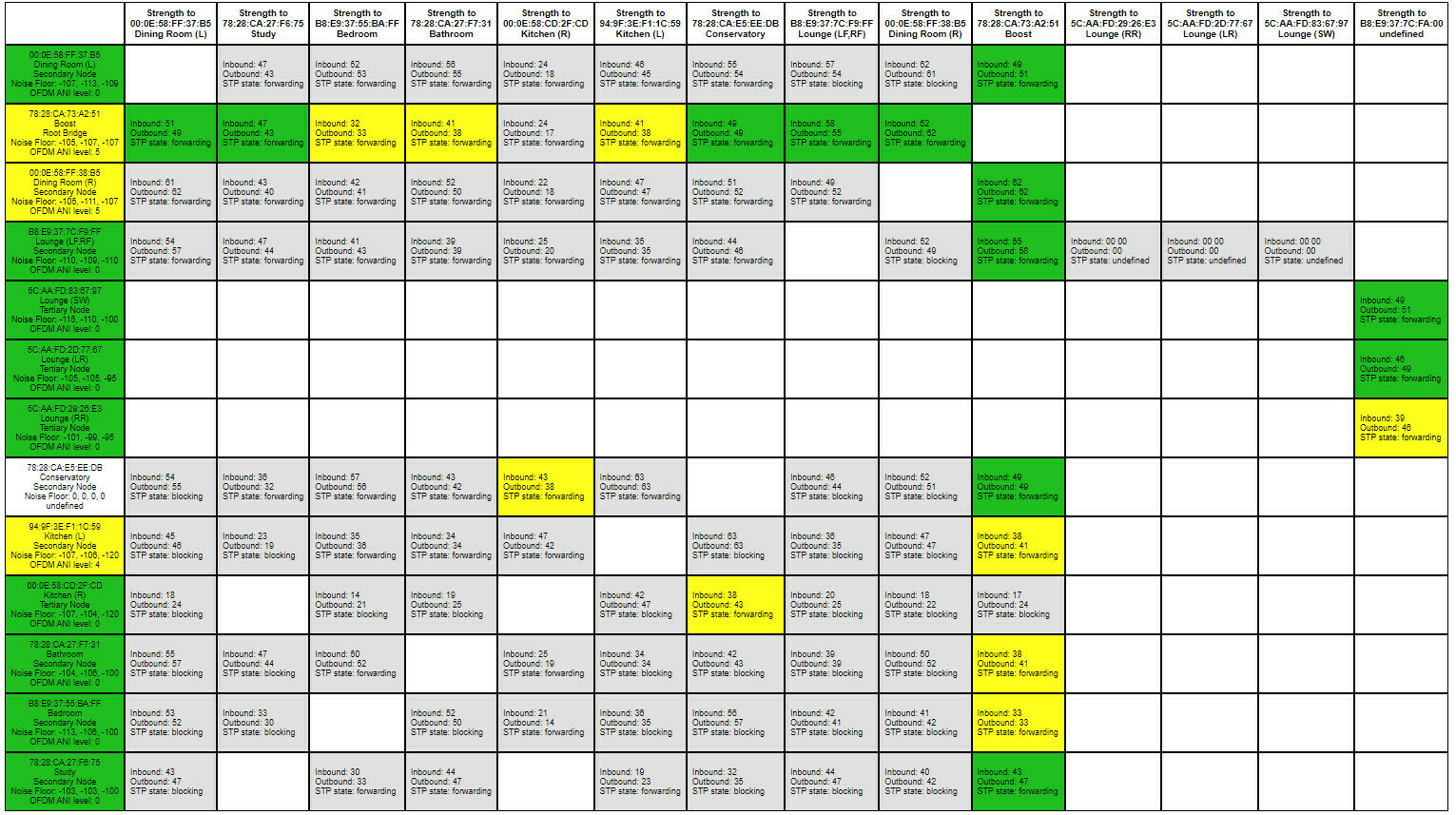
 

I did have an issue with my work computer and wireless connecting to the internet which was likely due to wireless interference. That was resolved by getting a couple of Powerline adapters. They won’t have got rid of the interference of course but it is only the last few days been having horrible drop-outs

It certainly seems more prevalent streaming my music library than TuneIn or Sonos Radio

All and any advice greatly welcomed

    This topic has been closed for further comments. You can use the search bar to find a similar topic, or create a new one by clicking Create Topic at the top of the page.

    6 replies

    James L.
    Retired Community Staff
    November 16, 2021

    Hey @Stuart_W,


    Taking a look at your diagnostic, I can see quite a high level of interference between your Dining Room speakers and your Boost. This is likely what’s causing the dropouts. I can see that communication between those units is not the best, dropping around 40% of the packets per minute.

    The interference appears to be in the 2.4GHz spectrum, so it’s more likely to be other clashing devices rather than structural or distance related.

    The Boost also looks like it’s having trouble communicating with your Conservatory too, but that’s not part of the group.

    Let’s try changing the group coordinator of that group of players. Ungroup all of the players, then, go to the rooms tab and select Study, and add the grouped players in from there. Test playback for a while and let me know how things go. :slight_smile:

    Mark good posts by pressing the like button, and select the best answer on questions you've asked to help others find solutions.
    ratty
    November 16, 2021

    To my untrained eye your matrix doesn’t look horrible at all. In fact it looks pretty good everywhere, though it is just a snapshot.

    EDIT: James is on the case. 

    Stuart_W
    Stuart_WAuthor
    World-Class Superstar
    November 16, 2021

    Many thanks.

    I tried this and the music cut out part way through the first song. Diagnostic 1251806946

    The Dining Room speakers are quite close to the router and Boost - the router and boost being in a cupboard under the stairs and the Play 3s being on a desk just to the left of the door to said cupboard so we’re talking less than 3 yards between Boost and Dining Room with router in between.

    I then unplugged the new TV unit to eliminate and tried again but no much different. Playing Study on own seems ok but group with Kitchen and Dining Room and it drops. Now just after I switched off TV unit I noted Dining Room Left had dropped off (red x in app) so re-started that speaker - query speaker fault.

    Second diagnostic:- 1979304054

    Latest matrix


    Arc + Sub (Gen 1) + 2 x Play 1/ Stereo Play 3s/ Era 100 Stereo in Kitchen, One Stereo in Bedroom, Play 1 stereo pair in Study, Play 1in Bathroom, Sonos Move 2
    Stuart_W
    Stuart_WAuthor
    World-Class Superstar
    November 16, 2021

    Ran it for 10 minutes on Study only and was fine. Added in Dining Room and again fine for 7 or 8 minutes then added Kitchen and playback stopped after a few minutes - app had message saying Playback interrupted because Wi-Fi unstable.


    Diagnostic:- 744581075

    Arc + Sub (Gen 1) + 2 x Play 1/ Stereo Play 3s/ Era 100 Stereo in Kitchen, One Stereo in Bedroom, Play 1 stereo pair in Study, Play 1in Bathroom, Sonos Move 2
    Stuart_W
    Stuart_WAuthor
    World-Class Superstar
    November 18, 2021

    @James L. 


    Any useful pointers in those diagnostics?

    Arc + Sub (Gen 1) + 2 x Play 1/ Stereo Play 3s/ Era 100 Stereo in Kitchen, One Stereo in Bedroom, Play 1 stereo pair in Study, Play 1in Bathroom, Sonos Move 2
    James L.
    Retired Community Staff
    November 22, 2021

    Apologies for the delay @Stuart_W,


    I can still see the high interference across pretty much all rooms in the group, and the reported issue for the dropout was a buffering error - specifically, that connection dropped between the player and the music source for over 12 seconds. That definitely indicates some form of connection error between the NAS drive and Sonos. I’m limited in the amount of troubleshooting I can perform here, since this isn’t a live platform, so I’d suggest getting in touch with our care team. You can tell them that you’ve been working with me on the Community and they can reach out to me with any questions.

    Mark good posts by pressing the like button, and select the best answer on questions you've asked to help others find solutions.