
Contributor I
January 1, 2025
Answered

How to play output from my Yamaha receiver—via Connect (Gen 2)—through Sonos Play1 speaker

  • January 1, 2025
  • 13 replies
  • 897 views

After searching threads on this site, I am STILL unable to successfully play radio output from my Yamaha receiver, (RX-V373) via a Sonos Connect (S15, Gen 2 mfg 05/2019), to play through my Play:1 and/or Roam SL speakers.

Once I get this working, I’ll hook up my turntable (unamplified) and CD player to it.

Here’s a photo of the back of my receiver. I have tried RCA cables connected to the Audio Out jacks (lower right hand corner of the photo)

In each case, I’ve connected them to the Analog Audio “In” jacks on the Sonos Connect.
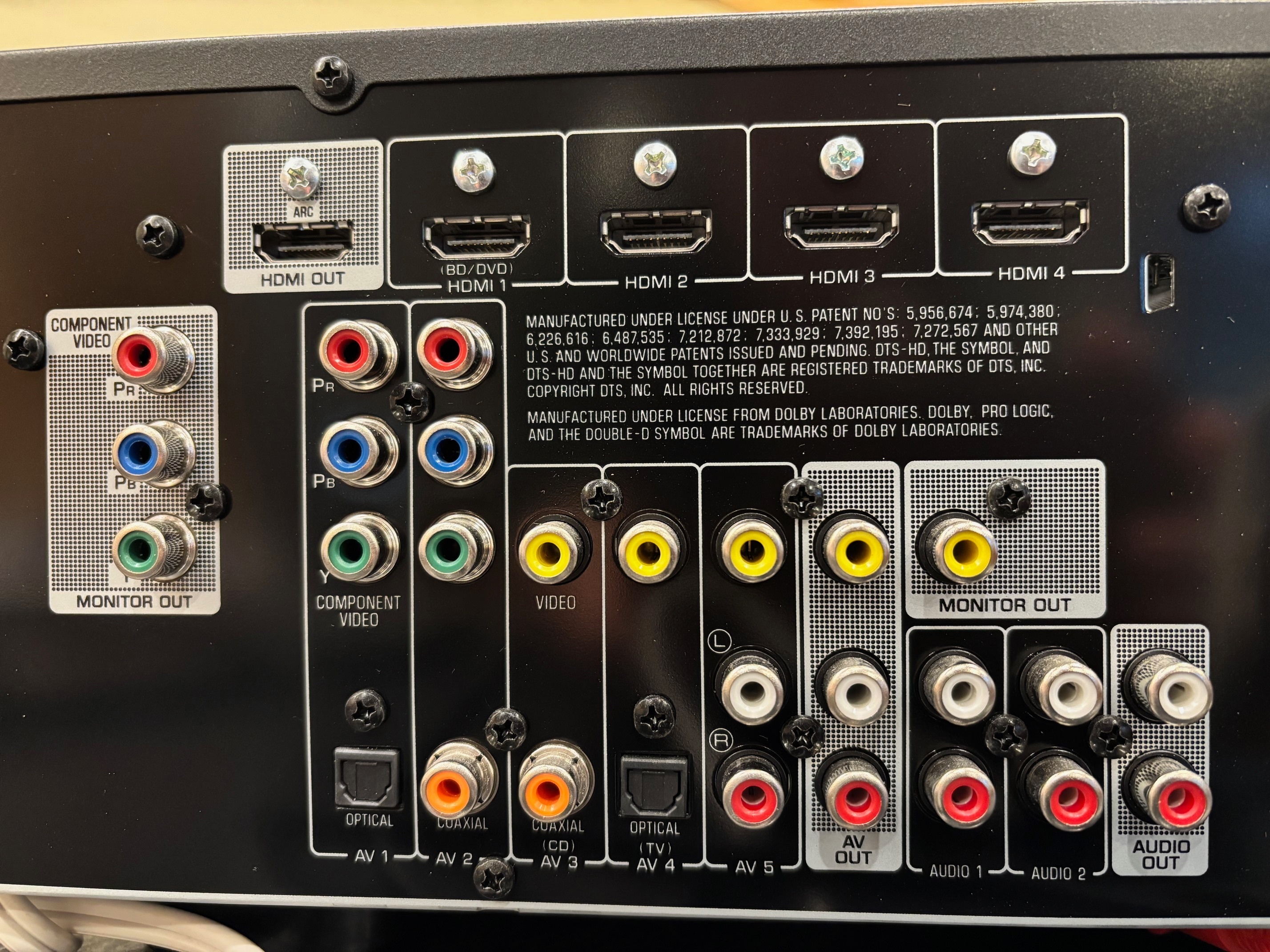
 My Overall System has 3 components:

Living Room: Play1

Living Room: Connect (Model S15, manufactured 05/2019)

Living Room: Roam SL

Connect menu shows the Line-in is connected.

The Line-Out only has a choice for Line-Out Level (I chose “variable”).


I’m clearly missing something crucial!

Thanks!

 

This topic has been closed for further comments. You can use the search bar to find a similar topic, or create a new one by clicking Create Topic at the top of the page.
Best answer by buzz

In the SONOS Room that you want to play the receiver select Line-In.

13 replies

buzz
buzzAnswer
January 2, 2025

In the SONOS Room that you want to play the receiver select Line-In.

sherryWRJAuthor
Contributor I
January 7, 2025

Yes, I’m using RCA to RCA cables and selecting “Line-In” in the SONOS room I want to play in. 

Have selected the “source” (on the receiver) that goes to the “output”. Have tried AV Out connection with source again appropriately selected.

Still no resolution of this issue and still working on it in a variety of ways including trying to get info from Yamaha Customer Service, and getting some headphones and a wired speaker to check outputs.

sherryWRJAuthor
Contributor I
January 12, 2025

Update:

First I deleted my entire 3-part Sonos “system” and reinstalled it.

Then I tried hooking our CD player directly to the Connect and it played! Amazing!

Then, I tested our receiver with a pair of headphones through the phono jack (I could hear the tuner, so knew it was okay). Hooked it up to the Connect (via the audio out RCA jacks) and lo and behold, it played through the speakers!

​@buzz, fortunately, as you mentioned, the Audio Out jacks do NOT respond to the receiver’s volume control.

Finally, I hooked the CD player up to the receiver’s AV5 input and it played through the SONOS speaker. Now I know I can get a non-amp turntable.

Bottom line: The solution was deleting the entire system and setting it back up again.

Thank you to all who helped me get this puzzle solved!