
Avid Contributor I
December 19, 2021

Here we go again...

  • December 19, 2021
  • 67 replies
  • 1599 views

Yet again the wonderfully robust and user friendly software messes up my day. 

The Sonos software and update process is a piece of junk, there’s imply no way it should behave as it is, the lack of attention to detail is astonishing.

The hoops we have to jump through to get something working is absurd.

Of course to complain means I’ll get asked lots of questions, I’ll be asked to unplug this and that, connect this or that to something else with a piece of cable and so on and so forth, all the burden is on the customer.

I tried to update because the PS controller software insists that I update, yet it always fails. If I try the same update from my iPhone, again it fails.

The iPhone fails (I think) because the controller is “not S2 compatible” whatever that means. The PC software is not S2 yet that also fails and the error code I get varies each time.

e.g. “Error code 30: BRIDGE” or “Error code 1002: BRIDGE”.

If these error codes mean something then why not pull down the message text and display it in the controller software???

Everything was working but I have a Roam that fully discharged, I recharged it yet it was not visible in either the PC controller or the iPhone controller, as I tried to get more insight it kept suggesting I update so I tried.

Now the system can’t find jack s**t, it cannot see even one of the devices.

I submitted a diagnostic and the code I got back was: 703555998 perhaps that can shed light.

I’m a very experienced software engineer so before people rush in to defend Sonos don’t bother, this is abysmal, with today’s technology the customer experience can be far far better than it is.

Now I have no system, can listen to no music and was planning on a restful Christmas alone this year to do some reading and studying, without Sonos this really messes up what would have been a restful period for me.


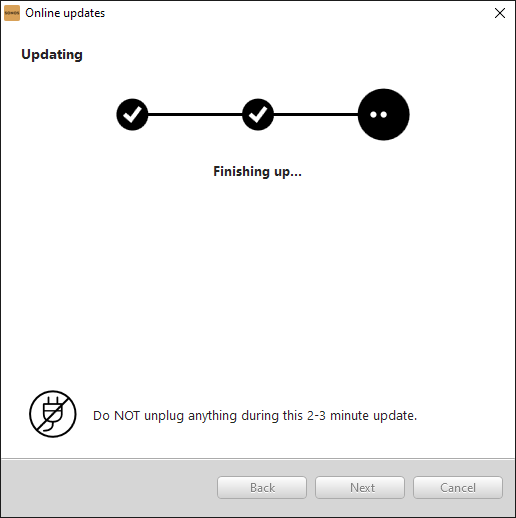
The update almost works, I get this far:
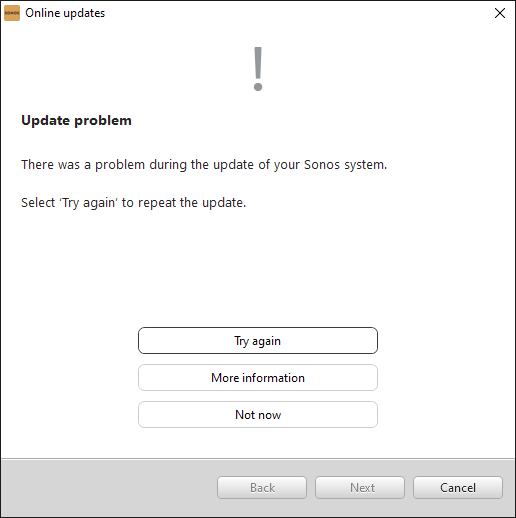
but then I get this:


“More information” gives this:
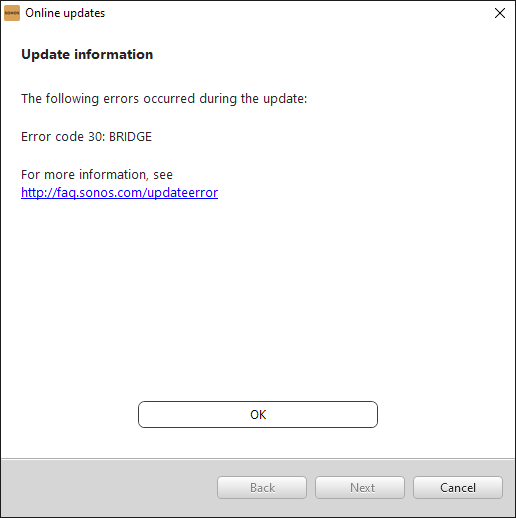


and that’s pretty much that!

Now I’m stuck with this:
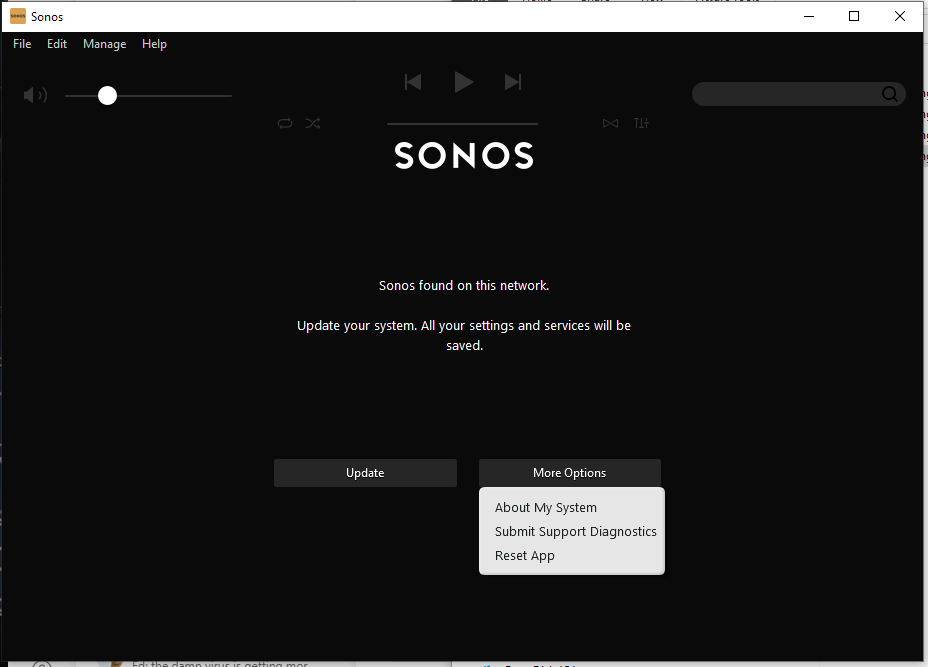
See? I cannot choose “Just continue running with current version” why? 

This update is something I CHOSE to try (because the Roam was not working) so by definition the existing version did work - at least - with the non-roam devices.

This is a one way trap door, the system works with some version, one tries to install an updated version - that fails - yet it is no longer possible to run with the older version - even though it was working!


    This topic has been closed for further comments. You can use the search bar to find a similar topic, or create a new one by clicking Create Topic at the top of the page.

    67 replies

    KorporalAuthor
    Avid Contributor I
    December 20, 2021

    OK I can see that all the PLAY3 devices are connected to the SSID in the house - HighChaparral - despite the app knowing only about HighChaparral_2GEXT.

    Even the PLAY3 devices in the casita (where HighChaparral is weak and HighChaparral_2GEXT is strong) are connected to HighChaparral the weaker of the two SSIDs.

    Those devices were connected using the phone while I was in the casita too.

    This is so so bewildering...

    KorporalAuthor
    Avid Contributor I
    December 20, 2021

    I would just call your router and extender access points HighChapparall_2G for their 2.4Ghz bands and set those to fixed channel 11, rather than ‘Auto’. 

    Similarly, just call your router and extender access points HighChapparall_5G for their 5Ghz bands and set those to fixed channel(s) too, rather than ‘Auto’.   

    Add both bands/SSID’s to your Sonos App network settings as mentioned previously - if problems persist, then it will likely be that SSDP multicast discovery/broadcast is not working correctly over the entire subnet, either between the two bands, and/or between the two different access points, which is not unheard of with a few devices …and there maybe other settings available on your router/access point that ‘may’ need to be set, such as IGMP snooping, or in some cases you may have to enable multicast and broadcast data if that is set to ‘disabled’ on the device by default ( …just as examples of some device settings).

    Finally, channel 1 for SonosNet for all the non-portable Sonos devices should be fine.

    I hope that information assists.

    Thanks Ken, I will play around with this some more, but my wife and I also use the wifi for work and I’m hesitant to make adjustments like this sometimes, hate to mess up everything else that’s working.

    So in your experience its fine to have the SSID the same for the router and the extender? (for a given frequency band I mean).

    We have TVS and stuff all setup so adjusting these name is possible, it might be my best bet for now to just adjust the HighChaparral_2GEXT in the extender to be named HighChaparral the router also only supports 2.4 GHz.

    That way only casita stuff might be impacted and the only 5G access anyway is via the extender so leaving that as is makes sense.


    KorporalAuthor
    Avid Contributor I
    December 20, 2021

    Next year I’m gonna dump that old gateway (DSL, but that’s my only option) and get the newer ones that support 5G too.

    Ken_Griffiths
    December 20, 2021

    OK I can see that all the PLAY3 devices are connected to the SSID in the house - HighChaparral - despite the app knowing only about HighChaparral_2GEXT.

    Even the PLAY3 devices in the casita (where HighChaparral is weak and HighChaparral_2GEXT is strong) are connected to HighChaparral the weaker of the two SSIDs.

    Those devices were connected using the phone while I was in the casita too.

    This is so so bewildering...

    Aren’t those non-portable devices using a SonosNet signal? I thought you had one device wired?

    Ken_Griffiths
    December 20, 2021

    I would just call your router and extender access points HighChapparall_2G for their 2.4Ghz bands and set those to fixed channel 11, rather than ‘Auto’. 

    Similarly, just call your router and extender access points HighChapparall_5G for their 5Ghz bands and set those to fixed channel(s) too, rather than ‘Auto’.   

    Add both bands/SSID’s to your Sonos App network settings as mentioned previously - if problems persist, then it will likely be that SSDP multicast discovery/broadcast is not working correctly over the entire subnet, either between the two bands, and/or between the two different access points, which is not unheard of with a few devices …and there maybe other settings available on your router/access point that ‘may’ need to be set, such as IGMP snooping, or in some cases you may have to enable multicast and broadcast data if that is set to ‘disabled’ on the device by default ( …just as examples of some device settings).

    Finally, channel 1 for SonosNet for all the non-portable Sonos devices should be fine.

    I hope that information assists.

    Thanks Ken, I will play around with this some more, but my wife and I also use the wifi for work and I’m hesitant to make adjustments like this sometimes, hate to mess up everything else that’s working.

    So in your experience its fine to have the SSID the same for the router and the extender? (for a given frequency band I mean).

    We have TVS and stuff all setup so adjusting these name is possible, it might be my best bet for now to just adjust the HighChaparral_2GEXT in the extender to be named HighChaparral the router also only supports 2.4 GHz.

    That way only casita stuff might be impacted and the only 5G access anyway is via the extender so leaving that as is makes sense.


    In the past all my WiFi access points had the same name/SSID for their 2.4Ghz band - Localnet_2G …and the 5Ghz band was called - Localnet_5G, I didn’t want my ‘Move’ device to use the 2.4Ghz band, so I put that on the 5Ghz band only. I therefore just added the Localnet_5G to my Sonos system via the network settings in the App.. however all my non-portable devices ran on SonosNet, rather than my WiFi - I just mainly used the access points for connecting my controller (and the Move) to the LAN.

    Of course network changes can take a while to do sometimes - I’m just offering some suggestions but it’s entirely upto you what bits you choose to take onboard - I’m just trying to provide you with some suggestions, that’s all.👍

    December 20, 2021

    I think having the casita 2.4GHz SSID and password the same as that for the main router is the way to go.  Then have that as the only network in the Sonos app.

    @Korporal - please then check in the app Settings under ‘About My System’.  All the speakers should have WM=0 next to them (indicates SonosNet) except for the Move, which should show WM=1.

    KorporalAuthor
    Avid Contributor I
    December 21, 2021

    OK I can see that all the PLAY3 devices are connected to the SSID in the house - HighChaparral - despite the app knowing only about HighChaparral_2GEXT.

    Even the PLAY3 devices in the casita (where HighChaparral is weak and HighChaparral_2GEXT is strong) are connected to HighChaparral the weaker of the two SSIDs.

    Those devices were connected using the phone while I was in the casita too.

    This is so so bewildering...

    Aren’t those non-portable devices using a SonosNet signal? I thought you had one device wired?


    Yes, that’s interesting I may have been hasty, I just checked again here’s what I actually see:


    Three zone players connected to the network:


    Now, this is most odd:


    According to the router the same three zone players are all connected via ethernet not wifi !!

    But only one is connected by cable the other two are definitely connected over wifi, they are in the casita with me now!

    So this is the actual status of these.

    I am supposing that the wired device is well, wired and the other two are connecting to that unit over the artifical “SonosNet” wifi network that I saw mentioned during setup, that is “mesh” I am guessing, the wired PLAY3 is generating a distinct SSID (but I can’t see it listed on my phone...)

    For that reason they appear as devices that are connected via the physical LAN cable, this seems to explain what I’m seeing.


    KorporalAuthor
    Avid Contributor I
    December 21, 2021
    KorporalAuthor
    Avid Contributor I
    December 21, 2021

    I would just call your router and extender access points HighChapparall_2G for their 2.4Ghz bands and set those to fixed channel 11, rather than ‘Auto’. 

    Similarly, just call your router and extender access points HighChapparall_5G for their 5Ghz bands and set those to fixed channel(s) too, rather than ‘Auto’.   

    Add both bands/SSID’s to your Sonos App network settings as mentioned previously - if problems persist, then it will likely be that SSDP multicast discovery/broadcast is not working correctly over the entire subnet, either between the two bands, and/or between the two different access points, which is not unheard of with a few devices …and there maybe other settings available on your router/access point that ‘may’ need to be set, such as IGMP snooping, or in some cases you may have to enable multicast and broadcast data if that is set to ‘disabled’ on the device by default ( …just as examples of some device settings).

    Finally, channel 1 for SonosNet for all the non-portable Sonos devices should be fine.

    I hope that information assists.

    Thanks Ken, I will play around with this some more, but my wife and I also use the wifi for work and I’m hesitant to make adjustments like this sometimes, hate to mess up everything else that’s working.

    So in your experience its fine to have the SSID the same for the router and the extender? (for a given frequency band I mean).

    We have TVS and stuff all setup so adjusting these name is possible, it might be my best bet for now to just adjust the HighChaparral_2GEXT in the extender to be named HighChaparral the router also only supports 2.4 GHz.

    That way only casita stuff might be impacted and the only 5G access anyway is via the extender so leaving that as is makes sense.


    In the past all my WiFi access points had the same name/SSID for their 2.4Ghz band - Localnet_2G …and the 5Ghz band was called - Localnet_5G, I didn’t want my ‘Move’ device to use the 2.4Ghz band, so I put that on the 5Ghz band only. I therefore just added the Localnet_5G to my Sonos system via the network settings in the App.. however all my non-portable devices ran on SonosNet, rather than my WiFi - I just mainly used the access points for connecting my controller (and the Move) to the LAN.

    Of course network changes can take a while to do sometimes - I’m just offering some suggestions but it’s entirely upto you what bits you choose to take onboard - I’m just trying to provide you with some suggestions, that’s all.👍


    Thanks Ken, I do appreciate your help here, despite my grumbling, none of that is directed at you of course, just expressing my frustration!


    Thanks


    KorporalAuthor
    Avid Contributor I
    December 21, 2021

    I think having the casita 2.4GHz SSID and password the same as that for the main router is the way to go.  Then have that as the only network in the Sonos app.

    @Korporal - please then check in the app Settings under ‘About My System’.  All the speakers should have WM=0 next to them (indicates SonosNet) except for the Move, which should show WM=1.


    OK they do all have WM:0 (all three) as for the ROAM that is yet to appear, it has not appeared on the network despite many attempts.

    I’ll do as suggested later, rename the extender SSID for 2.4 GHZ to be the same as main gateway’s SSID (they already share the same password).


    Thx