
Renowned Enthusiast I
April 6, 2020
Answered

Help with these undefined items? Some Red?
  • April 6, 2020
  • 13 replies
  • 537 views

Hello.  Folks here have been very helpful.  Thank you for that.  May I ask for some help?

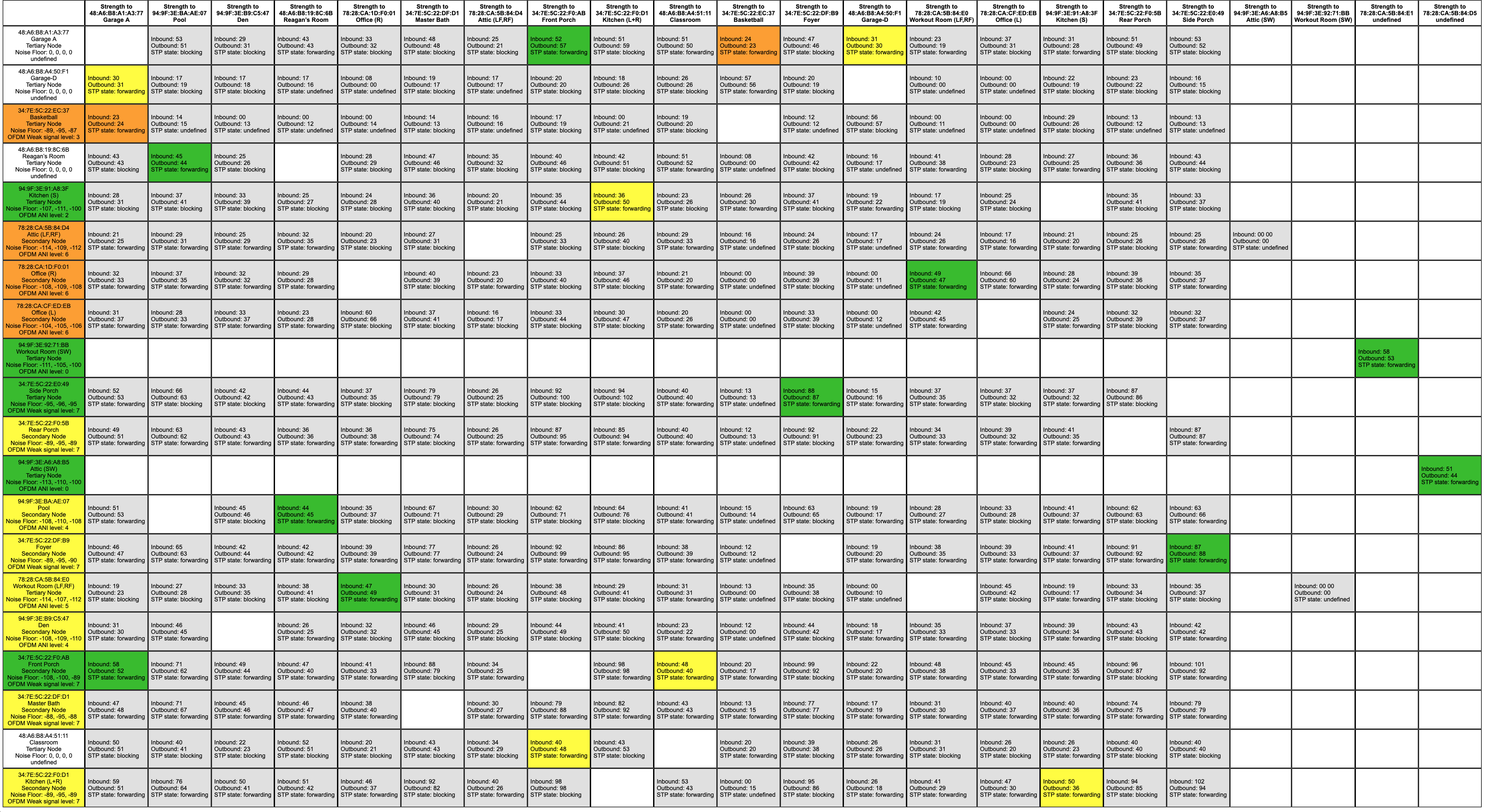
I recently added 4 new devices to my Sonos set-up.  They are noted here as Reagan’s Room, Classroom, and GarageA and Garage D.  

Only these new devices seem to be coming back as Undefined and in white boxes.  I’ve tried to find whether this is normal or important (problem) and I’m confused.  Is this a problem?

I have some devices by ethernet where I can and others relying on wireless.  

The only issues I’ve had involve:


  1. I had two drop-outs of audio last week for about 30 seconds.
  2. I’ve had issues where my Sonos controller on the iPhone (the one I use the most) is very slow to connect to the entire system and even play/pause seems to have glitches.  Had to re-start the app a few times.


Otherwise, I’ve tended to play just fine.  Some of my “orange” zones go back/forth between red/orange/green (connected by ethernet) but I haven’t worried to much about them as otherwise all seemed to work.


Thank you!

    This topic has been closed for further comments. You can use the search bar to find a similar topic, or create a new one by clicking Create Topic at the top of the page.
    Best answer by ratty

    The white “undefined” boxes in the left column are the latest Sonos models. They have an updated wireless module, which doesn’t report ambient noise data in a form that can be used in the matrix.

    13 replies

    Renowned Enthusiast I
    April 6, 2020

    Forgot to post my matrix.  Should be attached.

    ratty
    rattyAnswer
    April 6, 2020

    The white “undefined” boxes in the left column are the latest Sonos models. They have an updated wireless module, which doesn’t report ambient noise data in a form that can be used in the matrix.

    Contributor I
    January 13, 2021

    Sorry to reopen an oldish thread.


    I have just added a new Amp to my system. That shows as undefined in the matrix but thanks to your answer above I now know that’s correct.

    what I was wondering is why, despite being connected via a Boost, the Amp shows up on my BT HomeHub, whereas all other devices are, for want of a better phrase, hidden behind the Boost.

    is that also due to the way the different wifi module works? Or is something wrong?

    ratty
    January 13, 2021

    what I was wondering is why, despite being connected via a Boost, the Amp shows up on my BT HomeHub, whereas all other devices are, for want of a better phrase, hidden behind the Boost.

    is that also due to the way the different wifi module works? Or is something wrong?

    You mean the Amp is connecting via WiFi rather than SonosNet? What does the WM parameter show for it, in About My System?

    Contributor I
    January 13, 2021

    Sorry should have been clearer. And also realised it’s not a Wi-fi question. Doh!

    My Boost is connected to the Home hub via Ethernet. When I look at the connected devices on the HH it shows 2 devices on the Ethernet port, the Boost and the Amp. But none of the other devices, 3 x Play:3, 2 x Play:1, Sub or Playbase, show. 

    ratty
    January 13, 2021

    Do you mean the DHCP client table? Perhaps those units haven’t refreshed their IP lease since a HH restart? 

    If they’re working okay I’d just ignore it. HHs have their quirks...

    Contributor I
    January 13, 2021

    Think I’ve added a picture but doesn’t show to me.


    ratty
    January 13, 2021

    I haven’t poked around in my HH6 for ages, but as I recall that display wasn’t always accurate. If the other Sonos devices are accessible from a controller then they have IP addresses and are happily online.

    January 13, 2021

    May I repeat @ratty ‘s question and ask whether your Sonos devices show as WM:0 or WM:1 in About my System

    ratty
    January 13, 2021

    Or click on the “Wireless Connections” button on the HH status display.