
Contributor I
January 15, 2021

Dropouts in party mode

  • January 15, 2021
  • 14 replies
  • 289 views

 I keep getting dropouts in party mode. Rarely any errors reported in the app that I can see.

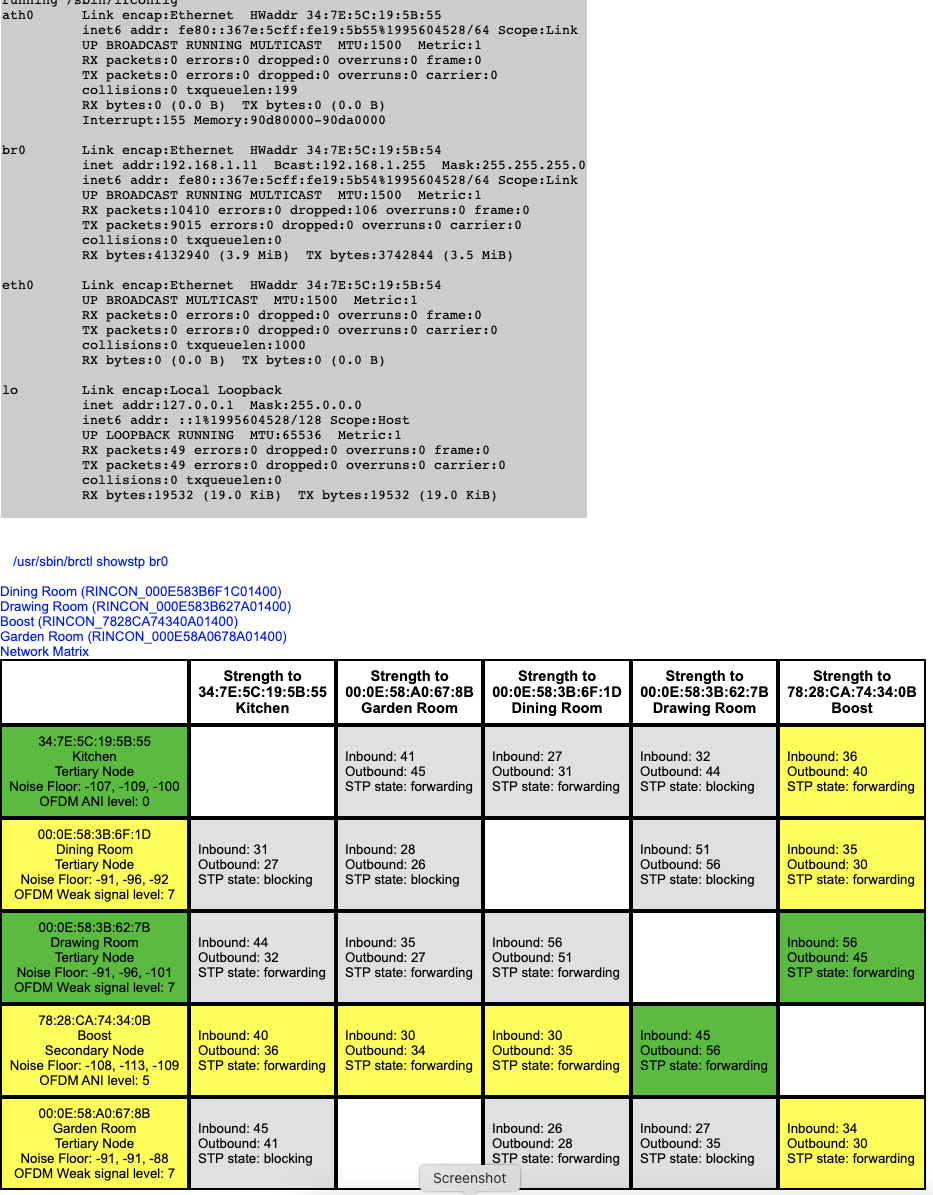
The signals all seem strong enough but I have noticed that the Kitchen unit (the newest device!) does suffer some packet loss.

Any ideas. I’ve tried using the home wifi which just gave buffering problems all the time so have stuck with sonosnet.

Any ideas of other places to look for clues as to the problem? The system is on channel 11 and a wifi scan shows that nothing else is on this channel.

Thanks for any ideas…….
 

This topic has been closed for further comments. You can use the search bar to find a similar topic, or create a new one by clicking Create Topic at the top of the page.

14 replies

Contributor I
January 21, 2021

I believe, from posts elsewhere, that the Boost is shown as secondary because it’s plugged into a switch which is in front of the router.

While playing some music I did a ping test to the Kitchen unit. Interesting…… not sure what the DUP! alert means. It gets significantly worse the more units I add to the group. All the units are on reserved IP addresses so unlikely to be caused by duplicate IP addresses.


64 bytes from 192.168.1.11: icmp_seq=225 ttl=64 time=20.065 ms (DUP!)

64 bytes from 192.168.1.11: icmp_seq=225 ttl=64 time=30.702 ms (DUP!)

64 bytes from 192.168.1.11: icmp_seq=226 ttl=64 time=53.061 ms

64 bytes from 192.168.1.11: icmp_seq=227 ttl=64 time=5.369 ms

Request timeout for icmp_seq 228

Request timeout for icmp_seq 229

64 bytes from 192.168.1.11: icmp_seq=230 ttl=64 time=5.271 ms

64 bytes from 192.168.1.11: icmp_seq=231 ttl=64 time=6.362 ms

64 bytes from 192.168.1.11: icmp_seq=231 ttl=64 time=8.619 ms (DUP!)

64 bytes from 192.168.1.11: icmp_seq=232 ttl=64 time=4.619 ms

64 bytes from 192.168.1.11: icmp_seq=233 ttl=64 time=7.101 ms

64 bytes from 192.168.1.11: icmp_seq=234 ttl=64 time=4.088 ms

64 bytes from 192.168.1.11: icmp_seq=235 ttl=64 time=9.760 ms

64 bytes from 192.168.1.11: icmp_seq=236 ttl=64 time=6.242 ms

64 bytes from 192.168.1.11: icmp_seq=237 ttl=64 time=6.679 ms

64 bytes from 192.168.1.11: icmp_seq=238 ttl=64 time=27.517 ms

Request timeout for icmp_seq 239

64 bytes from 192.168.1.11: icmp_seq=240 ttl=64 time=3.710 ms

Request timeout for icmp_seq 241

64 bytes from 192.168.1.11: icmp_seq=242 ttl=64 time=6.839 ms

Request timeout for icmp_seq 243

64 bytes from 192.168.1.11: icmp_seq=244 ttl=64 time=5.064 ms

64 bytes from 192.168.1.11: icmp_seq=245 ttl=64 time=7.130 ms

64 bytes from 192.168.1.11: icmp_seq=246 ttl=64 time=6.699 ms

^C

--- 192.168.1.11 ping statistics ---

248 packets transmitted, 226 packets received, +8 duplicates, 8.9% packet loss

round-trip min/avg/max/stddev = 2.492/8.283/110.718/12.207 ms

Kevins-MacBook:~ kevin$ 

January 21, 2021

I don't know what that error means either.

Yes I suspected a switch until you said it was direct into the router!

I wouldn't expect it to make a difference,  but could you try connecting the Boost experimentally directly to the router, but not placing the Boost too close to the router?

Contributor I
March 1, 2021

I know it’s been a while but….

I did some more experiments. I turned off my home wifi so no interference. The hard disk with the music library was connected directly to the Boost. Same problems as before with dropouts and lost packets to the Kitchen unit (Play:1).

I also removed the switch. Same problems.

Meanwhile, my old Play:3 had it’s power supply repaired. I swapped out the play:1 in the kitchen for the old play:3. Exactly the same position as the play:1. I can now in party mode without problems and without worrying which device is the primary in the group.

Either the Play:1 is faulty or the quality with respect to n/w  ability as gone backwards.

Anybody know how long the warranty on a play:1 1st gen is and how I get support from Sonos to repair, replace, refund?


Thanks for all the help and suggestions. Much appreciated!

Airgetlam
March 1, 2021

I’m sorry, turning off your home WiFi does not obviate potential WiFi interference. It can be created by any electrical device, and also can come from outside your home, again from either WiFi or other electrical sources, or even sunspots. 

Any PLAY:1 at this point would be out of warranty, it’s been tears since they were sold. 

Your best bet would be to call Sonos Support directly to discuss it.

When you speak directly to the phone folks, there are more options available for them to assist you.

Bruce