
Contributor I
January 15, 2021

Dropouts in party mode

  • January 15, 2021
  • 14 replies
  • 289 views

 I keep getting dropouts in party mode. Rarely any errors reported in the app that I can see.

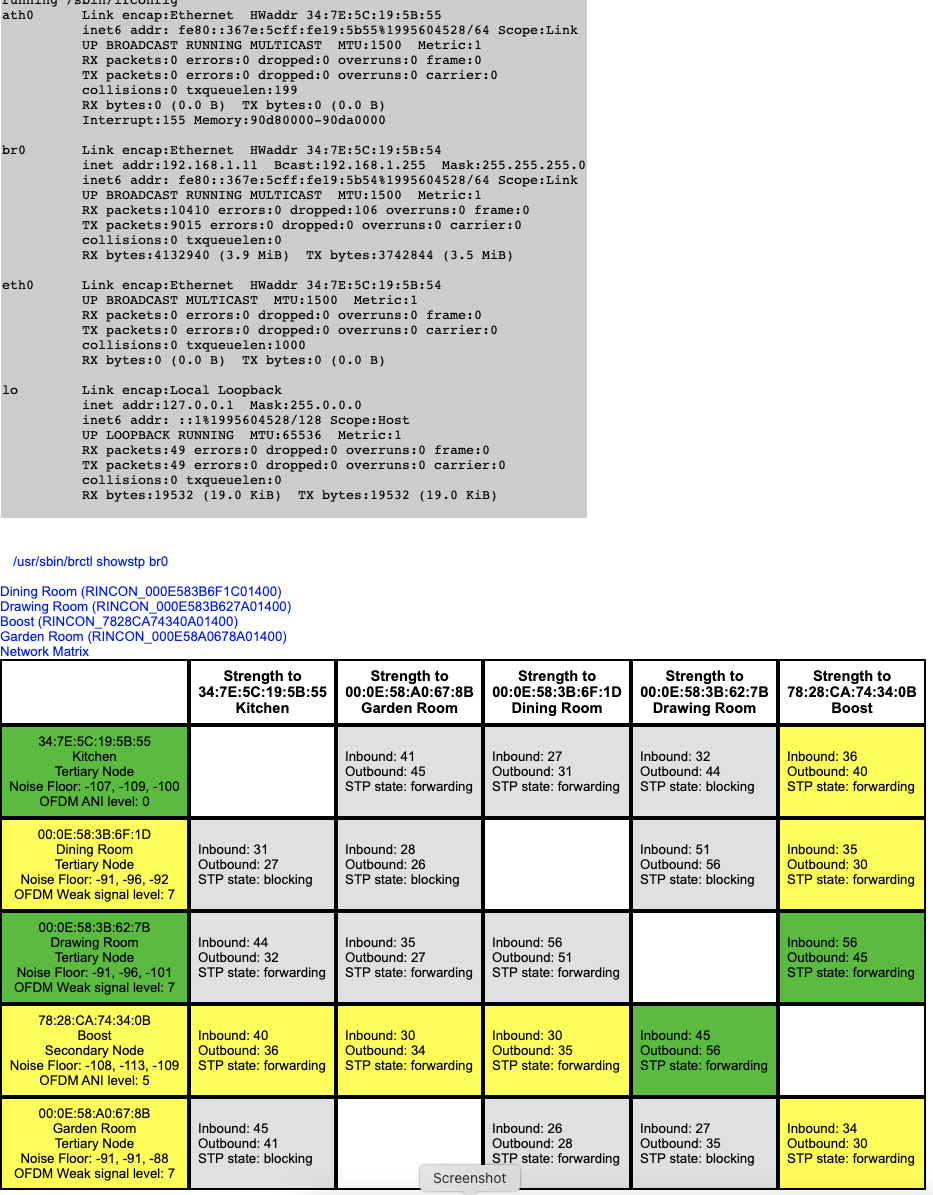
The signals all seem strong enough but I have noticed that the Kitchen unit (the newest device!) does suffer some packet loss.

Any ideas. I’ve tried using the home wifi which just gave buffering problems all the time so have stuck with sonosnet.

Any ideas of other places to look for clues as to the problem? The system is on channel 11 and a wifi scan shows that nothing else is on this channel.

Thanks for any ideas…….
 

This topic has been closed for further comments. You can use the search bar to find a similar topic, or create a new one by clicking Create Topic at the top of the page.

14 replies

ratty
January 15, 2021

Which channel is the WiFi using, and is it set to 20MHz width? Is it at least 5 channels away from SonosNet?

You might do better with SonosNet on ch 1 or 6, moving the WiFi as required. Your channel 11 may appear clear but microwave ovens tend to affect it more than the others. I wonder whether that has any bearing on the fact that it’s the kitchen player that sometimes struggles.

For grouped play, see if it helps to start the group from Drawing Room and add the others.


Note that the matrix is just a snapshot and RF conditions can change. For instance a strong Bluetooth signal could affect things.

Contributor I
January 15, 2021

Hi Ratty.

Thanks for the response.

The wifi is a Velop mesh so running on multiple channels with many hidden - channels 1, 5, & 8.

Various channel widths which it configures automatically. Channel 1 is 40Mhz and the rest 20.


The microwave certainly gives problems when in use but I can live with that.

I’ll definitely give the Drawing room idea a go and take a look at whether I can move the mesh system - it does seem to have a mind (somewhat demented) of it’s own.

I’ve tried to switch off mice & keyboards using bluetooth but not the phones and macs yet. I’ll give that a go too.


Thanks again!


ratty
January 15, 2021

Some of these WiFi mesh systems can be unruly beasts. Your Velop’s channel choices are a little odd: ch1/40MHz puts the secondary on ch5, and that overlaps with ch8.

Ch8 overlaps with your current choice of ch11 for SonosNet and won’t be doing it much good.


Apropos the Drawing Room suggestion, the first room in a group contains the ‘Group Coordinator’ node. This does the heavy lifting, fetching the stream and distributing it to the group peers. Choosing the room with the best wireless connection (or ideally a wired one) helps optimise the use of SonosNet wireless bandwidth.

Contributor I
January 15, 2021

Oh - I assumed that the boost would become Group Coordinator. 

I’ll have a go at dominating the mesh - each node has to be configured separately as changing the master node just then allows one of the slave nodes to switch to channel 1.

Cheers!


ratty
January 15, 2021

Oh - I assumed that the boost would become Group Coordinator. 

The Boost is a pure networking device. 

Contributor I
January 20, 2021

So - the the wifi mesh is now on channels 1, 4, and 7. All 20MHz as I read that using 40 can cause issues. Sonosnet is configured to be 11.

Even making the drawing room the first unit selected in the party mode the Kitchen still loses packets and dropped out.

So I moved the Kitchen unit to be about 3 feet away from the Boost and about 10 feet from the Drawing Room unit. It now shows signal strength of 61 in and 70 out. Unfortunately the Kitchen unit still drops packets.

The Kitchen unit is the only “S2 grade” unit I have; it’s a Play1 gen 1.

I now wonder if

  1. There is a compatibility issue between S1 systems and the new devices.
  2. The kitchen unit needs a firmware upgrade only available via S2 (I don’t have S2 installed anywhere).
  3. The kitchen play1 is faulty.
  4. The new generation of sonos units are poorer quality in terms of networking reliability.

Not sure what else to try other than buy a nice cheap 2nd hand old sonos unit to replace the newer one.

Any ideas?

Contributor I
January 20, 2021

I actually put the Kitchen unit where the Drawing unit currently. The Drawing room unit was getting 54 in and 50 out. The Kitchen unit, in the same position, gets 38 in and 43 out. And still drops packets.


January 20, 2021

So - the the wifi mesh is now on channels 1, 4, and 7. All 20MHz as I read that using 40 can cause issues. Sonosnet is configured to be 11.

Even making the drawing room the first unit selected in the party mode the Kitchen still loses packets and dropped out.

So I moved the Kitchen unit to be about 3 feet away from the Boost and about 10 feet from the Drawing Room unit.

If the Kitchen unit can be moved to within 3 feet of the Boost, and the Boost is (presumably) connected to your router by EtherNet, why can’t you wire the Kitchen speaker?


It now shows signal strength of 61 in and 70 out. Unfortunately the Kitchen unit still drops packets.

The Kitchen unit is the only “S2 grade” unit I have; it’s a Play1 gen 1.

I now wonder if

  1. There is a compatibility issue between S1 systems and the new devices.

No - there are loads of users with such setups and without such problems

  1. The kitchen unit needs a firmware upgrade only available via S2 (I don’t have S2 installed anywhere).

No - S1 and S2 are separate systems; this is nothing to do with firmware updates

SonosConvert wrote:

  1. The kitchen play1 is faulty.

Cannot rule that out

  1. The new generation of sonos units are poorer quality in terms of networking reliability.

In fact there has been continual improvement

Not sure what else to try other than buy a nice cheap 2nd hand old sonos unit to replace the newer one.

Buy an even newer, better one?

Any ideas?

You could submit a system diagnostic when the speaker drops out and post the confirmation number back here.

I am curious about the proximity of speaker and Boost though, as mentioned above.

Edit - looking at the matrix i wonder if the Boost is in fact wired to the router.  Please would you confirm what it is wired to?

Contributor I
January 20, 2021

The Boost is wired to the router. 

Moving the Kitchen unit next to the Boost (which is by the router in another room on another floore) and in place of the Drawing Room Zoneplayer were just experiments. I think these experiments suggest that it’s nothing to do with channels, interference, or location. 

My experience to date is that newer is not equal to better :-( 

January 21, 2021

Thanks for reply.  I wuold have expected the Boost to be the Root of the SonosNet mesh rather than a Secondary.  The router must be acting as the Root.  I don’’t think this accounts for your problem.

Is the Boost at least a couple of feet away from the router - it mustn’t be too close.