
Contributor I
Sep 29, 2024 6:48 PM UTC

connecting Apple airport, sonos and Denon

Hi everyone,

I am a beginner in this field. We got this second hand system in my house. We have Sonos speakers installed in the walls and ceiling. We have an entertainment stand with Apple AirPort Extreme, a switch, a Sonos connect, a Denon AVR-X2600H and a subwoofer. There is another Sonos connect in the pantry room connected to other wall Sonos speaker. I don’t see green light on sono connects and cannot hear sound from speakers. Appreciate any help and assistance. 


This topic has been closed for further comments. You can use the search bar to find a similar topic, or create a new one by clicking Create Topic at the top of the page.

19 replies

buzz
Grand Maestro
Sep 29, 2024 7:25 PM UTC

In many respects a SONOS CONNECT attaches to a system as if it is a cassette deck. Speakers cannot be directly wired to a SONOS CONNECT. The light can be turned OFF with a setup option and it behaves differently, depending on the system software installed on the unit. As a silly, make sure that the unit has power.

Before proceeding any farther, I suggest that you Factory Reset the SONOS units. This will remove the previous owner’s settings. Otherwise there could be some confusing interactions between your units and the previous owner’s current SONOS units.

Translate
AudsystAuthor
Contributor I
Sep 29, 2024 7:31 PM UTC

In many respects a SONOS CONNECT attaches to a system as if it is a cassette deck. Speakers cannot be directly wired to a SONOS CONNECT. The green light can be turned OFF with a setup option.

Before proceeding any farther, I suggest that you Factory Reset the SONOS units. This will remove the previous owner’s settings. Otherwise there could be some confusing interactions between your units and the previous owner’s current SONOS units.

Thank you for your reply. I have factory reset them. I don’t know which Ethernet cables should connect to Sonos connect. In addition, there is another Sonos connect in the pantry room and I don’t know if and how these two should get connected 

Translate
Senior Virtuoso
Sep 29, 2024 8:33 PM UTC

Thank you for your reply. I have factory reset them. I don’t know which Ethernet cables should connect to Sonos connect. In addition, there is another Sonos connect in the pantry room and I don’t know if and how these two should get connected 


 You need to install the Sonos app on your phone, then add the Connects to your system, if you haven’t already done so. Then get something playing on the Denon system and select the Line-in as a source on the Sonos app. You should then hear what’s playing on the Denon through a set of Sonos speakers. Lets get to that point first, and then we can run through grouping and other elements of what Sonos can do for you. 

Translate
buzz
Grand Maestro
Sep 29, 2024 9:32 PM UTC

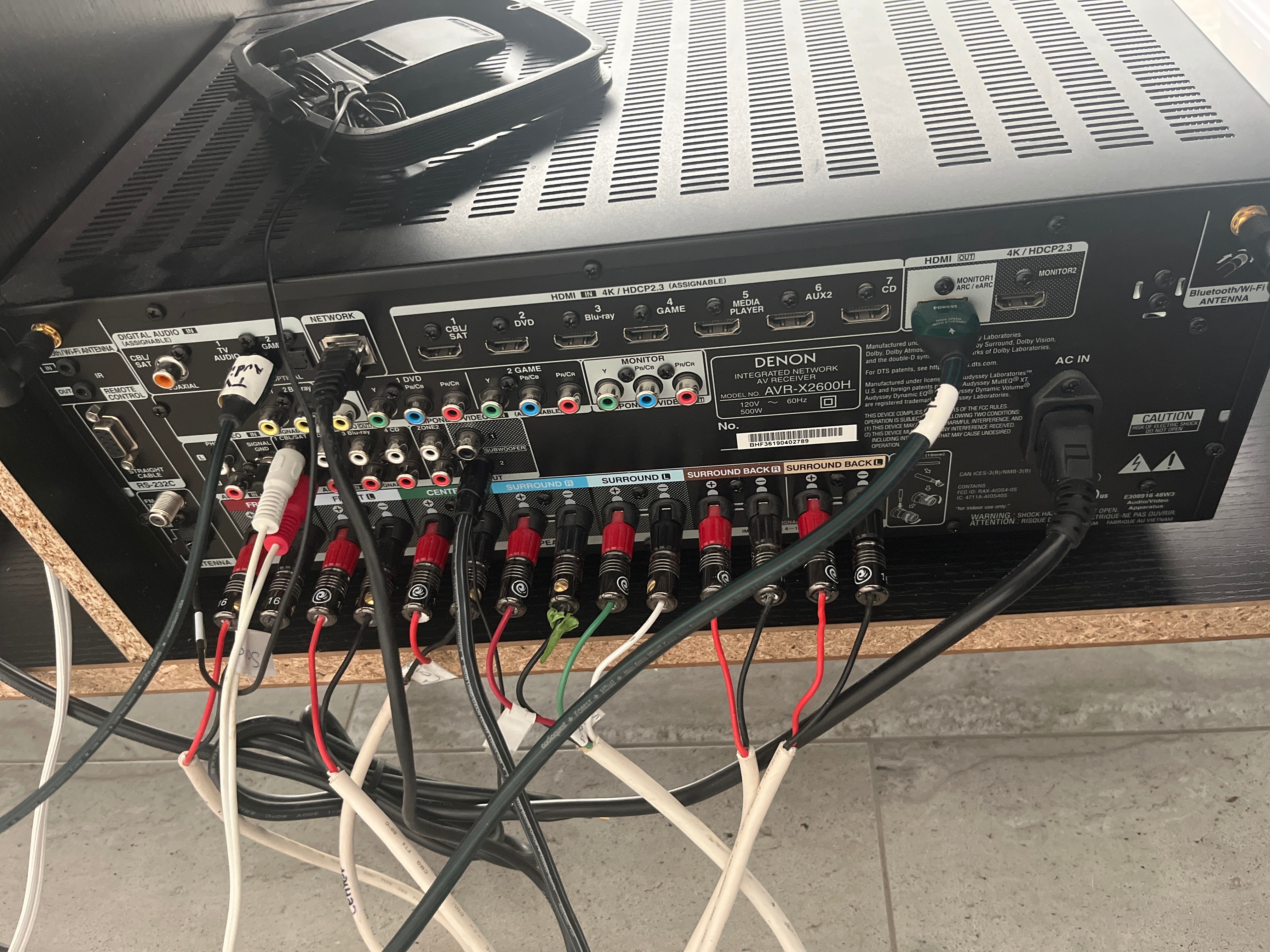
Based on the image above, there is currently no connection to allow DENON audio to play on SONOS.

Translate
AudsystAuthor
Contributor I
Sep 29, 2024 11:11 PM UTC

Thank you for your reply. I have factory reset them. I don’t know which Ethernet cables should connect to Sonos connect. In addition, there is another Sonos connect in the pantry room and I don’t know if and how these two should get connected 


 You need to install the Sonos app on your phone, then add the Connects to your system, if you haven’t already done so. Then get something playing on the Denon system and select the Line-in as a source on the Sonos app. You should then hear what’s playing on the Denon through a set of Sonos speakers. Lets get to that point first, and then we can run through grouping and other elements of what Sonos can do for you. 

I had installed the app and the Sonos connect is added. When I click on line-in, it gives me error. I have an Ethernet cable connect the Sonos connect to Apple airport and audio red and white out from Sonos connect to red and white audio in of Denon CBL/SAT. Not sure what to do? Tired of it


Translate
AudsystAuthor
Contributor I
Sep 29, 2024 11:12 PM UTC

Based on the image above, there is currently no connection to allow DENON audio to play on SONOS.

Thanks for reply. I connected to audio in CBL/SAT from audio out of Sonos connect. Not working

Translate
buzz
Grand Maestro
Sep 29, 2024 11:21 PM UTC

SONOS Line-In is aware when nothing is connected.

Play a music service in the CONNECT wired to the DENON.

Translate
AudsystAuthor
Contributor I
Sep 29, 2024 11:28 PM UTC

SONOS Line-In is aware when nothing is connected.

Play a music service in the CONNECT wired to the DENON.

Sonos connect is connected to airport and airport to TV by Ethernet cable. Denon is connected to a switch by Ethernet cable and to TV by HDMI. Sonos connect is not directly connected to Denon. 

Translate
buzz
Grand Maestro
Sep 29, 2024 11:35 PM UTC

I suggest connecting Line-Out to the DENON.

Translate
AudsystAuthor
Contributor I
Sep 29, 2024 11:58 PM UTC

I suggest connecting Line-Out to the DENON.

I tried Ethernet cable from Sonos connect to network port of Denon and one Ethernet from Sonos connect to airport. Still same error

Translate