Contributor I
Jun 26, 2024 8:19 PM UTC
Question

Can i add a sub to my set?

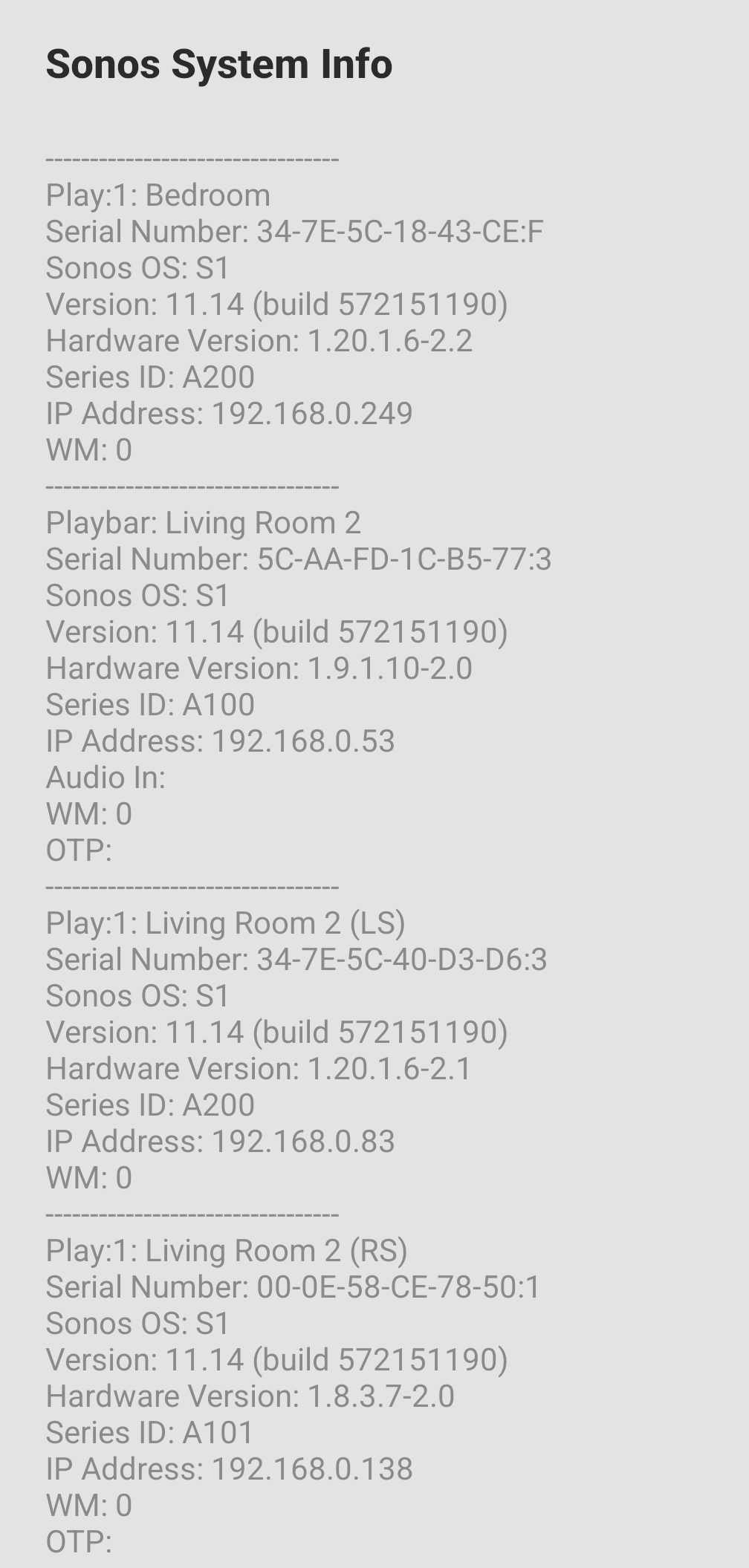
My set up is above, can I add a sub to my set up ?

This topic has been closed for further comments. You can use the search bar to find a similar topic, or create a new one by clicking Create Topic at the top of the page.

9 replies

Senior Virtuoso
Jun 26, 2024 8:28 PM UTC

Yes.
 

You have two rooms. You can add a Sub or Sub Mini to either of those rooms, or to both.
 

But to be clear: if you want the extra bass in both rooms, two rooms means two Subs. You can’t share a Sub across rooms. 

Translate
SootylfcAuthor
Contributor I
Jun 26, 2024 8:32 PM UTC

Yes that's fine, looking to add it to living room.

Does it have to be a certain gen sub?

Translate
Senior Virtuoso
Jun 26, 2024 8:36 PM UTC

Yes that's fine, looking to add it to living room.

Does it have to be a certain gen sub?

Are you running the old S1 or S2 version of the app? 

Translate
Senior Virtuoso
Jun 26, 2024 8:39 PM UTC
SootylfcAuthor
Contributor I
Jun 27, 2024 7:01 AM UTC

Only S1 works with my setup

Translate
Senior Virtuoso
Jun 27, 2024 7:26 AM UTC

Only S1 works with my setup

Why? Playbar and Play:1 are both S2 compatible- though I wouldn’t recommend switching for a few weeks, with all the fun and games we’re having with it at the moment. 

Translate
SootylfcAuthor
Contributor I
Jun 27, 2024 8:01 AM UTC

Thanks for the help, I did update the app but have downgraded it again to 16.1


However it's now saying this on play5 


Translate
Senior Virtuoso
Jun 27, 2024 8:39 AM UTC

The original data you gave did not show the gen1 Play:5, which is indeed S1 only. 
So, stay on S1 and get the Sub compatible with that, as answered above. 
Translate
SootylfcAuthor
Contributor I
Jun 27, 2024 8:53 AM UTC

The issue now is the below on S1


Translate
