James L.
Retired Community Staff
April 22, 2021
F.A.Q.

BT Smart Hub 2 - Connection Issues (April 2021)
  • April 22, 2021
  • 261 replies
  • 54367 views
BT Smart Hub 2 - Connection Issues (April 2021)

Update - 11th June 2021:

BT have confirmed that the firmware update that contains a fix for this original issue has been rolled out to the majority of users. Therefore, we can consider this issue closed. 

If your BT Smart Hub 2 router is still running the affected firmware (V0.26.03.01286) then please get in touch with BT directly.

Anyone that still experiences issues on the latest firmware, please create a new topic or get in touch with Sonos Customer Care.


Update - 7th May 2021:

BT have issued a new statement:

“We’re aware that a very small number of customers are experiencing an issue with their BT Smart Hub 2 connecting with multiple streaming devices on their Wi-Fi network. Any customer who experiences this should get in touch with BT who will update their device remotely as soon as possible. BT will be rolling out an update to all devices later this month. We’re sorry for any inconvenience caused.”


Original post - 22nd April 2021:

Hey everyone,


We’re aware of an issue affecting Sonos users with BT Smart Hub 2 routers that causes problems with connecting to players in a wireless configuration. This is caused by a bug in the BT Smart Hub 2’s firmware (version V0.26.03.01286) which prevents devices on the 5GHz band from communicating with devices on the 2.4GHz band, and vice versa. Most of the affected users have iPhones running iOS version 14.4.2, but we have seen other types of controller, such as Android devices, affected by this issue as well.


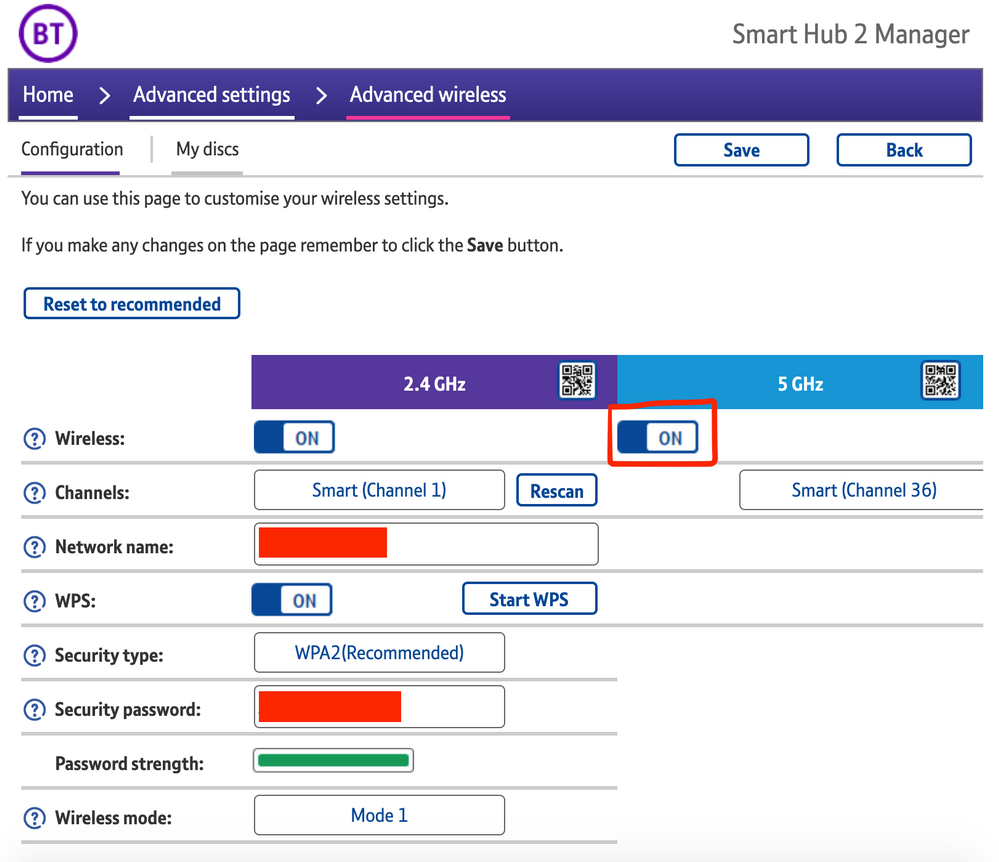
The most consistent workaround we have discovered is to disable the 5GHz band on the BT Smart Hub 2. You can learn more about how to do this using these steps:

Please be aware, turning off 5GHz could affect the speed at which other devices connect through the network and should only be considered a temporary workaround.


Steps taken from a post on the BT Community.


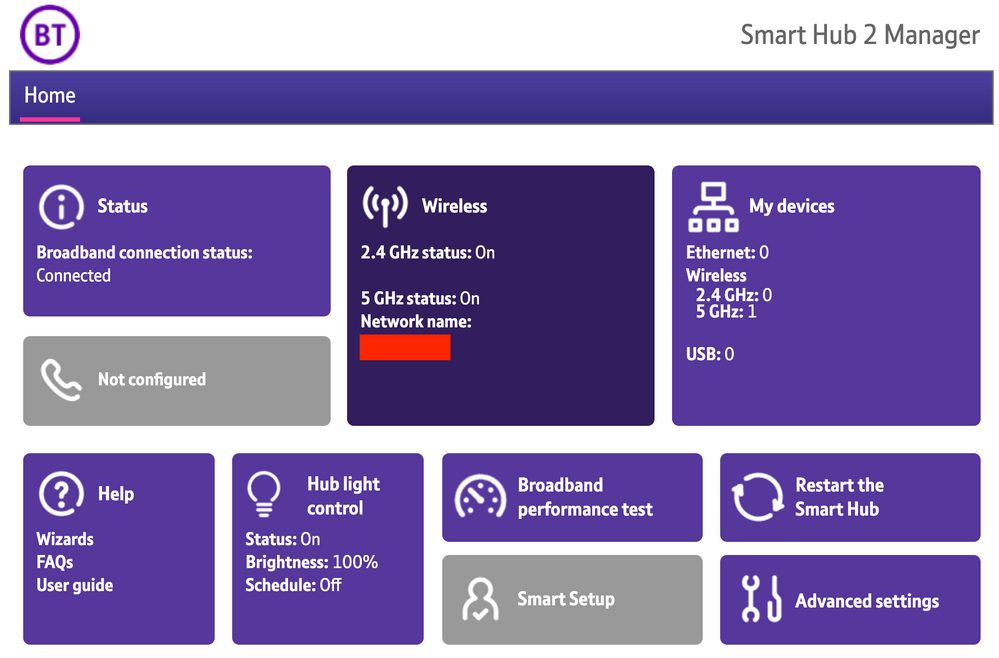
1) Open a new web browser on a device connected to your Hub and type 192.168.1.254 in the address bar. This will open the Hub Manager.
​


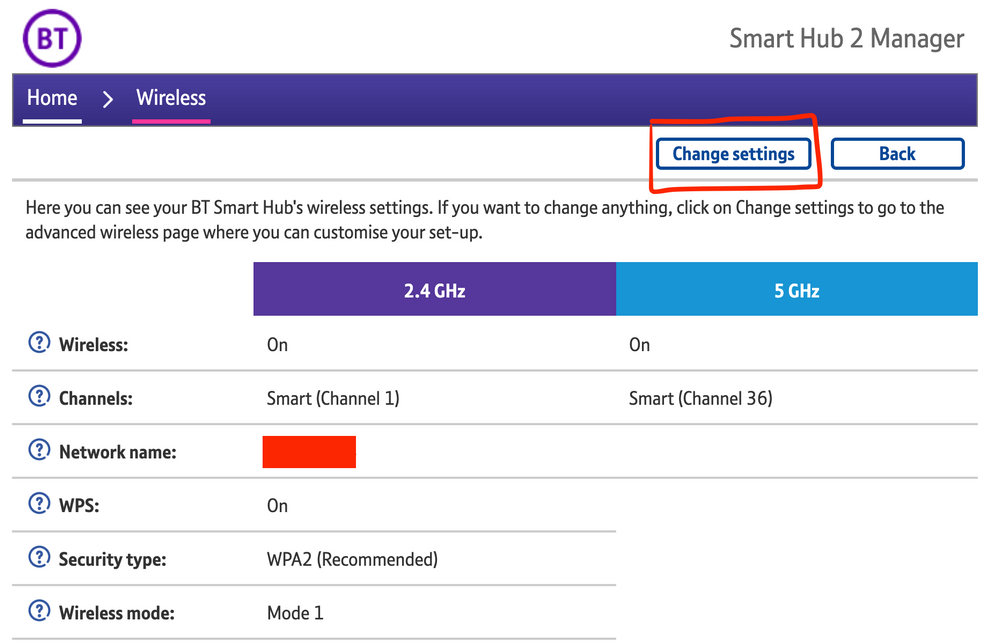
2) Click Wireless. This will open the Wireless Settings page.


3) Select ‘Change settings’
​


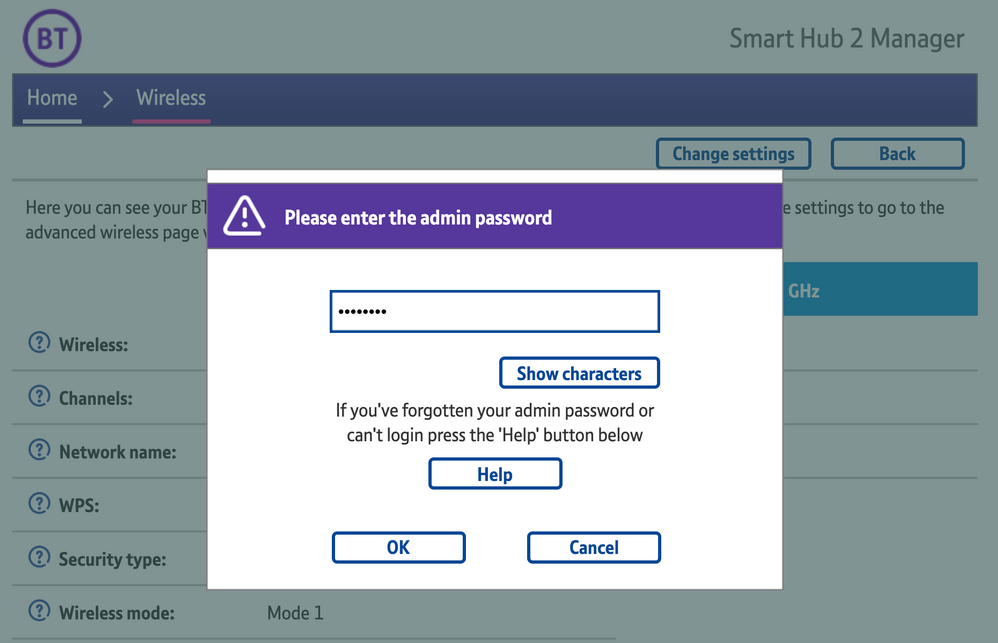
4) Enter the Admin password. This is found on the back of the router and on the removable card. Click ‘OK’
​


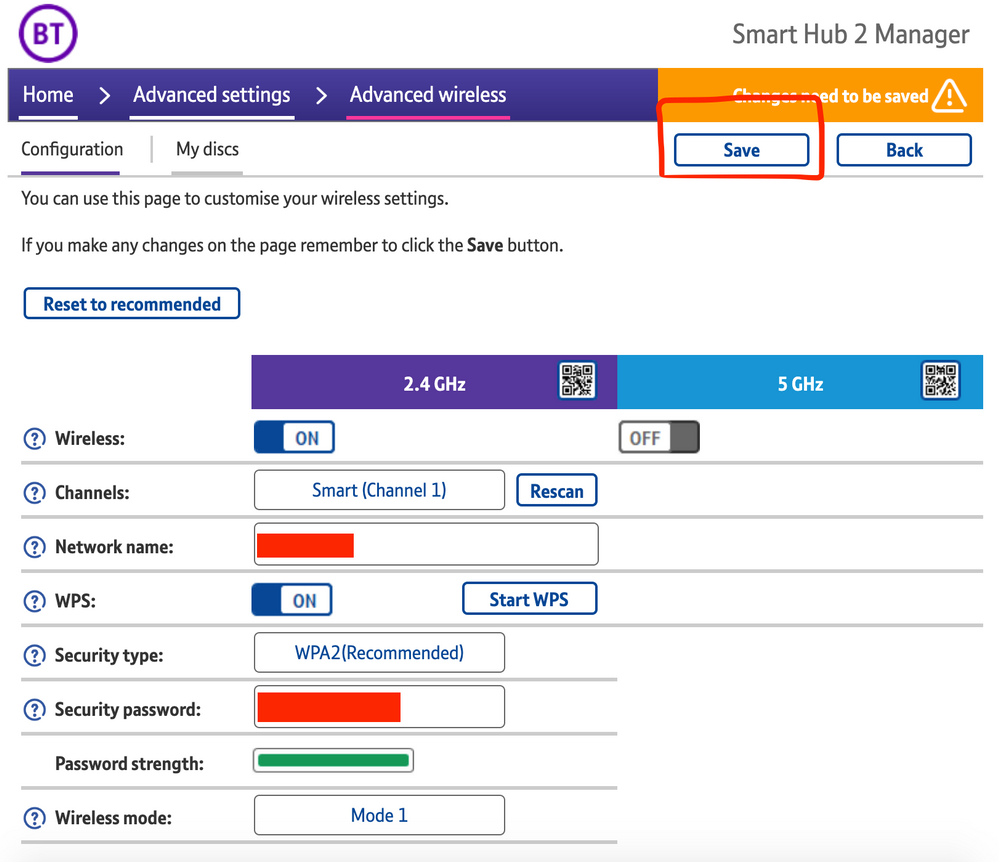
5) Toggle 5GHz OFF

​

6) Click 'Save'

​


7) Click 'Yes' at the warning prompt.
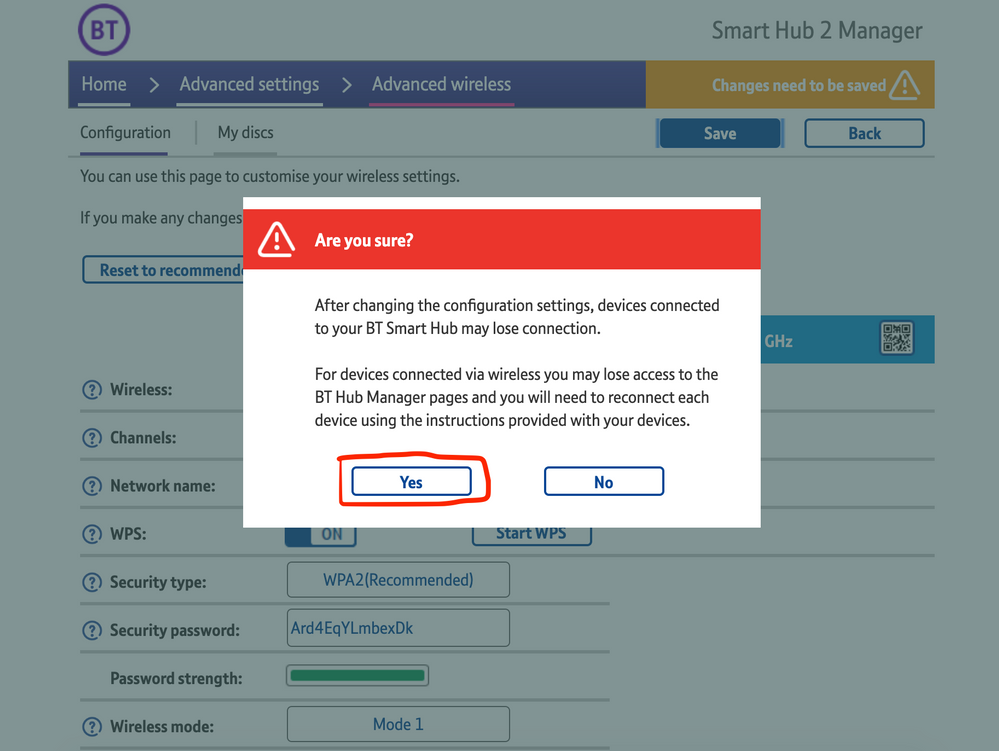
8) Wait for your devices to reconnect. You may need to reboot your Sonos devices by powering them down for 30 seconds and powering them back up.

​


Alternatively, some users have been able to work around the issue by wiring a player directly to the router, though this doesn’t work in every case. Systems that have a Sonos Move or Roam on them will also not be helped by this change, so disabling 5GHz would be best for those households.


 We recommend that you report this issue to BT with the following information:


“Devices connected to the 5GHz band are not able to communicate with devices connected to the 2.4GHz band and it appears the connections are being erroneously isolated.”


You don’t need to specifically mention Sonos devices when reporting this issue to BT as the information alone will be enough for them to recognize the issue you’re facing.
 

BT are indeed aware of this issue and are actively investigating and working to resolve it as quickly as possible. We’ll update this post with any further news as and when we receive it.

This topic has been closed for further comments. You can use the search bar to find a similar topic, or create a new one by clicking Create Topic at the top of the page.

261 replies

Lyricist III
May 2, 2021

Hello, has anyone tried using another router? “non bt” etc.

tks 

Contributor I
May 2, 2021

I’ve got the Sonos one and recently I’ve not been able to use it. The app won’t connect to it. I’ve tried all the “fix it” suggestions on the app and nothing. I’ve managed to get it to work twice using the suggestions and when I’ve gone back the next day to use it, it won’t connect. Nothing changed like WIFI, Placement etc so I don’t know what’s gone on. Can anyone help please? It’s driving me mad as I use it daily. Thanks 

ratty
May 2, 2021

You’re not on BT by any chance? 


Contributor I
May 2, 2021

Yeah I am, is there a connection somewhere? I’m just about to throw it out of a closed window and buy a new one. Lol not even my 16 year old son who’s gadget mad knows what’s wrong!! 

May 2, 2021

You mean throw your BT router out? Please read the thread linked by @ratty .

Contributor I
May 2, 2021

Hi. I’ve been told to come here by another user on here. I’ve been having problems with my Sonos one speaker for about a month I think. The app won’t connect to my speaker. I’ve tried all the suggestions on the app and nothing. I’ve managed to get it working once or twice but the next day im back to the same problem. I am a BT customer and have the new router, I’m not technical at all. So what can I do to sort this out. It’s driving me mad as I use my speaker daily, it’s come close to being thrown out of a closed window lol. Thanks 

Guyincognito76
Prominent Collaborator I
May 2, 2021

I only started having real problems with my Sonos fairly recently but Airplay has been unusable on my Sonos ever since it launched. I also have a HomePod Mini which I’ve never been able to airplay to. 
 

Since switching 5ghz off last night Airplay does seem to be working, although I’ve not tried an extended test. I don’t know if this is a good trade off for 8Mbps internet speed on my phone, mind, seeing as I’m paying for Infinity. 

Lyricist I
May 2, 2021

I have the same issue exactly as you, iPhone and iPad can not connect, mac and windows pc can.  Even though this looks to be an apple issue, the Sonos support does seem to be lacking, responses look automated and consist of mainly turning things on and off again which is clearly not going to help with this issue.


Here’s hoping that the imminent iOS 14.5 fixes the problem

Same thing happened here, 4 days ago, with iOS 14.5. :(

Contributor I
May 2, 2021

I had or have the same issue. Sonos connected on my iPad (after spending hours getting incredibly frustrated), but it did not work or pick up any of my Sonos products on my iPhone 12.

after yet more hours of resetting to no avail, I managed a fix it by going to wifi and disabling the ‘private address’ feature which I assume is relatively new to iOS 14, Sonos now works across both devices.

Weirdly, however, the iPad picks up my Sonos network even with the private address function enabled, so don’t know what the issue is. I did end up doing a hard reset and tried reconnecting on my iPad which got it to work, so may have something to do with it.

It is a major issue that software updates like this are not looked into and addressed by the Sonos team, I feel the app has got worse over the last 12 months. 

edit. For reference I had major connectivity issues on Sky router,  it it eventually always found the network, I switched to BT, signal is better but clearly some issues across hub - Sonos - iOS. 

ratty
May 2, 2021

I don’t know if this is a good trade off for 8Mbps internet speed on my phone, mind, seeing as I’m paying for Infinity. 

I’m not sure where the 8Mbps figure is coming from. If I connect to my BT Hub’s 2.4GHz I see the full available Infinity line rate (around 55Mbps where I live). If it’s as low as 8Mbps there must be some pretty horrible interference coming from somewhere.